Working on Android for me (but not on iOS).Same here. Unfortunately, I’m on vacation without a laptop so I’m not able to look at this myself. I’ve alerted the team and asked them to investigate.
I suspect that the store headend is returning a malformed response that is causing the app to close. So this should be fixable from the store side.
Have any Android users experienced this issue, or only Apple OSes?


-
Thanks for visiting the Kaleidescape Owners' Forum
This forum is for the community of Kaleidescape owners, and others interested in learning about the system, equipment, services, and the company itself.It is run by a group of enthusiastic Kaleidescape owners and dealers purely as a service to this community.
This board is not affiliated in any way with Kaleidescape, Inc.
For official technical support, product information, or customer service, please visit www.kaleidescape.com
You can dismiss this box forever by clicking the "X" in the upper right corner of this message. -
You are currently in "Guest" mode and not logged in with a registered account.
The forum is free to use and most of the forum can be used by guests who are not registered....
... but we strongly encourage you to register for a full account. There is no cost to register for a full account.
Benefits of registering for a full account:
- Participate in the discussions! You must have a registered account to make posts on the forums. You will be able to start your own thread on a topic or question, or you can reply to other threads/discussions.
- Use the "Conversation" feature (known as "private messaging" on other forums) to communicate directly with any of the other users here.
- Access the Files area. The "resources" area of the forum contains many "Favorite Scene" and Script files that can dramatically increase the enjoyment of your Kaleidescape system. Go directly to great scenes in your favorite movies, created by other owners, and add automation to playback of your system with Scripts.
- You won't see this annoying notice at the top of every screen!😊
This box goes away for registered users.
You are using an out of date browser. It may not display this or other websites correctly.
You should upgrade or use an alternative browser.
You should upgrade or use an alternative browser.
Kaleidescape Mobile App for iOS v2.2 released
- Thread starter MikeKobb
- Start date
deejaykorn
Member
My app isn’t crashing, but the My System tab will not connect. It just returns Connection Failed. iOS 27.2 beta 2 for reference.

JonProphet
Well-known member
Yeah my physical remote is working swimmingly. I use it normally anyhow. I don’t usually use the app. Use the web page for store stuff.Popcorn Ready - app and extension still work. Check it out if you haven’t already and need a remote to control your system.

I restarted my iPhone and my app now works.
JonProphet
Well-known member
I didn’t restart my phone and it works. Bet the handshake between the store and app had to be kick started.I restarted my iPhone and my app now works.
Completely Lawless
Well-known member
Looks like it’s been fixed. Mine works now.

It appears to be working again for me as well. Not sure what that was all about. I’m not sure whether somebody on the store team had a chance to look into it or if there was a transient issue that resolved itself. Regardless, apologies for the disruption and hopefully it stays up and running now.

Same here … all ok now
And I didn’t do anything
And I didn’t do anything

- Joined
- Jul 22, 2024
- Messages
- 1,090
Didn’t need to restart or do anything, issue got resolved itself.
Apparently it was due to the Google Analytics for Firebase integration receiving malformed payload:

 github.com
[Resolved] Crash in Analytics after sdk-exp response: -[__NSDictionaryM setObject:forKeyedSubscript:]: key cannot be nil (since 2026-09-29 00:41 UTC) · Issue #16728 · firebase/firebase-ios-sdk
Description Since 2026-09-29 00:41 UTC, our production iOS app has been crashing at a growing rate (56 crashes / 56 users in the first 18 minutes). We have not shipped an update. The crash started ...
github.com
raz77
Well-known member
Can we have an option to search my movies? We have the search function at the bottom but that’s just for the country store you are in. If you have movies from multiple countries there is no way to search them. Would like to quickly bring a movie I have so can set it to download.
Attachments
For those of us with stand alone players,
Is there a way to view all your purchased content - one page-
that include a downloaded to system indication in the icon?
Unless I’m doing it wrong,
The way I navigate now I have to jump all over the place through menus to get my full system info.
Is there a way to view all your purchased content - one page-
that include a downloaded to system indication in the icon?
Unless I’m doing it wrong,
The way I navigate now I have to jump all over the place through menus to get my full system info.
J.Chitwood
Well-known member
Look into the Popcorn Ready app - Popcorn Ready App. There is an iOS app and Chrome Extension. It has pretty much taken over any use for the official Kaleidescape app for me.For those of us with stand alone players,
Is there a way to view all your purchased content - one page-
that include a downloaded to system indication in the icon?
Unless I’m doing it wrong,
The way I navigate now I have to jump all over the place through menus to get my full system info.
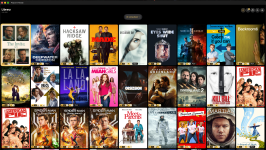
Here is that main screen when I browse on my macbook. The filters are fantastic and there are different views, even if you want a simple list view.
It sounds like for your use case, if your owned content were returned as part of the search regardless of current geolocation, that would get you what you need. True?Can we have an option to search my movies? We have the search function at the bottom but that’s just for the country store you are in. If you have movies from multiple countries there is no way to search them. Would like to quickly bring a movie I have so can set it to download.
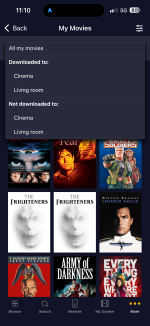
Not exactly, but pretty close. If you go to More -> My Movies, that will show you all of the movies you've purchased. There's a popup menu at the top of that screen to toggle between showing all of them, and showing only the ones downloaded to your system.For those of us with stand alone players,
Is there a way to view all your purchased content - one page-
that include a downloaded to system indication in the icon?
Unless I’m doing it wrong,
The way I navigate now I have to jump all over the place through menus to get my full system info.
Edub
Active member
Any word on if the app will be updated for the iPhone Duo at some point?
Not yet. That feature is assigned to an upcoming release. For now, you will have to use the onscreen display for that use case.@MikeKobb - I have been trying to use the "my system" on the app to play titles, however where I have more than 1 available, I can't find the "more options" command to allow me to choose the "version". Is this not available on the app.
Absolutely. Working on that right now.Any word on if the app will be updated for the iPhone Duo at some point?
raz77
Well-known member
Yes, it works like that in the popcorn app.It sounds like for your use case, if your owned content were returned as part of the search regardless of current geolocation, that would get you what you need. True?
Edub
Active member
Sounds great to me. Thanks Mike!Absolutely. Working on that right now.