

-
Thanks for visiting the Kaleidescape Owners' Forum
This forum is for the community of Kaleidescape owners, and others interested in learning about the system, equipment, services, and the company itself.It is run by a group of enthusiastic Kaleidescape owners and dealers purely as a service to this community.
This board is not affiliated in any way with Kaleidescape, Inc.
For official technical support, product information, or customer service, please visit www.kaleidescape.com
You can dismiss this box forever by clicking the "X" in the upper right corner of this message. -
You are currently in "Guest" mode and not logged in with a registered account.
The forum is free to use and most of the forum can be used by guests who are not registered....
... but we strongly encourage you to register for a full account. There is no cost to register for a full account.
Benefits of registering for a full account:
- Participate in the discussions! You must have a registered account to make posts on the forums. You will be able to start your own thread on a topic or question, or you can reply to other threads/discussions.
- Use the "Conversation" feature (known as "private messaging" on other forums) to communicate directly with any of the other users here.
- Access the Files area. The "resources" area of the forum contains many "Favorite Scene" and Script files that can dramatically increase the enjoyment of your Kaleidescape system. Go directly to great scenes in your favorite movies, created by other owners, and add automation to playback of your system with Scripts.
- You won't see this annoying notice at the top of every screen!😊
This box goes away for registered users.
You are using an out of date browser. It may not display this or other websites correctly.
You should upgrade or use an alternative browser.
You should upgrade or use an alternative browser.
Jurassic World - file size
- Thread starter lujan
- Start date

The movie is long, but not that long. Wonder why a non-C file would be so large.I purchased all of the Jurassic Park movies where most have been upgraded to Cinematic except for Jurassic World: Dominion. Even though it's not Cinematic, I noticed the file size for that one is huge:
I think it has 2 versions - Theatrical and Director’s CutThe movie is long, but not that long. Wonder why a non-C file would be so large.

If you click on features, you'll see that there are two versions of the film in each download.The movie is long, but not that long. Wonder why a non-C file would be so large.

I had no idea about this and that's actually pretty annoying. Even with a 24 TB server, I find I have to manage space quite a bit. I'd really prefer not to have entirely duplicate copies of movies sitting around.
I'm guessing there's no way to delete one of the two versions?
Also is there any easy way to tell what titles have this, or to see file sizes on titles without clicking into them one by one? Even if it just showed it in the http://my-kaleidescape.local/movies interface, that would help.
I'm guessing there's no way to delete one of the two versions?
Also is there any easy way to tell what titles have this, or to see file sizes on titles without clicking into them one by one? Even if it just showed it in the http://my-kaleidescape.local/movies interface, that would help.
- Joined
- Nov 27, 2023
- Messages
- 2,286
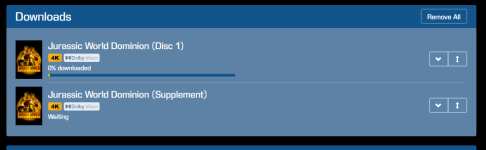
Selecting download triggers multiple individual downloads including one per cut. Go to your download queue, pick the one you want, and remove the other. Pretty simple.I'm guessing there's no way to delete one of the two versions?
Ah, so it's like extras where they can't be deleted after the fact. Very good to know -- thanks. I'd still consider that a workaround more than an intuitive solution, though.Selecting download triggers multiple individual downloads including one per cut. Go to your download queue, pick the one you want, and remove the other. Pretty simple.
The real problem is that it's still easy to not even know these are there taking up space. And since they introduced the (very welcome) option to not download extras automatically, I no longer watch the download queue like a hawk as I'm buying things.
I tried Jurassic World Dominion as a test, deleting it and re-downloading. Interstingly, the second cut is identified as "supplement", but is still downloaded by default even with downloading of extras disabled.
- Joined
- Nov 27, 2023
- Messages
- 2,286
You should see something like Rocky Horror Picture Show. I think there's 5 downloads? This is actually something K has been working on as they go back and re-do things. Splitting cuts. Splitting Extras out. Let the user have more choice. I'd be curious on the above example if you tell the system to not download Extras, does it still trigger that Supplement?I tried Jurassic World Dominion as a test, deleting it and re-downloading. Interstingly, the second cut is identified as "supplement", but is still downloaded by default even with downloading of extras disabled.
Yes, I have downloading extras disabled and it still downloaded the JW Dominion "Supplement" automatically. I don't have Rocky Horror so I can't test that one.You should see something like Rocky Horror Picture Show. I think there's 5 downloads? This is actually something K has been working on as they go back and re-do things. Splitting cuts. Splitting Extras out. Let the user have more choice. I'd be curious on the above example if you tell the system to not download Extras, does it still trigger that Supplement?
- Joined
- Nov 27, 2023
- Messages
- 2,286
Thanks for the info. Very likely related to how the additional cut is handled by the system. Unfortunately there are three options:Yes, I have downloading extras disabled and it still downloaded the JW Dominion "Supplement" automatically. I don't have Rocky Horror so I can't test that one.
1. Native part of the title/listing. When you access the title on your K you see two different play options. (Example: Play Theatrical Cut, Play Extended Cut.). This happens when a listing includes two versions of the movie. Normal play/resume functionality.
2. Separate "version." When you access the title you need to scroll down and access "Other Versions" where you can select the title you want. This happens when two versions of the movie are sold separately. Once you select to play a specific version, normal play/resume functionality work.
3. As an "Extra." The absolute worst handling of an alternate cut is when it's included as an Extra in the system. When you play the alt cut you only see details/metadata for the original title and when you stop the film you cannot resume it as it's no different than watching a Deleted Scene.
This is an area I'd love to see K address at some point in time, much as they've been working to address the "Extras as Separate Downloads" issue. However, given the amount of requested features, I can see how this isn't a priority.