

-
Thanks for visiting the Kaleidescape Owners' Forum
This forum is for the community of Kaleidescape owners, and others interested in learning about the system, equipment, services, and the company itself.It is run by a group of enthusiastic Kaleidescape owners and dealers purely as a service to this community.
This board is not affiliated in any way with Kaleidescape, Inc.
For official technical support, product information, or customer service, please visit www.kaleidescape.com
You can dismiss this box forever by clicking the "X" in the upper right corner of this message. -
You are currently in "Guest" mode and not logged in with a registered account.
The forum is free to use and most of the forum can be used by guests who are not registered....
... but we strongly encourage you to register for a full account. There is no cost to register for a full account.
Benefits of registering for a full account:
- Participate in the discussions! You must have a registered account to make posts on the forums. You will be able to start your own thread on a topic or question, or you can reply to other threads/discussions.
- Use the "Conversation" feature (known as "private messaging" on other forums) to communicate directly with any of the other users here.
- Access the Files area. The "resources" area of the forum contains many "Favorite Scene" and Script files that can dramatically increase the enjoyment of your Kaleidescape system. Go directly to great scenes in your favorite movies, created by other owners, and add automation to playback of your system with Scripts.
- You won't see this annoying notice at the top of every screen!😊
This box goes away for registered users.
You are using an out of date browser. It may not display this or other websites correctly.
You should upgrade or use an alternative browser.
You should upgrade or use an alternative browser.
Initial thoughts & frustrations
- Thread starter DaveN
- Start date
I was able to add the AppleTV IP device. I still can't get the IP flow commands executed by the AppleTV. Previously it did work. I can control the Apple via an iPad or iPhone.
My system is a TP Link Deco 85 2200 mesh system. Fast roaming is off. Device isolation is off. AVA brain and AppleTV are connected to the same ethernet switch. My AVA screens are below. So far everything my dealer and I have tried hasn't been successful. Anyone here have any suggestions?
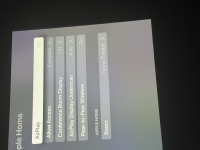
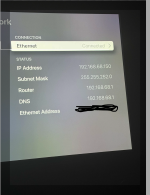
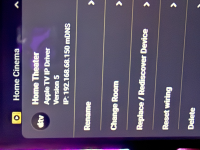
My system is a TP Link Deco 85 2200 mesh system. Fast roaming is off. Device isolation is off. AVA brain and AppleTV are connected to the same ethernet switch. My AVA screens are below. So far everything my dealer and I have tried hasn't been successful. Anyone here have any suggestions?

Unfortunately, yes. Network connection doesn't appear to be a problem. Remote can connect to brain and control everything besides AppleTV.Have you tried this?


Did you fix this?I was able to add the AppleTV IP device. I still can't get the IP flow commands executed by the AppleTV. Previously it did work. I can control the Apple via an iPad or iPhone.
My system is a TP Link Deco 85 2200 mesh system. Fast roaming is off. Device isolation is off. AVA brain and AppleTV are connected to the same ethernet switch. My AVA screens are below. So far everything my dealer and I have tried hasn't been successful. Anyone here have any suggestions?
View attachment 9286View attachment 9288
View attachment 9287
Since adding a second Apple AirPlay connection to the Apple TV, I lose the AVA remote connection if the Apple TV restarts. The fix is to change the Apple room home connection under AirPlay back and forth until it syncs up.
Nope. Still trying. I bought a Unifi Dream 7 router since I was told that my mesh system was most likely the culprit. I hooked the AVA brain and ATV to a switch connected directly to the router, bypassing the mesh, and still no go. AVA sees the device and adds it but is unable to control the ATV. Quite frustrating.Did you fix this?
Since adding a second Apple AirPlay connection to the Apple TV, I lose the AVA remote connection if the Apple TV restarts. The fix is to change the Apple room home connection under AirPlay back and forth until it syncs up.
Try changing the Apple room name a few times under Apple AIrplay, see how you get onNope. Still trying. I bought a Unifi Dream 7 router since I was told that my mesh system was most likely the culprit. I hooked the AVA brain and ATV to a switch connected directly to the router, bypassing the mesh, and still no go. AVA sees the device and adds it but is unable to control the ATV. Quite frustrating.

No Bueno. I've tried it several times. Been using AI. Something funny with multicast. Spending my afternoon trying solutions...Try changing the Apple room name a few times under Apple AIrplay, see how you get on
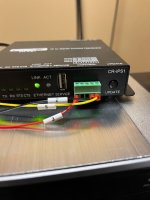
Did you create your own template or use one of Ava’s pre configured files ?FWIW, I bought a breakout cable from Amazon. This is how the breakout cable was labeled and what worked for me.
View attachment 9386
I used their file. Accessory is the correct one for Lumagen. It was tedious adding all the commands to the CYP template but now Lumagen control has been perfect.Did you create your own template or use one of Ava’s pre configured files ?
Spending the afternoon working the ATV problem I believe that it is the Netgear unmanaged 2.5 GB switch causing the issue. Perplexity AI deep search is pretty amazing.
I had another ATV that I hadn't used in a while and it paired perfectly with the change to a Unify switch and Unify Dream 7 router.
After switching out from a CYP CR-IPS1 to CR-IPS4 my AVA remote via brain IP stopped controlling my AppleTV. I have spent the afternoon trying fixes. AI suggested that latest ATV software is the cause. Evidently a number of remote brands have had issues. Would those who are using ATV successfully please let me know which software version the ATV is running?
After switching out from a CYP CR-IPS1 to CR-IPS4 my AVA remote via brain IP stopped controlling my AppleTV. I have spent the afternoon trying fixes. AI suggested that latest ATV software is the cause. Evidently a number of remote brands have had issues. Would those who are using ATV successfully please let me know which software version the ATV is running?
MacManAZ
Member
I’m on tvOS 26.2 (23K54), that latest version. I’m using the AVA remote Apple TV IP Driver and everything seems to be working fine.
Thanks MacManAZ.I’m on tvOS 26.2 (23K54), that latest version. I’m using the AVA remote Apple TV IP Driver and everything seems to be working fine.