• Thanks for visiting the Kaleidescape Owners' Forum

    This forum is for the community of Kaleidescape owners, and others interested in learning about the system, equipment, services, and the company itself.

    It is run by a group of enthusiastic Kaleidescape owners and dealers purely as a service to this community.

    This board is not affiliated in any way with Kaleidescape, Inc.
    For official technical support, product information, or customer service, please visit www.kaleidescape.com

    You can dismiss this box forever by clicking the "X" in the upper right corner of this message.
  • You are currently in "Guest" mode and not logged in with a registered account.

    The forum is free to use and most of the forum can be used by guests who are not registered....

    ... but we strongly encourage you to register for a full account. There is no cost to register for a full account.

    Benefits of registering for a full account:

    • Participate in the discussions! You must have a registered account to make posts on the forums. You will be able to start your own thread on a topic or question, or you can reply to other threads/discussions.
    • Use the "Conversation" feature (known as "private messaging" on other forums) to communicate directly with any of the other users here.
    • Access the Files area. The "resources" area of the forum contains many "Favorite Scene" and Script files that can dramatically increase the enjoyment of your Kaleidescape system. Go directly to great scenes in your favorite movies, created by other owners, and add automation to playback of your system with Scripts.
    • You won't see this annoying notice at the top of every screen!😊

    It's easy and free to register for the forum. Just click the "Register" button in the upper right corner of this page, and follow the instructions there.

    This box goes away for registered users.

http://my-kaleidescape.local/ does not work

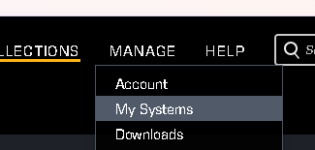
So, you probably don't have a good DNS on your local network. If you go to kaleidescape.com and go to my system. Click on the little box with an arrow pointing out. It will launch your browser and should take it to the IP address. Easiest way to get to it. Now, if it still won't come up, you may need to power cycle.

1791073870638.png

1791073819396.png
 
Shouldn't you just be typing in the system's local IP? Any half-decent home router should tell you the address. I don't think even a shitty provider thing would hide those local IPs from ya.
 
Shouldn't you just be typing in the system's local IP? Any half-decent home router should tell you the address. I don't think even a shitty provider thing would hide those local IPs from ya.
Some people don't have that skill or knowledge. That's why I recommended he go through the K-Scape website because you can get to all of your devices via IP there.
 
Someone with Ubiquiti better have that skill :p

Unfortunately lots of people recommend UniFi kit to others who don’t :(

If anyone asks, I never recommended it because the mere fact of asking means you lack the skills to manage it!

To the OP, if you used a system integrator, ask them for help, if not then there a ton of reasons why it may fail, from DNS (it’s ALWAYS DNS) to VLANs to AV software or not giving your browser ’local network’ access (this one is very common now if you clicked ‘no’ on a box a month ago!!) etc etc, ask an AI to walk you through troubleshooting as that’s much faster than back and forth on a forum
 
If someone is using VLAN’s at home, I’d have to ask WHY??!?!?!?!!!!

Traffic prioritisation and network segmentation - if you've got a device which downloads a ton of data now and again you can separate it so it doesn't kill all your other devices whilst doing so. What sort of device could saturate the network with 100GB+ downloads, I wonder... ;)

The most common uses aside from that are control of phoning home and isolation of IoT devices from PCs etc

Also, putting people visiting with phones and laptops which may already be compromised onto a guest Wifi network that has no access to anything else is a sensible precaution.
 
Also separating multicast traffic from your "production network" would be a use-case.
 
Unfortunately lots of people recommend UniFi kit to others who don’t :(

If anyone asks, I never recommended it because the mere fact of asking means you lack the skills to manage it!
...
:LOL:

It doesn't come with one of those brain-dead simple phone/table apps, like the Ruckus Unleashed app or the Orbi app?

(mind, I think those are awful but they will tell one the IP addresses of things on the local net.)
 
Back
Top