• Thanks for visiting the Kaleidescape Owners' Forum

    This forum is for the community of Kaleidescape owners, and others interested in learning about the system, equipment, services, and the company itself.

    It is run by a group of enthusiastic Kaleidescape owners and dealers purely as a service to this community.

    This board is not affiliated in any way with Kaleidescape, Inc.
    For official technical support, product information, or customer service, please visit www.kaleidescape.com

    You can dismiss this box forever by clicking the "X" in the upper right corner of this message.
  • You are currently in "Guest" mode and not logged in with a registered account.

    The forum is free to use and most of the forum can be used by guests who are not registered....

    ... but we strongly encourage you to register for a full account. There is no cost to register for a full account.

    Benefits of registering for a full account:

    • Participate in the discussions! You must have a registered account to make posts on the forums. You will be able to start your own thread on a topic or question, or you can reply to other threads/discussions.
    • Use the "Conversation" feature (known as "private messaging" on other forums) to communicate directly with any of the other users here.
    • Access the Files area. The "resources" area of the forum contains many "Favorite Scene" and Script files that can dramatically increase the enjoyment of your Kaleidescape system. Go directly to great scenes in your favorite movies, created by other owners, and add automation to playback of your system with Scripts.
    • You won't see this annoying notice at the top of every screen!😊

    It's easy and free to register for the forum. Just click the "Register" button in the upper right corner of this page, and follow the instructions there.

    This box goes away for registered users.

How to see how fast download is going?

CDub

Member
⭐️ Premium ⭐️
Joined
Oct 15, 2026
Messages
13
Location
Incline Village NV
While the download is occurring. And also how long previous downloads took.

I’ve been searching and can’t find it. I’m hoping it’s sort of hidden and it’s not sitting right there and I’m being dumb…..🤣👊🏼
 
Go to your Kaleidescape Network Browser and under History, it shows downloading speed and time.
 
While the download is occurring. And also how long previous downloads took.

I’ve been searching and can’t find it. I’m hoping it’s sort of hidden and it’s not sitting right there and I’m being dumb…..🤣👊🏼
It's available in multiple locations.
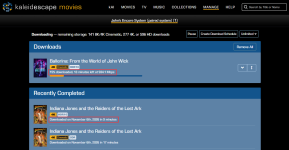
On the Kaleidescape web store, navigate to the "Downloads" page. The active download will show time remaining and current throughput. Historical downloads will show how much time it took for the download to complete:
1794421674019.png

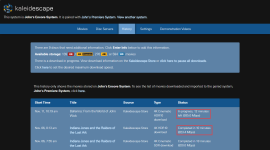
It's also available on the system's local browser interface on the "History" page:
1794421705003.png

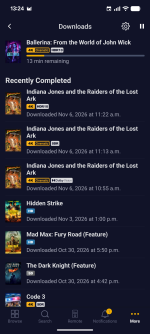
And finally, you can look at the Downloads screen on the mobile app (More > Downloads):
The active download will show time remaining and historical downloads show when it was downloaded:
1794421782173.png
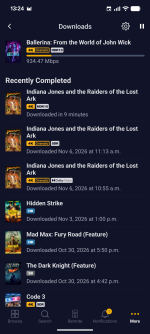
If you tap on the "13 min remaining" text of an active download or the "Downloaded <date> at <time>" text on a given download, the text will change to show you throughput for the active download or download time for historical downloads:
1794421871943.png
 
It's available in multiple locations.
On the Kaleidescape web store, navigate to the "Downloads" page. The active download will show time remaining and current throughput. Historical downloads will show how much time it took for the download to complete:
View attachment 12636

It's also available on the system's local browser interface on the "History" page:
View attachment 12637

And finally, you can look at the Downloads screen on the mobile app (More > Downloads):
The active download will show time remaining and historical downloads show when it was downloaded:
View attachment 12638
If you tap on the "13 min remaining" text of an active download or the "Downloaded <date> at <time>" text on a given download, the text will change to show you throughput for the active download or download time for historical downloads:
View attachment 12639
Thank you for the amazing tutorial!!!
 
Back
Top