• Thanks for visiting the Kaleidescape Owners' Forum

    This forum is for the community of Kaleidescape owners, and others interested in learning about the system, equipment, services, and the company itself.

    It is run by a group of enthusiastic Kaleidescape owners and dealers purely as a service to this community.

    This board is not affiliated in any way with Kaleidescape, Inc.
    For official technical support, product information, or customer service, please visit www.kaleidescape.com

    You can dismiss this box forever by clicking the "X" in the upper right corner of this message.
  • You are currently in "Guest" mode and not logged in with a registered account.

    The forum is free to use and most of the forum can be used by guests who are not registered....

    ... but we strongly encourage you to register for a full account. There is no cost to register for a full account.

    Benefits of registering for a full account:

    • Participate in the discussions! You must have a registered account to make posts on the forums. You will be able to start your own thread on a topic or question, or you can reply to other threads/discussions.
    • Use the "Conversation" feature (known as "private messaging" on other forums) to communicate directly with any of the other users here.
    • Access the Files area. The "resources" area of the forum contains many "Favorite Scene" and Script files that can dramatically increase the enjoyment of your Kaleidescape system. Go directly to great scenes in your favorite movies, created by other owners, and add automation to playback of your system with Scripts.
    • You won't see this annoying notice at the top of every screen!😊

    It's easy and free to register for the forum. Just click the "Register" button in the upper right corner of this page, and follow the instructions there.

    This box goes away for registered users.

Help! - Stratto S Frozen

Gaviour

Member
Joined
Feb 1, 2023
Messages
6
Hi,

I have a Strato S (12TB) which I purchased through these very usefull forums a couple of years ago.

I went to watch a movie tonight and it wouldn't come out of stanby using the IoS app. I. can access the Strato via the web interface and have done a software reboot and a hard reboot to no avail. The unit responds to network pings and I can view status through the web consol. I can see that it updated to kOS 26.1.2-27147 on the 23rd sept and I haven't used the player since.

I'm tech savvy, (worked in IT 30 yrs) but I don't know how to further troubleshoot kScape gear) nor how to force a kOS update to latest version/ roll back to last.

Any help appreciated, I'm in the UK so sending the unit to kscape is an exspensive option, but not out of the question...

Thanks!
 
Reach out to K support (support at kaleidescape.com). They should be able to remote into your unit and see what´s happening.
 
Also, if you would be so kind as to report back on what happened. Is your unit still under warranty? I'd assume not.

Quick question, are you able to download and delete content?
 
The unit is out of warranty.

I am able to download and delete content, it just wont come out of sleep mode.
 
There is a small pin hole on the back of the player, you insert a straightened paper clip into the pin hole, to reset the unit when it is locked up.
 
I'm tech savvy, (worked in IT 30 yrs) but I don't know how to further troubleshoot kScape gear) nor how to force a kOS update to latest version/ roll back to last.
kOS 26.1.2-27147 is the latest version of kOS. There is no mechanism for rolling back to previous versions of kOS.

There is a small pin hole on the back of the player, you insert a straightened paper clip into the pin hole, to reset the unit when it is locked up.
This is not correct. Pressing the pinhole reset button simpy resets the network configuration back to DHCP (and resets video configuration settings on Alto and Cinema One 2nd Gen players).

If you are able to access the browser interface and download movies, then kOS is running on the Strato S. If the Strato's front panel is lit -- assuming you haven't set the panel brightness to "0" -- then it isn't in standby and a lack of picture would likely indicate an HDMI problem. Try loading the Video Capabilities troubleshooter in the browser interface (Component -> Settings -> Show video capabilities and status in the popup window). This will show if your system has any issue with your HDMI chain.

You mention that the iOS app won't take the Strato S out of standby. Have you tried any other remote? This could actually be an issue with the iOS app being unable to connect to the player (perhaps by an iOS network permission setting). So the first step would be to determine if plain IR remote works. If so, the issue is network and/or mobile app related.
 
Resolved... yes, but not quite.

I followed John's advice and checked the status of the hdmi connection, which turned out to be not connected! so I reseated all cables rebooted and tried again I still don't have the front control panel lighting, But I do have the capability to play movies which is I guess the aim of the game it'd be nice to get the emblem lit up again i've tried resetting it might come back in time who knows. all I can assume is one of our furry friends has managed to get behind the unit and dislodged a few cables!

It might have been coming out of standby all along (without the front lighting - which usually comes on), but without HDMI connected Who knows.

I haven't gone as far as resetting the machine using the button back as I want to give it time and see what happens to the front panel lights don't really want to go through the hassle of resetting the machine, re downloading movies etc...


Thanks for all the help, turned out not to be as exspensive as I first thought.
 
It might have been coming out of standby all along (without the front lighting - which usually comes on), but without HDMI connected Who knows.
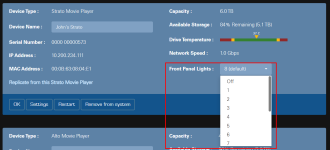
Have you verified that the panel brightness setting hasn't been set to "Off"?
1790773948968.png

I haven't gone as far as resetting the machine using the button back as I want to give it time and see what happens to the front panel lights don't really want to go through the hassle of resetting the machine, re downloading movies etc...
Let me reiterate what I posted in my original response above:
Pressing the pinhole reset button is not going to do any good for your particular issue. All it does is reset the Strato's network settings back to DHCP.
 
  • Like
Reactions: Woo
Back
Top