• Thanks for visiting the Kaleidescape Owners' Forum

    This forum is for the community of Kaleidescape owners, and others interested in learning about the system, equipment, services, and the company itself.

    It is run by a group of enthusiastic Kaleidescape owners and dealers purely as a service to this community.

    This board is not affiliated in any way with Kaleidescape, Inc.
    For official technical support, product information, or customer service, please visit www.kaleidescape.com

    You can dismiss this box forever by clicking the "X" in the upper right corner of this message.
  • You are currently in "Guest" mode and not logged in with a registered account.

    The forum is free to use and most of the forum can be used by guests who are not registered....

    ... but we strongly encourage you to register for a full account. There is no cost to register for a full account.

    Benefits of registering for a full account:

    • Participate in the discussions! You must have a registered account to make posts on the forums. You will be able to start your own thread on a topic or question, or you can reply to other threads/discussions.
    • Use the "Conversation" feature (known as "private messaging" on other forums) to communicate directly with any of the other users here.
    • Access the Files area. The "resources" area of the forum contains many "Favorite Scene" and Script files that can dramatically increase the enjoyment of your Kaleidescape system. Go directly to great scenes in your favorite movies, created by other owners, and add automation to playback of your system with Scripts.
    • You won't see this annoying notice at the top of every screen!😊

    It's easy and free to register for the forum. Just click the "Register" button in the upper right corner of this page, and follow the instructions there.

    This box goes away for registered users.

Feature Request: Option to have the onscreen UI in HDR

madFloyd

Well-known member
⭐️ Premium ⭐️
Joined
Jul 12, 2026
Messages
108
Location
Jupiter, FL, USA
As a projector user, having to constantly handshake with my video processor and projector at the start of (almost) every movie is very annoying. If the Kaleidescape UI was in HDR it would eliminate 90% of this.

Please add an option for HDR. My Dune media player has that and it works well.

Without this, I can't really enjoy any scripts because even though all the scenes may be in HDR, the Strato K seems to insist on reverting to SDR inbetween scenes and it really confuses the heck out of my video chain.
 
Absolutely agree with this. I configure my AppleTV this way, and since most of what I watch is HDR, this definitely helps with HDMI handshakes.
 
The onscreen UI can already be in HDR. You just need to set the Video Output Behavior to "Minimize display mode changes" in the web ui. Pairing that with setting the OSD Refresh to "Prefer 24 Hz onscreen menus" under advanced video settings would make the most sense too, so content is still displayed at the correct frame rate (99% of the time).
 
The onscreen UI can already be in HDR. You just need to set the Video Output Behavior to "Minimize display mode changes" in the web ui. Pairing that with setting the OSD Refresh to "Prefer 24 Hz onscreen menus" under advanced video settings would make the most sense too, so content is still displayed at the correct frame rate (99% of the time).
Do you have any documentation confirming this behavior?

It's my understanding that this would force the KScape player to convert 24 fps content to the native 60 fps of the UI. I'm unsure how this would work in conjunction with the 24 hz onscreen menu option.

In any case, how would this result in HDR being sent for the UI? I'm not saying you're wrong, but when I've looked into this before, it was never clear if or how this would work, and what other problems it would create (e.g. upscaling 1080p content to 4k, when I'd rather my Envy handle that).
 
I don't have any documentation mentioning it off-hand, but I just confirmed my memory of this being the case by testing again on both my Strato E, and Strato K.

Yes, by default the "minimize display mode changes" setting would convert everything to 60Hz as you mentioned. However, when paired with setting the OSD refresh to prefer 24Hz, both the OSD and the content stays at 24 Hz, and always in whatever dynamic range Kaleidescape deems as the highest quality your display supports (unless you also set a different preferred dynamic range), I.E. DV or HDR10, if your projector or display supports one of those formats, and everything else is converted to that format to avoid display mode changes, including the UI.
 
Last edited:
I don't have any documentation mentioning it off-hand, but I just confirmed my memory of this being the case by testing again on both my Strato E, and Strato K.

Yes, by default the "minimize display mode changes" setting would convert everything to 60Hz as you mentioned. However, when paired with setting the OSD refresh to prefer 24Hz, both the OSD and the content stays at 24 Hz, and always in whatever dynamic range Kaleidescape deems as the highest quality your display supports (unless you also set a different preferred dynamic range), I.E. DV or HDR10, if your projector or display supports one of those formats, and everything else is converted to that format to avoid display mode changes, including the UI.
Thanks. I might have to play around with this and see how it works.

I assume this would result in it sending content that is SDR native as HDR, which could potentially be problematic. And it would prevent me from having the Envy handle the upscaling for 1080p content (although this would likely be a subtle difference, so not a deal killer).

Will repost when I have opportunity to explore this.
 
Thanks. I might have to play around with this and see how it works.

I assume this would result in it sending content that is SDR native as HDR, which could potentially be problematic. And it would prevent me from having the Envy handle the upscaling for 1080p content (although this would likely be a subtle difference, so not a deal killer).

Will repost when I have opportunity to explore this.
Yep, both of your assumptions are correct, SDR will be sent as HDR/DV, and everything will be internally upscaled to 4K. Just wanted to mention this as an option if the goal was to remove as many handshakes as possible and get a UI in HDR/DV. They don't personally bother me, and I never use the scripts/scenes functionality, so I set my system to allow display mode changes and leave the UI at 60Hz.
 
Yep, both of your assumptions are correct, SDR will be sent as HDR, and everything will be internally upscaled to 4K. Just wanted to mention this as an option if the goal was to remove as many handshakes as possible. They don't personally bother me, and I never use the scripts/scenes functionality, so I set my system to allow display mode changes and leave the UI at 60Hz.
Well, I tried it out. Everything is sent out at 24 fps, as expected. But the UI is still sent as SDR. Maybe I'm missing a step somewhere, but this is pretty much what I expected to happen. As best I can see, there is not a way to have the UI sent as HDR, and it is a feature that would be beneficial to many setups.
 
What are you trying to eliminate? Are you seeing a resync on the input to the Envy when switching from the UI to movie content?
 
Well, I tried it out. Everything is sent out at 24 fps, as expected. But the UI is still sent as SDR. Maybe I'm missing a step somewhere, but this is pretty much what I expected to happen. As best I can see, there is not a way to have the UI sent as HDR, and it is a feature that would be beneficial to many setups.
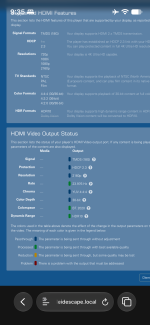
Not sure what to tell you, but it definitely behaves exactly as I described on my system. Here’s proof, the video capabilities and status info screen from the web ui describing what is being sent while the Strato is on the OSD, and it’s showing HDR10 (note the lack of media info, meaning nothing is playing).
 

Attachments

  • IMG_0013.png
    IMG_0013.png
    529.9 KB · Views: 4
@DLCPhoto Are you using a Strato C by chance? I don’t believe it supports outputting the UI in HDR. Only the E/V/M/K models do when using the settings I described, from what I recall when I still had my C.
 
@DLCPhoto Are you using a Strato C by chance? I don’t believe it supports outputting the UI in HDR. Only the E/V/M/K models do when using the settings I described, from what I recall when I still had my C.
That must be it - I do have the Strato C.
 
I have a Strato V, JVC NZ7, and Lumagen. Handshakes are definitely a pain. I’ve set my Strato V to minimize display changes which as described above locks output to 4K HDR 60hz and all content will get upscaled/converted. I actually have found that with my NZ7 set to reverse telecine it looks identical to 24hz and that way the UI stays smooth. Since 90% of what I watch is 4K HDR the upscaling or SDR->HDR conversion isn’t an issue. And I can always temporarily change the setting from my phone if it bothers me. This config definitely helps minimize handshakes making it more enjoyable.
 
I have a Strato V, JVC NZ7, and Lumagen. Handshakes are definitely a pain. I’ve set my Strato V to minimize display changes which as described above locks output to 4K HDR 60hz and all content will get upscaled/converted. I actually have found that with my NZ7 set to reverse telecine it looks identical to 24hz and that way the UI stays smooth. Since 90% of what I watch is 4K HDR the upscaling or SDR->HDR conversion isn’t an issue. And I can always temporarily change the setting from my phone if it bothers me. This config definitely helps minimize handshakes making it more enjoyable.
Yeah, I’d probably do the same, except my nz500 doesn’t have reverse telecine, so I can’t leave the movies at 60 Hz without introducing judder, and the 24Hz UI bothers me more than the handshakes, so I just deal with the handshakes and leave frame rate matching enabled with the UI set to 60 Hz lol.
 
Yeah, I’d probably do the same, except my nz500 doesn’t have reverse telecine, so I can’t leave the movies at 60 Hz without introducing judder, and the 24Hz UI bothers me more than the handshakes, so I just deal with the handshakes and leave frame rate matching enabled with the UI set to 60 Hz lol.
Yeah I get that. I’ve played with the UI at 24hz. It actually doesn’t bother me as much as I thought it would so I’d take that over the long handshake if I needed to but obviously totally subjective.
 
Back
Top