• Thanks for visiting the Kaleidescape Owners' Forum

    This forum is for the community of Kaleidescape owners, and others interested in learning about the system, equipment, services, and the company itself.

    It is run by a group of enthusiastic Kaleidescape owners and dealers purely as a service to this community.

    This board is not affiliated in any way with Kaleidescape, Inc.
    For official technical support, product information, or customer service, please visit www.kaleidescape.com

    You can dismiss this box forever by clicking the "X" in the upper right corner of this message.
  • You are currently in "Guest" mode and not logged in with a registered account.

    The forum is free to use and most of the forum can be used by guests who are not registered....

    ... but we strongly encourage you to register for a full account. There is no cost to register for a full account.

    Benefits of registering for a full account:

    • Participate in the discussions! You must have a registered account to make posts on the forums. You will be able to start your own thread on a topic or question, or you can reply to other threads/discussions.
    • Use the "Conversation" feature (known as "private messaging" on other forums) to communicate directly with any of the other users here.
    • Access the Files area. The "resources" area of the forum contains many "Favorite Scene" and Script files that can dramatically increase the enjoyment of your Kaleidescape system. Go directly to great scenes in your favorite movies, created by other owners, and add automation to playback of your system with Scripts.
    • You won't see this annoying notice at the top of every screen!😊

    It's easy and free to register for the forum. Just click the "Register" button in the upper right corner of this page, and follow the instructions there.

    This box goes away for registered users.

Claude and Home Assistant

StanfieldNC

Well-known member
⭐️⭐️PATRON⭐️⭐️
Joined
Aug 4, 2023
Messages
538
Location
NC, USA
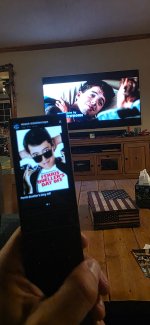
Been a while since I posted but figured I'd share for the others thay may have been frsutrated with this remote or felt it is too complicated.

I've had this Remote for nearly a year and I never made the time to sit down and program it. Claude had it done in a few minutes and I dialed it in to how I want it, to include voice control within another hour.

I finally have the remote I thought I was buying. Glad I finally decided to throw Claude at it instead of selling it off.
 

Attachments

  • 20261123_202055.jpg
    20261123_202055.jpg
    564.9 KB · Views: 11
  • 20261123_202301.jpg
    20261123_202301.jpg
    677.4 KB · Views: 12
  • 20261123_202311.jpg
    20261123_202311.jpg
    596 KB · Views: 12
  • 20261123_202055.jpg
    20261123_202055.jpg
    564.9 KB · Views: 12
Nicely done! Alas I already brute-forced my way through this. Although it was actually easy given Thrillcat's videos, just time-consuming.

I did however have Claude improve my system’s lip-sync. It’s like having a direct report for life.
 
Last edited:
Nicely done! Alas I already brute-forced my way through this. I did however have Claude improve my system’s lip-sync. It’s like having a direct report for life.
Curious what you did for lip sync with Claude? I typically manually just dial it in with the Catchin Sync app on my phone.
 
Been a while since I posted but figured I'd share for the others thay may have been frsutrated with this remote or felt it is too complicated.

I've had this Remote for nearly a year and I never made the time to sit down and program it. Claude had it done in a few minutes and I dialed it in to how I want it, to include voice control within another hour.

I finally have the remote I thought I was buying. Glad I finally decided to throw Claude at it instead of selling it off.
Cool! I have considered either this remote or Astrion Pro so that I can also do my own customization. Curious what you think of the build quality and how it runs your software now?
 
I think you mean voice control. Claude did most of the build in Home Assistant:

Mic: I hold the mic button on my Unfolded Circle Remote 3. It sends my speech to Home Assistant's voice assistant, which uses Nabu Casa cloud speech-to-text.

Commands: a Home Assistant automation listens for phrases like "Play [movie] on the Kaleidescape."

Library search: a custom integration called Kaleidescape Voice (on GitHub) scrapes my movie library, so Home Assistant can match the title. It handles partial titles, close spellings, series, and directors or actors.

On screen: Home Assistant sends Kaleidescape control protocol commands over the network to open the Movie List and type the title into its filter. The movie comes up highlighted and I press OK. I chose not to have it auto-play.

Speed: at first it sent each letter as its own command, and each one took about 3 seconds. Claude found the player accepts all the commands in one message, so now it takes about 3 seconds total.

Directors and actors: for something like "Quentin Tarantino movies," the title filter can't search by person, so the remote reads back the matching titles and I say the one I want.

One gotcha if you try it: the remote's voice kept saying "unavailable." Home Assistant's default voice pipeline had no speech-to-text set up, and the remote sometimes fell back to it. Adding speech-to-text to that pipeline fixed it.
 
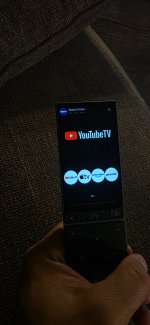
Cool! I have considered either this remote or Astrion Pro so that I can also do my own customization. Curious what you think of the build quality and how it runs your software now?
Build quality is great. No issues there. It runs well, now that it is all setup. For a non-programmer like myself, I had it running at 10% barely replicating my harmony 900. Claude unlocked a lot of the potential. I can use it to control my thermostats, lights, fans. See how much propane is in my tank. I believe there is a lost of similar visibility as home assistant.
 
Curious what you did for lip sync with Claude? I typically manually just dial it in with the Catchin Sync app on my phone.
Sure! I asked it to resolve what are the correct settings to ensure lip sync. It scanned the manual, the sales guide PDFs, my build thread in AVS Forum, the rest of AVS Forum, and Reddit, and gave me step by step instructions. First it was the right settings in the Lumagen for EDID return and Genlock. These two things helped my receiver sync up the audio sync automatically. Claude then had me tune the delay to my ear. I added an 11ms delay on top of the auto. Now it's synced for all sources, all files, all codecs. In the past it would vary slightly based on those factors and I'd get frustrated.

I just looked up Catchin' Sync, it looks great! Especially for the part where Claude told me to do the final tuning myself. How has Catchin' Sync been working for you?
 
Last edited:
Sure! I asked it to resolve what are the correct settings to ensure lip sync. It scanned the manual, the sales guide PDFs, my build thread in AVS Forum, the rest of AVS Forum, and Reddit, and gave me step by step instructions. First it was the right settings in the Lumagen for EDID return and Genlock. These two things helped my receiver sync up the audio sync automatically. Claude then had me tune the delay to my ear. I added an 11ms delay on top of the auto. Now it's synced for all sources, all files, all codecs. In the past it would vary slightly based on those factors and I'd get frustrated.

I just looked up Catchin' Sync, it looks great! Especially for the part where Claude told me to do the final tuning myself. How has Catchin' Sync been working for you?
Catchin Sync works well. I use a Lip Sync video on YouTube from Audio Advice for Apple TV and also typically use the hammer in opening credits scene of Iron Man 2 on Kaleidescape.
 
Back
Top