• Thanks for visiting the Kaleidescape Owners' Forum

    This forum is for the community of Kaleidescape owners, and others interested in learning about the system, equipment, services, and the company itself.

    It is run by a group of enthusiastic Kaleidescape owners and dealers purely as a service to this community.

    This board is not affiliated in any way with Kaleidescape, Inc.
    For official technical support, product information, or customer service, please visit www.kaleidescape.com

    You can dismiss this box forever by clicking the "X" in the upper right corner of this message.
  • You are currently in "Guest" mode and not logged in with a registered account.

    The forum is free to use and most of the forum can be used by guests who are not registered....

    ... but we strongly encourage you to register for a full account. There is no cost to register for a full account.

    Benefits of registering for a full account:

    • Participate in the discussions! You must have a registered account to make posts on the forums. You will be able to start your own thread on a topic or question, or you can reply to other threads/discussions.
    • Use the "Conversation" feature (known as "private messaging" on other forums) to communicate directly with any of the other users here.
    • Access the Files area. The "resources" area of the forum contains many "Favorite Scene" and Script files that can dramatically increase the enjoyment of your Kaleidescape system. Go directly to great scenes in your favorite movies, created by other owners, and add automation to playback of your system with Scripts.
    • You won't see this annoying notice at the top of every screen!😊

    It's easy and free to register for the forum. Just click the "Register" button in the upper right corner of this page, and follow the instructions there.

    This box goes away for registered users.

Changing Strato E Audio Output - not working?

Brody

Active member
Joined
Sep 13, 2026
Messages
33
Location
Canada
I have a bit of an unusual situation.

Because I’ve had a huge flareup of tinnitus I’m actually having trouble listening to movies with high dynamic range. So I’m trying everything I can to find where I can apply compression for now.

Unfortunately my old Denon AVR 2809 doesn’t offer very good features for that.
My OPPO has some dynamic range control as a source but unfortunately Kaleidescape doesn’t offer that feature.

So I was trying to see what it might sound like if I feed my Denon stereo tracks.

I went to the web interface for my audio settings on my Strato E and I changed from bitstream to have it output stereo PCM.
It didn’t seem to work. The setting on my AVR screen did not seem to change showing any change of input signal, and I didn’t hear any difference. I also tried switching it to PCM multi channel and that didn’t seem to take either.

Does anybody know what’s going on or how to make this work?

I was watching Jurassic Park by the way when trying this.
 
I had issues with tinnitus many years ago and had a Denon receiver back then too. Couldn’t remember my workaround, but my buddy Google did. See if this info about “Activating Audyssey Dynamic Volume from the Remote” helps : Google Search
 
I had issues with tinnitus many years ago and had a Denon receiver back then too. Couldn’t remember my workaround, but my buddy Google did. See if this info about “Activating Audyssey Dynamic Volume from the Remote” helps : Google Search

Thanks very much. Unfortunately, I already went through all the possible dynamic compression settings on my Denon and they are not good enough.

The problem is that with dynamic volume it actually does squash dynamics, mostly in the mid range and highs and works quite well for that. But the stupid thing also employees dynamic EQ at the very same time! It does that I believe to try and make up for the fact that we perceive less bass when the volume has turned low. So at the same time that it is squashing dynamics in the upper frequencies it’s massively boosting bass in the lower frequencies! So for instance, I was watching a scene in avatar when I was trying these features and there’s two characters talking I guess in a loading bay area and in the distance behind them, there’s somebody in one of those giant robot outfits walking away.
When played with normal sound the sound of that robot walking is distant and not bother them at all. When played with dynamic volume because of the EQ boost even though its way in the distance the footstep rumbles are gigantic and rumbling through the home theatre and practically covering the dialogue. It’s just absurd.
What a stupid feature - you want to squash dynamic range, but it just boosts it in the bass anyways.
 
I went to the web interface for my audio settings on my Strato E and I changed from bitstream to have it output stereo PCM.
It didn’t seem to work. The setting on my AVR screen did not seem to change showing any change of input signal, and I didn’t hear any difference. I also tried switching it to PCM multi channel and that didn’t seem to take either.
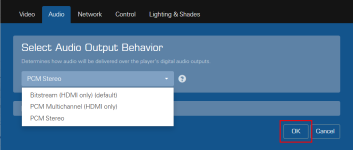
Changes to the audio and/or video settings don't take place in real time. You have to commit the change by clicking the "OK" button on the popup page:
1791898631253.png
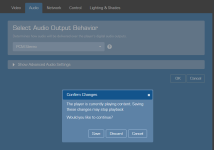
If you make and save a configuration change while the player is playing a movie, you will get a notice that playback will be halted:
1791898763685.png
 
Changes to the audio and/or video settings don't take place in real time. You have to commit the change by clicking the "OK" button on the popup page:
View attachment 12343
If you make and save a configuration change while the player is playing a movie, you will get a notice that playback will be halted:
View attachment 12344

Ah!

Stupid me. I don’t think I had selected the OK button! I think that solves the mystery.

Thank you very much for the information!

It’s always the simple things…
 
Back
Top