

-
Thanks for visiting the Kaleidescape Owners' Forum
This forum is for the community of Kaleidescape owners, and others interested in learning about the system, equipment, services, and the company itself.It is run by a group of enthusiastic Kaleidescape owners and dealers purely as a service to this community.
This board is not affiliated in any way with Kaleidescape, Inc.
For official technical support, product information, or customer service, please visit www.kaleidescape.com
You can dismiss this box forever by clicking the "X" in the upper right corner of this message. -
You are currently in "Guest" mode and not logged in with a registered account.
The forum is free to use and most of the forum can be used by guests who are not registered....
... but we strongly encourage you to register for a full account. There is no cost to register for a full account.
Benefits of registering for a full account:
- Participate in the discussions! You must have a registered account to make posts on the forums. You will be able to start your own thread on a topic or question, or you can reply to other threads/discussions.
- Use the "Conversation" feature (known as "private messaging" on other forums) to communicate directly with any of the other users here.
- Access the Files area. The "resources" area of the forum contains many "Favorite Scene" and Script files that can dramatically increase the enjoyment of your Kaleidescape system. Go directly to great scenes in your favorite movies, created by other owners, and add automation to playback of your system with Scripts.
- You won't see this annoying notice at the top of every screen!😊
This box goes away for registered users.
You are using an out of date browser. It may not display this or other websites correctly.
You should upgrade or use an alternative browser.
You should upgrade or use an alternative browser.
[Buyer’s Guide] Kaleidescape Quality Compared to Blu-ray & other Digital Sources
- Thread starter Rmarci
- Start date

One of my biggest disappointments since going with Kaleidescape is no 4k version of the extended version of The Martian. Big fan of the book and movies...but always thought the extended version was the best version.The Martian 2015
UHD-BD = 39.8gb
KSCAPE = 78.6gb !!
- Most shots look significantly better than the heavily DNRed UHD-BD: it's a night and day difference.
- The exterior Mars shot appears slightly softer and darker, with some macroblocking visible in the sky. I assume this comes from the master, and the BD’s heavy DNR likely masked it. Example
- Once again, the HDR10 metadata doesn’t make sense; there are even impossible values, like MaxFALL being higher than MaxCLL.
- I wish the extended cut was available in 4K like the bluray
View attachment 8072
Brightness:
View attachment 8071


Trevor
Well-known member
If you're not a nit-nerd with a true high brightness DV display you can skip all this. Don't even worry about it.
This all was tested on a 2600-nit Sony Z9K TV, Oppo 203 disc player, and a Strato V for DV & Strato C for HDR.
So after seeing the TMNT clipping I went down a rabbit hole...ID'ing definitively all DV FEL discs in my crazy collection, attempting to nail down the ones with an associated brightness boost, and bouncing those brightest scenes off KScape's encodes with video bitrates 100-115% of the disc to see if I wanted to forego some bitrate for the disc FEL improvements. (WHEW! ) I didn't bother checking anything greater than 115% for time reasons.
Some good news...while the Mission Impossible discs with DV FEL are incredibly bright the DV KScape encodes are lock step and bright as can be. After checking the original's finale and MI: Fallout at roughly 1:29 I called KScape DV encodes good and started concentrating on HDR.
Star Trek III (25:43) - Lights are definitely brighter in the room but I actually liked the color reproduction even more (check out the uniforms/textiles). Sticking with disc on this one.
Deep Impact (54:22) - Not much noticeable additional brightness with the disc but the colors were a hair better also IMO.
Cliffhanger (1:03:57) - Man...the 2023 steelbook 30th anniversary disc is a stunner all around. No contest. Brightness was up a hair but everything is just better. Even the dimensionality of the snow is improved leaving KScape looking flat.
Last Night in Soho (24:19) - Lighting on the big street-level reveal was not only brighter but more realistic...to the point where it went from "neat!" to near jaw-dropping. Much more effective. Just before this scene the neon signs looked better also. Slight color improvement too. Disc all day.
Braveheart (1:57:28) - I guess the torch lights here were supposed to be kicked up a notch but I didn't really see much of a difference. Colors looked similar and detail was better resolved on KScape. Disc is going to gather dust on this one.
Croods 2 (50:03) - This time stamp really only showed the brighter highlights in the monkey eyes and really had very little impact. What got my attention was a couple minutes later at the start of the next chapter - the brighter areas of the screen helped define shadows better and gave the image more dimensionality. Not a huge improvement over KScape but it's a little better.
Mother (1:26:32) - This was a weird one. The brightness over time plot ID'd this scene with flashlights as a significant improvement but other than that brightness before and after (+/-3 Min) looked near identical throughout the house. I did like other elements of the image over KScape though but the disc isn't a huge improvement.
Push (17:22) - Lights in the market were MUCH hotter (in a great way). Very realistic looking. Easy win for disc.
GI Joe: Rise of Cobra (20:09) - Almost the same deal as the flashlights in Mother - the colorist went a but nuts making a split-second torch flame really bright but otherwise the picture before and after was near identical. Sticking with KScape on this one...detail looks slightly better IMO.
Sum of All Fears (1:10:33) - The disc provided a slight uptick in brightness (stadium lights and overall) but the real improvement was additional color saturation. Skin tones on KScape were a noticeably washed out in comparison. Disc gets this one.
Scream (59:46) - Seemed to be a wash brightness wise but colors on the disc win again. KScape looked good on this one though...I found disc just slightly better.
Terminator Dark Fate (1:02:33) - Quite a brightness boost from lighting in the Border Patrol facility and (lesser so) the heli-pad outside. Otherwise, they're really close in all other aspects. Maybe a bit better detail from KScape. Your call; brightness or detail?
Star Trek IV (7:38) - I'm guessing the DV brightness plot picked up the extra hit from some reflections in this scene. Really not much difference, That said the color reproduction from the disc hooked me again (check out the uniforms again). Not night and day but good enough to choose the disc.
So where does this leave me? Wanting more DV transfers of these hotly mastered Paramount and Universal titles from the KScape content team! The more the merrier - bring em' on!
This all was tested on a 2600-nit Sony Z9K TV, Oppo 203 disc player, and a Strato V for DV & Strato C for HDR.
So after seeing the TMNT clipping I went down a rabbit hole...ID'ing definitively all DV FEL discs in my crazy collection, attempting to nail down the ones with an associated brightness boost, and bouncing those brightest scenes off KScape's encodes with video bitrates 100-115% of the disc to see if I wanted to forego some bitrate for the disc FEL improvements. (WHEW!
) I didn't bother checking anything greater than 115% for time reasons.Some good news...while the Mission Impossible discs with DV FEL are incredibly bright the DV KScape encodes are lock step and bright as can be. After checking the original's finale and MI: Fallout at roughly 1:29 I called KScape DV encodes good and started concentrating on HDR.
Star Trek III (25:43) - Lights are definitely brighter in the room but I actually liked the color reproduction even more (check out the uniforms/textiles). Sticking with disc on this one.
Deep Impact (54:22) - Not much noticeable additional brightness with the disc but the colors were a hair better also IMO.
Cliffhanger (1:03:57) - Man...the 2023 steelbook 30th anniversary disc is a stunner all around. No contest. Brightness was up a hair but everything is just better. Even the dimensionality of the snow is improved leaving KScape looking flat.
Last Night in Soho (24:19) - Lighting on the big street-level reveal was not only brighter but more realistic...to the point where it went from "neat!" to near jaw-dropping. Much more effective. Just before this scene the neon signs looked better also. Slight color improvement too. Disc all day.
Braveheart (1:57:28) - I guess the torch lights here were supposed to be kicked up a notch but I didn't really see much of a difference. Colors looked similar and detail was better resolved on KScape. Disc is going to gather dust on this one.
Croods 2 (50:03) - This time stamp really only showed the brighter highlights in the monkey eyes and really had very little impact. What got my attention was a couple minutes later at the start of the next chapter - the brighter areas of the screen helped define shadows better and gave the image more dimensionality. Not a huge improvement over KScape but it's a little better.
Mother (1:26:32) - This was a weird one. The brightness over time plot ID'd this scene with flashlights as a significant improvement but other than that brightness before and after (+/-3 Min) looked near identical throughout the house. I did like other elements of the image over KScape though but the disc isn't a huge improvement.
Push (17:22) - Lights in the market were MUCH hotter (in a great way). Very realistic looking. Easy win for disc.
GI Joe: Rise of Cobra (20:09) - Almost the same deal as the flashlights in Mother - the colorist went a but nuts making a split-second torch flame really bright but otherwise the picture before and after was near identical. Sticking with KScape on this one...detail looks slightly better IMO.
Sum of All Fears (1:10:33) - The disc provided a slight uptick in brightness (stadium lights and overall) but the real improvement was additional color saturation. Skin tones on KScape were a noticeably washed out in comparison. Disc gets this one.
Scream (59:46) - Seemed to be a wash brightness wise but colors on the disc win again. KScape looked good on this one though...I found disc just slightly better.
Terminator Dark Fate (1:02:33) - Quite a brightness boost from lighting in the Border Patrol facility and (lesser so) the heli-pad outside. Otherwise, they're really close in all other aspects. Maybe a bit better detail from KScape. Your call; brightness or detail?
Star Trek IV (7:38) - I'm guessing the DV brightness plot picked up the extra hit from some reflections in this scene. Really not much difference, That said the color reproduction from the disc hooked me again (check out the uniforms again). Not night and day but good enough to choose the disc.
So where does this leave me? Wanting more DV transfers of these hotly mastered Paramount and Universal titles from the KScape content team!
The more the merrier - bring em' on!
Last edited:
Trevor
Well-known member
That's 1:29:40-ish for MI: Fallout's brightness test scene.
Good testing, man. I bought a couple of movies on KS that get brighter on Blu-ray via FEL Dolby Vision. I’ll eventually do some HDMI captures in order to get the full difference. Sometimes, the difference is harder to notice in real-time viewing unless you have two identical TVs side by side because of the time it takes to switch from one input to another.
And very often, FEL doesn’t just expand the brightness of the highlight from 1000 to 4000+ nits, it also brightens the whole mid-range. For example, Madagascar is barely a 400-nit master, yet they chose to deliver a trim pass, and the FEL restores the original brightness. To me that's a stupid decision but they do that quite often.
And very often, FEL doesn’t just expand the brightness of the highlight from 1000 to 4000+ nits, it also brightens the whole mid-range. For example, Madagascar is barely a 400-nit master, yet they chose to deliver a trim pass, and the FEL restores the original brightness. To me that's a stupid decision but they do that quite often.
Crocodile Dundee 1986
 slow.pics
KSCAPE = 55gb (lossless audio included)
iTunes = 17gb (lossy audio)
Paramount+ = 9.8gb (lossy audio)
- Good compression
- itunes applies strong DNR as always
Brightness:


##################################################################################
Crocodile Dundee II 1988
slow.pics
KSCAPE = 63gb (lossless audio included)
iTunes = 19.7gb (lossy audio)
Paramount+ = 11.3gb (lossy audio)
- Good compression
- itunes applies strong DNR as always
- Overcropped
Brightness


Crocodile Dundee 1986 KSCAPE vs iTunes vs Paramount+ vs 1080pBD | Slowpoke Pics
Slowpoke Pics image comparison service
slow.pics
KSCAPE = 55gb (lossless audio included)
iTunes = 17gb (lossy audio)
Paramount+ = 9.8gb (lossy audio)
- Good compression
- itunes applies strong DNR as always
Brightness:
##################################################################################
Crocodile Dundee II 1988
Crocodile Dundee II 1988 KSCAPE vs iTunes vs Paramount= vs 1080pBD | Slowpoke Pics
Slowpoke Pics image comparison service
slow.pics
KSCAPE = 63gb (lossless audio included)
iTunes = 19.7gb (lossy audio)
Paramount+ = 11.3gb (lossy audio)
- Good compression
- itunes applies strong DNR as always
- Overcropped
Brightness
Trevor
Well-known member
Round two today with the discs that should be even further behind bitrate wise. As before, don't burn too many brain cells on this if you don't have a DV setup or care about 1500+ nits craziness. Also keep in mind these are cherry picked discs with the potential for extended brightness. Most discs aren't like these (and after this post I think I covered most of them).
Many time stamps are rough so go +/- a couple minutes if you want to check out the sample.
Allegiant (30:56) - I have the french DV Divergent set and the disc wasn't good for much. Less detail - same brightness as K. Skip the disc.
Apocalypse Now (38:13) - Man...I'm starting to see a theme here...DV discs with FEL just have this sheen and richness. Brightness really wasn't all that different, but K's HDR grade looks flat and (dare I say) dead in comparison. I'm firmly on board with team-K but some of these discs just kick it up a notch. Sorry!
Fatal Attraction (35:27) - Timestamp really didn't have anything interesting brightness wise but went back a couple chapters to when they're in the park to look harder. Brightness was slightly higher on the disc, detail/grain structure slightly behind K, but color from the disc hooked me like a couple other titles. Maybe I'm a sucker for saturation. Whatever, this one is close but I'm going with the disc.
Friday the 13th (1980) (1:00:07) - Whoever mastered this disc must have not had access to a high-nit mastering monitor because the disc had me like:

Seriously...until today I thought I would never find something too bright but the fireplace fire, lanterns, and especially the daylight lake scene earlier were way overcooked. Completely outside of reality. Stick with K on this one.
GI Joe: Retaliation (1:19:14) - One thing hooked me: Cobra Commander cruising in on the hovercraft - great color and reflections / very life-like. HDR looks flat and dead again. I think I'm going to dust off the other GI Joe disc too. Maybe I didn't spend enough time sampling it.
John Wick 2 (1:39:48 - 1:41:29) - This one is a little different; HDR Disc vs KScape DV. So I had stayed away from K's DV encode because the disc has an exceptional video bitrate (~78 mbps) for a mainstream title but I stumbled on the JW Ch 2 DV brightness plot @Rmarci has in their stash and it looks like it kicks brightness up a notch vs vanilla HDR. So after viewing both the DV didn't look noticeably brighter necessarily (both are incredibly bright!) but the DV K encode seemed to be better controlled. Not less bright but better gradients within individual lights. In hind sight, the DV encode might actually get brighter in tiny areas but everything is so bright it's kinda hard to tell. I hope that makes sense. Going with the K DV encode on this in the future.
Major League (1:38:42) - I'll cut to the chase on this one. Saturation and dimensionality from the DV FEL disc wins again. This wasn't a blowout though...this HDR grade is pretty lively but I feel the disc has an edge.
Man of Steel (39:37) - I started at this timestamp where there's a couple bright lights for a second but it really wasn't representative, so I went back to the beginning (5:00). So, like John Wick 2, this is another HDR disc vs K DV that could have additional brightness. K wins again with more detail along with better highlight control/tone mapping while appearing to sacrifice zero brightness. Holy crap this thing is a light cannon in the best way (both HDR & DV).
Pacific Rim (1:10:54) - I think there's been some scuttle-butt on K's DV encode but I figured I would take a look at it. 3 for 3 with K DV winning over HDR disc. Same deal - all the nits coupled with all the control along with improved detail. I didn't see any issues during the bay fight. <shrug>
Real Genius (32:40) - The disc's brightness is star here. The headlight on the car hooked me from the get-go. Lights and the following outdoor scene lighting just look like they should.
Saving Private Ryan (1:53:18) - At first glance there didn't seem to be much to differentiate at this timestamp but after looking a bit harder the disc started to stand out. It's that same DV sheen and richness I mentioned in Apocalypse Now (just lesser so). Check out the reflection on the bridge as they're walking. Just after this scene, when they're inventorying their supplies, check out the reflection on the soldier's watch at screen left. It's just a blob in HDR but in DV the raised brightness ceiling gives it some realistic definition/behavior. Disc it is...even with the reduced bitrate due to being a long movie.
Shutter Island (17:43) - Not much going on brightness wise in this scene outside of lighting but disc has K covered. Surprising how much DV adds. Also surprised I liked the disc as the video bitrate is pretty low (~43.8 mbps). Not great for sure but it looked no worse for wear regardless.
Spartacus (2:40:13) - I think this timestamp is a bit late and it's really the fire you're looking for in the fight before (2:35:00-ish). On this one the DV disc didn't add much (if anything) brightness and color wise and it couldn't overcome the relatively poor detail due to the disc's compromised video bitrate (~44.2 mbps). KScape all day on this one.
The Doors (48:18) - Same deal as Spartacus. Maybe a bit of additional brightness out of the disc but it wasn't worth the detail & grain structure hit from the disc's relatively poor video encode/bitrate (~56.5 mbps). KScape FTW!
The Core (48:17) - Mostly looking at the lightning here. Definitely livelier brightness. Other scenes showed the same. A bit better color IMO. Regarding detail - both encodes look to be limited by the quality of the source so I picked the disc on this one just to have the additional punch.
Hunger Games Mockingjay Part 1 (39:17) - Scene you're looking for is just after this; room lighting and arrow explosion. Another HDR Disc Vs KScape DV. Took me a bit of back and forth but I believe the K DV grade gives up a bit of peak brightness vs the disc's HDR grade. Unlike the other 3 entries in the series this particular movie/disc has a pretty healthy video bitrate (~73.0 mbps) so I'm sticking with the disc on this one.
Trolls World Tour (7:09) - Brightness from the Baby Diamond segment was noticeably improved in DV on disc. Surprisingly I didn't really notice any color improvements with DV. The HDR grade holds it's own. Going with the disc though.
Rambo (2008) (22:56) - Holy crap, this disc is horrible. I think this is one of those discs where the theatrical and extended versions are two separate files on the disc (vs seamless branching) and MAN is it a train wreck. KScape looks so much better all around. Not only that but even the bright lights from the pirate camp look the same so there's zero reason to pick the disc here (unless you really want to see the extended version in psuedo blu-ray quality).
Knowing (45:11) & (1:02:54) - I ran the disc first and was really impressed with the brightness from the highlights. It had all the lighting signatures of a great DV encode so I didn't think HDR would hang but surprisingly K's encode is really close brightness wise. Details are a hair better on K as the disc's video bitrate is kinda lackluster (~49.1 mbps) but it holds it together pretty well just the same. The disc doesn't look near as poor as it should. This is a toss-up - a bit more detail (K) or a bit more brightness (Disc)?
Annihilation (1:03:00) & (1:33:18) - This is another relatively low video bitrate disc (~50 mbps) but I think this is another where both encodes are detail limited by the source so the K encode really couldn't show off. Matter of fact I swear I could see just a bit more skin texture in the first scene on the disc. The HDR encode is also quite bright (like Knowing) but the DV has a slight edge there. While the colors were really close in the earlier scene the largest difference was the colors and shimmering effects during the emergence in the second listed scene. The DV disc just provided more of definition to what was going on with the swirling around the room. Way larger of a difference than what I thought possible. To be clear I'm not sold on the whole 12-bit color DV marketing as a visible improvement but this one showed a real difference here. Likely just how it was graded (IE it could be rendered just the same in HDR10 by a good colorist) but what's there is there (IMO). Going with the disc.
Whew...all right! If you've stuck with me this far kudos.
And content team - if you're reading this good job on the DV encodes so far. Send more, especially these spicy ones that kick it up a notch!
But not Friday the 13th - burn that one with fire.
Many time stamps are rough so go +/- a couple minutes if you want to check out the sample.
Allegiant (30:56) - I have the french DV Divergent set and the disc wasn't good for much. Less detail - same brightness as K. Skip the disc.
Apocalypse Now (38:13) - Man...I'm starting to see a theme here...DV discs with FEL just have this sheen and richness. Brightness really wasn't all that different, but K's HDR grade looks flat and (dare I say) dead in comparison. I'm firmly on board with team-K but some of these discs just kick it up a notch. Sorry!
Fatal Attraction (35:27) - Timestamp really didn't have anything interesting brightness wise but went back a couple chapters to when they're in the park to look harder. Brightness was slightly higher on the disc, detail/grain structure slightly behind K, but color from the disc hooked me like a couple other titles. Maybe I'm a sucker for saturation. Whatever, this one is close but I'm going with the disc.
Friday the 13th (1980) (1:00:07) - Whoever mastered this disc must have not had access to a high-nit mastering monitor because the disc had me like:
Seriously...until today I thought I would never find something too bright but the fireplace fire, lanterns, and especially the daylight lake scene earlier were way overcooked. Completely outside of reality. Stick with K on this one.
GI Joe: Retaliation (1:19:14) - One thing hooked me: Cobra Commander cruising in on the hovercraft - great color and reflections / very life-like. HDR looks flat and dead again. I think I'm going to dust off the other GI Joe disc too. Maybe I didn't spend enough time sampling it.
John Wick 2 (1:39:48 - 1:41:29) - This one is a little different; HDR Disc vs KScape DV. So I had stayed away from K's DV encode because the disc has an exceptional video bitrate (~78 mbps) for a mainstream title but I stumbled on the JW Ch 2 DV brightness plot @Rmarci has in their stash and it looks like it kicks brightness up a notch vs vanilla HDR. So after viewing both the DV didn't look noticeably brighter necessarily (both are incredibly bright!) but the DV K encode seemed to be better controlled. Not less bright but better gradients within individual lights. In hind sight, the DV encode might actually get brighter in tiny areas but everything is so bright it's kinda hard to tell. I hope that makes sense. Going with the K DV encode on this in the future.
Major League (1:38:42) - I'll cut to the chase on this one. Saturation and dimensionality from the DV FEL disc wins again. This wasn't a blowout though...this HDR grade is pretty lively but I feel the disc has an edge.
Man of Steel (39:37) - I started at this timestamp where there's a couple bright lights for a second but it really wasn't representative, so I went back to the beginning (5:00). So, like John Wick 2, this is another HDR disc vs K DV that could have additional brightness. K wins again with more detail along with better highlight control/tone mapping while appearing to sacrifice zero brightness. Holy crap this thing is a light cannon in the best way (both HDR & DV).
Pacific Rim (1:10:54) - I think there's been some scuttle-butt on K's DV encode but I figured I would take a look at it. 3 for 3 with K DV winning over HDR disc. Same deal - all the nits coupled with all the control along with improved detail. I didn't see any issues during the bay fight. <shrug>
Real Genius (32:40) - The disc's brightness is star here. The headlight on the car hooked me from the get-go. Lights and the following outdoor scene lighting just look like they should.
Saving Private Ryan (1:53:18) - At first glance there didn't seem to be much to differentiate at this timestamp but after looking a bit harder the disc started to stand out. It's that same DV sheen and richness I mentioned in Apocalypse Now (just lesser so). Check out the reflection on the bridge as they're walking. Just after this scene, when they're inventorying their supplies, check out the reflection on the soldier's watch at screen left. It's just a blob in HDR but in DV the raised brightness ceiling gives it some realistic definition/behavior. Disc it is...even with the reduced bitrate due to being a long movie.
Shutter Island (17:43) - Not much going on brightness wise in this scene outside of lighting but disc has K covered. Surprising how much DV adds. Also surprised I liked the disc as the video bitrate is pretty low (~43.8 mbps). Not great for sure but it looked no worse for wear regardless.
Spartacus (2:40:13) - I think this timestamp is a bit late and it's really the fire you're looking for in the fight before (2:35:00-ish). On this one the DV disc didn't add much (if anything) brightness and color wise and it couldn't overcome the relatively poor detail due to the disc's compromised video bitrate (~44.2 mbps). KScape all day on this one.
The Doors (48:18) - Same deal as Spartacus. Maybe a bit of additional brightness out of the disc but it wasn't worth the detail & grain structure hit from the disc's relatively poor video encode/bitrate (~56.5 mbps). KScape FTW!
The Core (48:17) - Mostly looking at the lightning here. Definitely livelier brightness. Other scenes showed the same. A bit better color IMO. Regarding detail - both encodes look to be limited by the quality of the source so I picked the disc on this one just to have the additional punch.
Hunger Games Mockingjay Part 1 (39:17) - Scene you're looking for is just after this; room lighting and arrow explosion. Another HDR Disc Vs KScape DV. Took me a bit of back and forth but I believe the K DV grade gives up a bit of peak brightness vs the disc's HDR grade. Unlike the other 3 entries in the series this particular movie/disc has a pretty healthy video bitrate (~73.0 mbps) so I'm sticking with the disc on this one.
Trolls World Tour (7:09) - Brightness from the Baby Diamond segment was noticeably improved in DV on disc. Surprisingly I didn't really notice any color improvements with DV. The HDR grade holds it's own. Going with the disc though.
Rambo (2008) (22:56) - Holy crap, this disc is horrible. I think this is one of those discs where the theatrical and extended versions are two separate files on the disc (vs seamless branching) and MAN is it a train wreck. KScape looks so much better all around. Not only that but even the bright lights from the pirate camp look the same so there's zero reason to pick the disc here (unless you really want to see the extended version in psuedo blu-ray quality).
Knowing (45:11) & (1:02:54) - I ran the disc first and was really impressed with the brightness from the highlights. It had all the lighting signatures of a great DV encode so I didn't think HDR would hang but surprisingly K's encode is really close brightness wise. Details are a hair better on K as the disc's video bitrate is kinda lackluster (~49.1 mbps) but it holds it together pretty well just the same. The disc doesn't look near as poor as it should. This is a toss-up - a bit more detail (K) or a bit more brightness (Disc)?
Annihilation (1:03:00) & (1:33:18) - This is another relatively low video bitrate disc (~50 mbps) but I think this is another where both encodes are detail limited by the source so the K encode really couldn't show off. Matter of fact I swear I could see just a bit more skin texture in the first scene on the disc. The HDR encode is also quite bright (like Knowing) but the DV has a slight edge there. While the colors were really close in the earlier scene the largest difference was the colors and shimmering effects during the emergence in the second listed scene. The DV disc just provided more of definition to what was going on with the swirling around the room. Way larger of a difference than what I thought possible. To be clear I'm not sold on the whole 12-bit color DV marketing as a visible improvement but this one showed a real difference here. Likely just how it was graded (IE it could be rendered just the same in HDR10 by a good colorist) but what's there is there (IMO). Going with the disc.
Whew...all right! If you've stuck with me this far kudos.
And content team - if you're reading this good job on the DV encodes so far. Send more, especially these spicy ones that kick it up a notch!
But not Friday the 13th - burn that one with fire.
Last edited:
DV and HDR10 dont have any visible color difference unless there was a mistake in the HDR10 delivery, like the bluray La La Land. FEL only restores the HDR12 master, the same master the HDR10 was encoded from.To be clear I'm not sold on the whole 12-bit color DV marketing as a visible improvement but this one showed a real difference here. Likely just how it was graded (IE it could be rendered just the same in HDR10 by a good colorist) but what's there is there (IMO). Going with the disc.
example:
The main difference that FEL DV brings is the expanded brightness (about 30% of the discs are encoded like this). It also improves the bitrate but when the HDR10 layer is properly encoded, this is meaningless.
Fantastic Four 2015
slow.pics
UHD-BD USA= 35.1gb
UHD-BD GER= 51gb (FEL+BL)
KS= 53gb
- Much better grain than the old US BD and slightly more than the new German FEL bluray
- Green push again!! This is clearly a problem with some titles on KS.
- HDR10 metadata makes no sense again! I hope the team who did all those amateurish encodes no longer works for KS...
- overcropped
Brightness:


#######################################################################
Star Wars Episode IV A New Hope 1977:
slow.pics
UHD-BD= 45.1gb
KS= 71.5gb
– Most shots have more grain than the UHD-BD, but it looks very bad near the bottom letterbox area, completely smoothed out, showing signs of poor encoding settings.
– The Dolby Vision encode doesn’t have this near black bar issue and has slightly better grain overall, except in the white areas of the image, where the grain is missing and replaced with artifacts. Example
– Overcropped.
– Disappointing encoding for such a classic movie.

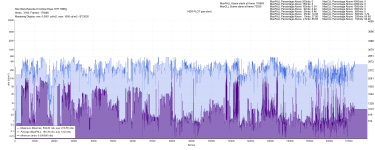
#######################################################################
Hurry Up Tomorrow 2025:
slow.pics
KS= 55gb
iTunes= 18.6gb
- Good compression, but only have DNRed itunes to compare.
Brightness:

**** Dynamic Aspect ratio so maxfall includes the letterbox in this one.

#######################################################################
Pretty Woman 1990:
slow.pics
KS= 66.9gb (lossless audio included)
Disney= 15.5gb (lossless audio included, added from 1080pBD)
- Much better than the Disney+ Artifacts Festival
- Much better than the ugly old 1080pBD
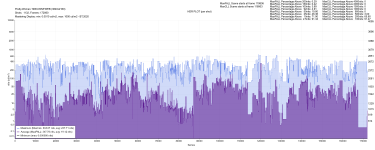
- Strangely, it's about twice as bright as the Disney+ stream. Hopefully, this isn't another case of KS artificially boosting the brightness, like they did with The Hangover and The Last of Us Season 2. Compared to the old 1080p Blu-ray, the Disney+ brightness makes more sense. That said, the KS version is still 100% better. Also, the DV metadata on Disney+ is closer to the disney+ HDR10 layer.. So KS brightness is definitely suspect here.
Brightness:

KSCAPE brightness measurement with madVR:

Disney+ (letterbox included in madVR measurement, so maxfall is not accurate):
#######################################################################
Avengers Endgame:
slow.pics
UHD-BD= 52gb
KS= 106gb
- Wow, what a disappointing encode. All the grain is absent, yet the Kscape encode is twice the size of the UHD-BD. Very strange, considering all the other Avengers movies have more grain than their UHD-BD counterparts. This was also the lowest HDMI capture bitrate I've ever seen on KS: barely 700mbps while they are usually in the 1000-2000mbps range.
- overcropped
Brightness:

*** Didn't bother measuring the disappointing KScape version.
dolby vision metadata (can't attach more than 10 pictures). On disneyplus, DV is slightly brighter than the HDR10 layer they delivered.
Fantastic Four 2015 Kscape vs UHD-BD OLD vs NEW + FEL | Slowpoke Pics
Slowpoke Pics image comparison service
slow.pics
UHD-BD USA= 35.1gb
UHD-BD GER= 51gb (FEL+BL)
KS= 53gb
- Much better grain than the old US BD and slightly more than the new German FEL bluray
- Green push again!! This is clearly a problem with some titles on KS.
- HDR10 metadata makes no sense again! I hope the team who did all those amateurish encodes no longer works for KS...
- overcropped
Brightness:
#######################################################################
Star Wars Episode IV A New Hope 1977:
Star Wars Episode IV A New Hope 1977 Kscape vs UHD-BD | Slowpoke Pics
Slowpoke Pics image comparison service
slow.pics
UHD-BD= 45.1gb
KS= 71.5gb
– Most shots have more grain than the UHD-BD, but it looks very bad near the bottom letterbox area, completely smoothed out, showing signs of poor encoding settings.
– The Dolby Vision encode doesn’t have this near black bar issue and has slightly better grain overall, except in the white areas of the image, where the grain is missing and replaced with artifacts. Example
– Overcropped.
– Disappointing encoding for such a classic movie.
#######################################################################
Hurry Up Tomorrow 2025:
Hurry.Up.Tomorrow.2025 kscape vs itunes | Slowpoke Pics
Slowpoke Pics image comparison service
slow.pics
KS= 55gb
iTunes= 18.6gb
- Good compression, but only have DNRed itunes to compare.
Brightness:
**** Dynamic Aspect ratio so maxfall includes the letterbox in this one.
#######################################################################
Pretty Woman 1990:
Pretty Woman 1990 KSCAPE vs DisneyPlus vs 1080pBD | Slowpoke Pics
Slowpoke Pics image comparison service
slow.pics
KS= 66.9gb (lossless audio included)
Disney= 15.5gb (lossless audio included, added from 1080pBD)
- Much better than the Disney+ Artifacts Festival
- Much better than the ugly old 1080pBD
- Strangely, it's about twice as bright as the Disney+ stream. Hopefully, this isn't another case of KS artificially boosting the brightness, like they did with The Hangover and The Last of Us Season 2. Compared to the old 1080p Blu-ray, the Disney+ brightness makes more sense. That said, the KS version is still 100% better. Also, the DV metadata on Disney+ is closer to the disney+ HDR10 layer.. So KS brightness is definitely suspect here.
Brightness:
KSCAPE brightness measurement with madVR:
Disney+ (letterbox included in madVR measurement, so maxfall is not accurate):
#######################################################################
Avengers Endgame:
Avengers Endgame 2019 Kscape vs UHD-BD | Slowpoke Pics
Slowpoke Pics image comparison service
slow.pics
UHD-BD= 52gb
KS= 106gb
- Wow, what a disappointing encode. All the grain is absent, yet the Kscape encode is twice the size of the UHD-BD. Very strange, considering all the other Avengers movies have more grain than their UHD-BD counterparts. This was also the lowest HDMI capture bitrate I've ever seen on KS: barely 700mbps while they are usually in the 1000-2000mbps range.
- overcropped
Brightness:
*** Didn't bother measuring the disappointing KScape version.
dolby vision metadata (can't attach more than 10 pictures). On disneyplus, DV is slightly brighter than the HDR10 layer they delivered.
Tomcup
Active member
Big bummer on this one, since I just spent like 115 bucks on the set while it was on sale, since I only own the 2K blu-rays.Star Wars Episode IV A New Hope 1977:
UHD-BD= 45.1gbStar Wars Episode IV A New Hope 1977 Kscape vs UHD-BD | Slowpoke Pics
Slowpoke Pics image comparison service
KS= 71.5gb
– Most shots have more grain than the UHD-BD, but it looks very bad near the bottom letterbox area, completely smoothed out, showing signs of poor encoding settings.
– The Dolby Vision encode doesn’t have this near black bar issue and has slightly better grain overall, except in the white areas of the image, where the grain is missing and replaced with artifacts. Example
– Overcropped.
– Disappointing encoding for such a classic movie.
Have avoided watching them on Disney Plus thinking I'd prefer to have the quality of disc....
Figured a $3,000 player that has a stamp of approval from big name directors would have one of the better quality options available for this set....
I just checked one of my FEL Dolby Vision Blu-rays that has its HDR10 base layer mapped down with a trim pass, and I can confirm that Kscape did not tone map their HDR10 encode on this movie down to 1000 nits like the bluray disc did for its base layer. It has the same brightness as the disc with the base layer and FEL combined. This suggests that the studios aren’t requiring them to tone map HDR10 down like the disc does so ultimately, it’s a Kscape decision.
The HDR10 Kscape encode is lower quality than their DV encode, and both have slightly worse compression than the UHD-BD.
RED 2010 lossless HDR10 BL vs 12bit FEL+BL
slow.pics
Bluray FEL vs HDR10 vs KS HDR10 vs KS DV
KS HDR10 Metadata also follows that logic:
KScape HDR10 metadata:

Bluray disc HDR10 metadata:

Bluray disc FEL DV metadata (with expanded brightness):

 www.kaleidescape.com
The HDR10 Kscape encode is lower quality than their DV encode, and both have slightly worse compression than the UHD-BD.
RED 2010 lossless HDR10 BL vs 12bit FEL+BL
RED 2010 HDR10 base layer VS Full Enhancement Layer (FEL) | Slowpoke Pics
Slowpoke Pics image comparison service
slow.pics
Bluray FEL vs HDR10 vs KS HDR10 vs KS DV
KS HDR10 Metadata also follows that logic:
KScape HDR10 metadata:
Bluray disc HDR10 metadata:
Bluray disc FEL DV metadata (with expanded brightness):
Red
A retired operative assembles a crew of fellow assassins to uncover why the CIA wants him dead. Action, Comedy, Spy. Directed by Robert Schwentke. Starring Bruce Willis, Morgan Freeman, John Malkovich, and Helen Mirren. Purchase and download today in 4K Dolby Vision with Dolby Atmos audio.
www.kaleidescape.com
Madagascar 2005
slow.pics
- UHD-BD(with FEL) = 45.1gb
- KSCAPE = 47.5gb
- UHD-BD (with FEL) has better grain retention and fine details
- KS HDR10 has the same brightness as FEL+BL combined, proving again that KS does not deliver trim pass from 12-bit masters.
- HDR10 metadata makes no sense and will force the TVs to use the strongest 10 000nits tone mapping curve for 400nits content.
- UHD-BD MDCP = P3 while KS is BT2020
Brightness:

 www.kaleidescape.com
Madagascar 2005 Kscape vs UHD-BD FEL vs BL | Slowpoke Pics
Slowpoke Pics image comparison service
slow.pics
- UHD-BD(with FEL) = 45.1gb
- KSCAPE = 47.5gb
- UHD-BD (with FEL) has better grain retention and fine details
- KS HDR10 has the same brightness as FEL+BL combined, proving again that KS does not deliver trim pass from 12-bit masters.
- HDR10 metadata makes no sense and will force the TVs to use the strongest 10 000nits tone mapping curve for 400nits content.
- UHD-BD MDCP = P3 while KS is BT2020
Brightness:
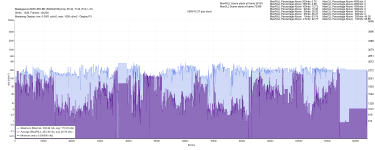
*** Since quality is worse than bluray, I did not bother measuring/capturing the whole movie brightness with madVR but here's the uhd-bd brightness(without fel)
KS HDR10 metadata:

UHD-BD HDR10 metadata:

HDR10 plot (madvr)
Dovi Metadata (L1)
WCG and heatmap and comparison with old 1080pbd:
KS HDR10 metadata:
UHD-BD HDR10 metadata:
HDR10 plot (madvr)
Dovi Metadata (L1)
WCG and heatmap and comparison with old 1080pbd:
Madagascar
Four pampered animals from a New York zoo find themselves lost in the wild after a botched escape attempt. Animated, Adventure, Family. Starring Ben Stiller, Chris Rock, David Schwimmer, and Cedric the Entertainer. Purchase and download today in 4K Dolby Vision with Dolby Atmos audio.
www.kaleidescape.com

FYI, I just published this video last week taking a look at streaming bit rates. The last time I did this was late 2023, so it's been 18+ months. Spoiler alert, nothing has changed in that time for streaming. Rates and quality are essentially unchanged, yet most services have gotten more expensive and been tiered such that 4K and Atmos and whatnot requires paying even more at a higher tier.
Keep those Kaleidescape systems!

stanrozenfeld
Well-known member
People advised me that streaming has come a long way, along with the promise that parity with physical media/Kaleidescape is just around the corner.
Well yes, it came a long way since 2009. But I do not see a narrowing quality gap over say, the last 5 years.
I don't think there is any real incentive for streaming to become as good as physical media.
Well yes, it came a long way since 2009. But I do not see a narrowing quality gap over say, the last 5 years.
I don't think there is any real incentive for streaming to become as good as physical media.
All the streaming services are garbage, except Movies Anywhere.
Bitrate doesn’t mean much if the encoding or denoising settings are bad. For example, I’d take a 16 Mb/s encode from Disney+, Netflix, or HBO Max over a 24 Mb/s iTunes encode any day. And I have many comparisons here that show that MA 24mb/s is better than KSCAPE higher bitrate.
iTunes encodes are always very soft and heavily denoised. Sometimes there's also a noticeable bitrate variation between the Dolby Vision and HDR10 streams. In some cases, the DV stream is only 14 Mb/s while the HDR10 stream hits 24 Mb/s and sometimes it's the other way around. For their original content, the bitrate is consistently 24 Mb/s. Their Dolby Vision Profile 5 encodes are all flawed as well, with a color shift caused by the same static reshaping they apply in the DV metadata. On top of that, all their content is overcropped, even worse than Kaleidescape.
Amazon is by far the worst streaming service, the quality is just criminal. Anyone buying a movie there is getting robbed, big time.
Disney+ has very good compression for the bitrate. With clean, digital sources, their 16 Mb/s encodes can look as good as a full-bitrate Blu-ray disc.
HBO Max also performs surprisingly well at low bitrates.
Fandango is a mixed bag, but it can sometimes beat iTunes in quality.
Netflix has increased its bitrate in recent years from 16 to 19 Mb/s, and it shows. Their DV encodes are always better compressed than their HDR10 counterparts.
Movies Anywhere is the king of streaming. The bitrate is always 24 Mb/s(no exception), and I’ve seen many encodes that are better quality than UHD-BD or even Kaleidescape. That said, for grainy content, Movies Anywhere can show quite a bit of compression artifacting.
P.S., Im not just guessing things based on some app that reads the bitrate while streaming. I'm talking about actual files downloaded from the streaming services servers.
Bitrate doesn’t mean much if the encoding or denoising settings are bad. For example, I’d take a 16 Mb/s encode from Disney+, Netflix, or HBO Max over a 24 Mb/s iTunes encode any day. And I have many comparisons here that show that MA 24mb/s is better than KSCAPE higher bitrate.
iTunes encodes are always very soft and heavily denoised. Sometimes there's also a noticeable bitrate variation between the Dolby Vision and HDR10 streams. In some cases, the DV stream is only 14 Mb/s while the HDR10 stream hits 24 Mb/s and sometimes it's the other way around. For their original content, the bitrate is consistently 24 Mb/s. Their Dolby Vision Profile 5 encodes are all flawed as well, with a color shift caused by the same static reshaping they apply in the DV metadata. On top of that, all their content is overcropped, even worse than Kaleidescape.
Amazon is by far the worst streaming service, the quality is just criminal. Anyone buying a movie there is getting robbed, big time.
Disney+ has very good compression for the bitrate. With clean, digital sources, their 16 Mb/s encodes can look as good as a full-bitrate Blu-ray disc.
HBO Max also performs surprisingly well at low bitrates.
Fandango is a mixed bag, but it can sometimes beat iTunes in quality.
Netflix has increased its bitrate in recent years from 16 to 19 Mb/s, and it shows. Their DV encodes are always better compressed than their HDR10 counterparts.
Movies Anywhere is the king of streaming. The bitrate is always 24 Mb/s(no exception), and I’ve seen many encodes that are better quality than UHD-BD or even Kaleidescape. That said, for grainy content, Movies Anywhere can show quite a bit of compression artifacting.
P.S., Im not just guessing things based on some app that reads the bitrate while streaming. I'm talking about actual files downloaded from the streaming services servers.
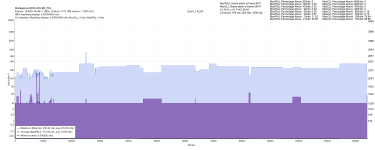
National Treasure 2004
slow.pics
- KSCAPE= 68.9gb (with audio)
- MA= 27.4gb (with lossless audio added)
- Slightly worse grain than MA but without compression noise or artifacts.
- MA says MDCP is P3, KS says it's BT2020
- FYI, MA always has more grain than any source, even more than UHD-BD. Example.
Brightness:

 www.kaleidescape.com
#############################################################
National Treasure: Book of Secrets 2007:
slow.pics
- KSCAPE= 66.7gb (with audio)
- MA= 25.9gb (with lossless audio added)
- Slight worse grain than MA but without compression noise or artifacts.
*no brightness measurement for this one, sorry
 www.kaleidescape.com
#############################################################
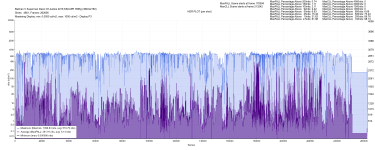
Batman V Superman Dawn Of Justice 2016:
slow.pics
- KSCAPE= about 90gb ?
- UHD-BD= 76.83gb
-Slightly better grain retention than UHD-BD but without chroma compression artifacts
Brightness:
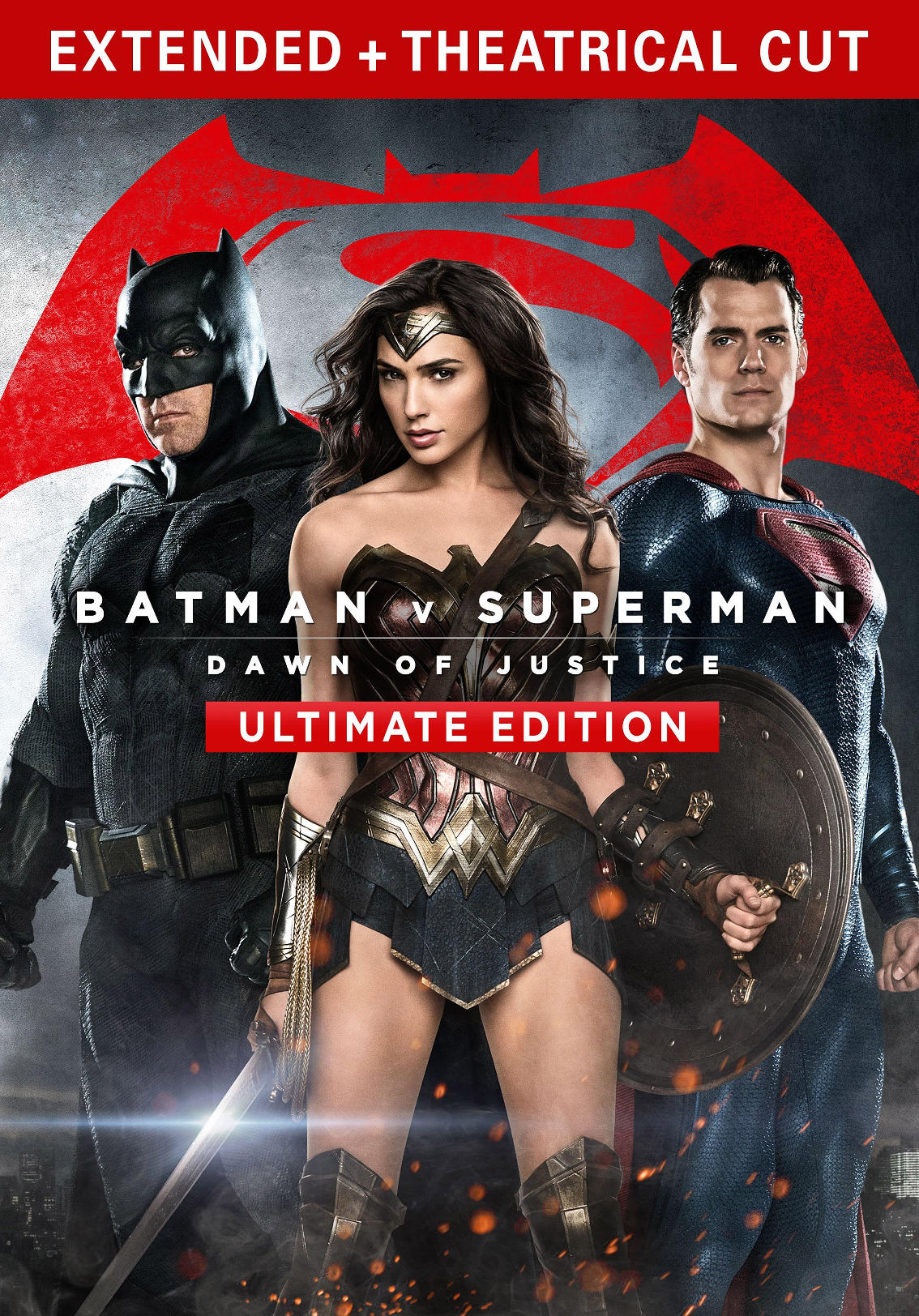 www.kaleidescape.com
#############################################################
RED 2010:
slow.pics
- KSCAPE= 63.6gb
- UHD-BD= 69.7gb (FEL included)
-As discussed earlier, this proves that KSCAPE does not deliver a trim pass for their HDR10 encode when they have a 12bit master brighter than 1000nits. The KS HDR10 brightness matches 1:1 the bluray disc FEL+BL decoded brightness.
-Some shots are better(indoor shots), some shots are way worse (outdoor shots). I wish KSCAPE would stop doing any DNR, anywhere.
example indoor shot
example outdoor shot
*no brightness measurement for this one too, sorry
www.kaleidescape.com
National Treasure 2004 Kscape vs MA vs 1080pBD | Slowpoke Pics
Slowpoke Pics image comparison service
slow.pics
- KSCAPE= 68.9gb (with audio)
- MA= 27.4gb (with lossless audio added)
- Slightly worse grain than MA but without compression noise or artifacts.
- MA says MDCP is P3, KS says it's BT2020
- FYI, MA always has more grain than any source, even more than UHD-BD. Example.
Brightness:
National Treasure
A treasure hunter seeks a hoard of riches from clues hidden on the back of the American Declaration of Independence. Action, Adventure. Directed by Jon Turteltaub. Starring Nicolas Cage, Jon Voight, Harvey Keitel, and Diane Kruger. Purchase and download today in 4K Dolby Vision.
www.kaleidescape.com
#############################################################
National Treasure: Book of Secrets 2007:
National Treasure Book of Secrets 2007 KSCAPE vs MA | Slowpoke Pics
Slowpoke Pics image comparison service
slow.pics
- KSCAPE= 66.7gb (with audio)
- MA= 25.9gb (with lossless audio added)
- Slight worse grain than MA but without compression noise or artifacts.
*no brightness measurement for this one, sorry
National Treasure 2: Book of Secrets
The patriotic treasure hunter embarks on an intrepid global adventure to clear his family's name after it is linked to President Lincoln's assassination. Directed by Jon Turteltaub. Starring Nicolas Cage, Jon Voight, Harvey Keitel, and Ed Harris. Purchase and download today in 4K HDR10.
www.kaleidescape.com
#############################################################
Batman V Superman Dawn Of Justice 2016:
Batman V Superman Dawn Of Justice 2016 KSCAPE vs UHD-BD | Slowpoke Pics
Slowpoke Pics image comparison service
slow.pics
- KSCAPE= about 90gb ?
- UHD-BD= 76.83gb
-Slightly better grain retention than UHD-BD but without chroma compression artifacts
Brightness:
Batman v Superman: Dawn of Justice (Ultimate Edition)
As controversy over Superman mounts, an aging Bruce Wayne is driven toward a titanic battle with the Man of Steel. Action, Sci-Fi. Directed by Zack Snyder. Starring Ben Affleck, Henry Cavill, Amy Adams, and Jesse Eisenberg. Purchase and download today in 4K HDR10 with Dolby Atmos audio.
www.kaleidescape.com
#############################################################
RED 2010:
RED 2010 kscape vs UHD-BD FEL vs BL | Slowpoke Pics
Slowpoke Pics image comparison service
slow.pics
- KSCAPE= 63.6gb
- UHD-BD= 69.7gb (FEL included)
-As discussed earlier, this proves that KSCAPE does not deliver a trim pass for their HDR10 encode when they have a 12bit master brighter than 1000nits. The KS HDR10 brightness matches 1:1 the bluray disc FEL+BL decoded brightness.
-Some shots are better(indoor shots), some shots are way worse (outdoor shots). I wish KSCAPE would stop doing any DNR, anywhere.
example indoor shot
example outdoor shot
*no brightness measurement for this one too, sorry
Red
A retired operative assembles a crew of fellow assassins to uncover why the CIA wants him dead. Action, Comedy, Spy. Directed by Robert Schwentke. Starring Bruce Willis, Morgan Freeman, John Malkovich, and Helen Mirren. Purchase and download today in 4K Dolby Vision with Dolby Atmos audio.
www.kaleidescape.com
28 Years Later 2025:
slow.pics
- RED push compared to iTunes HDR10 and Amazon SDR.
- DV version has the same red push
- SDR version has the same red push -- Does KS make artistic decisions, or are there two masters? Or are both iTunes and Amazon wrong? Kscape has 1:1 the same HDR10 metadata as iTunes. Very strange...
- Macroblocking artifacts in the white areas of the image (not the first time I see this, it happens a LOT on KS)
This movie proves that they crop everything at 2.40 regardless of the video's actual AR... They cropped this one at 2.40 (280/280) when the movie has a much larger letterbox than that (2.76). Even listed as 2.40 on the website.
Also, this movie shows very well how their DV to HDR10 conversion lifts black levels. Look at the letterbox in this comparison, you can see the raised black exactly at 2.40, where they improperly cropped the black bars. Never watch DV in HDR10 with this device!!!
Macroblocking example:

Brightness:
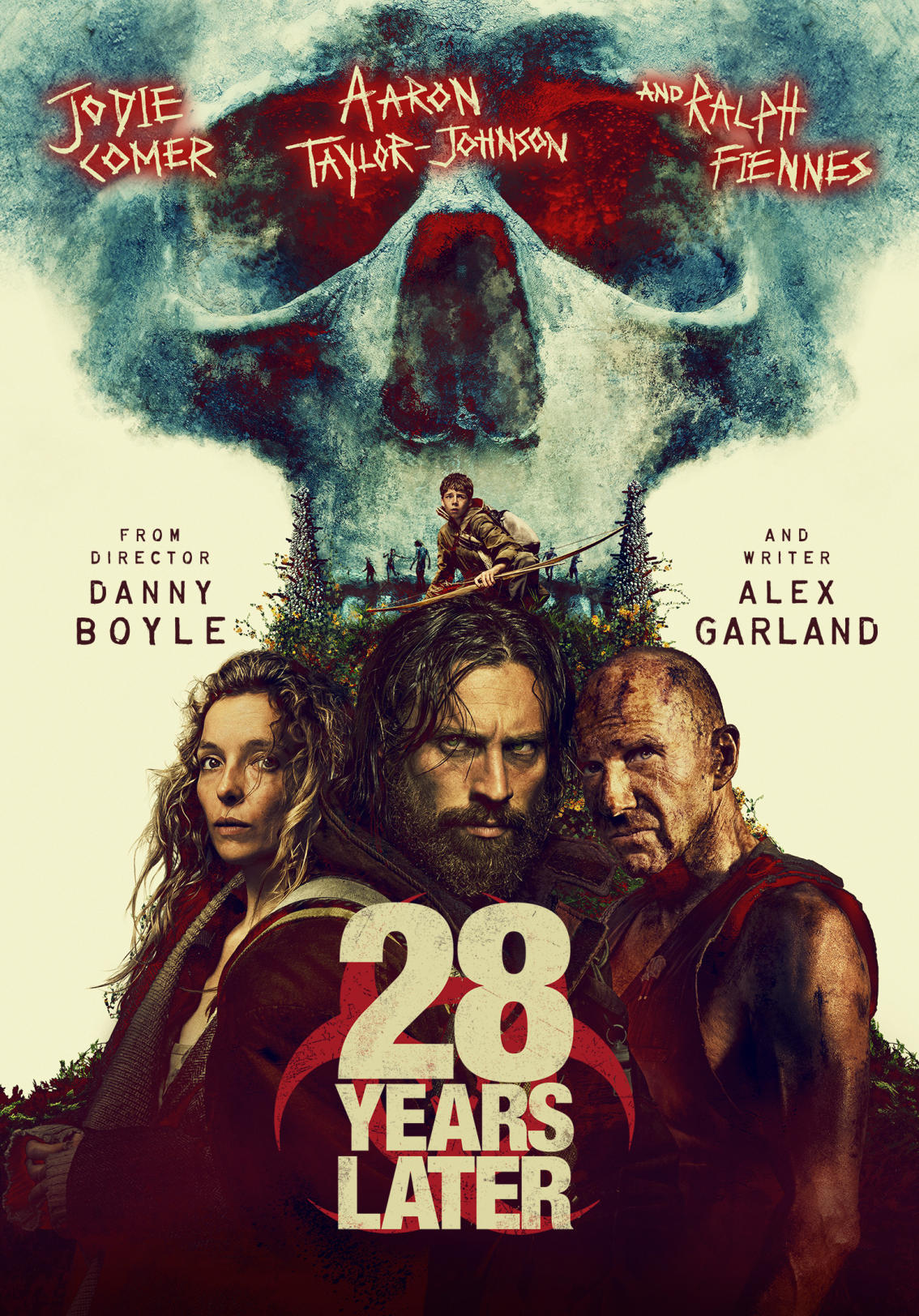 www.kaleidescape.com
#####################################################################
Ballerina 2025
- Better grain retention than iTunes (not hard to beat)
Brightness:

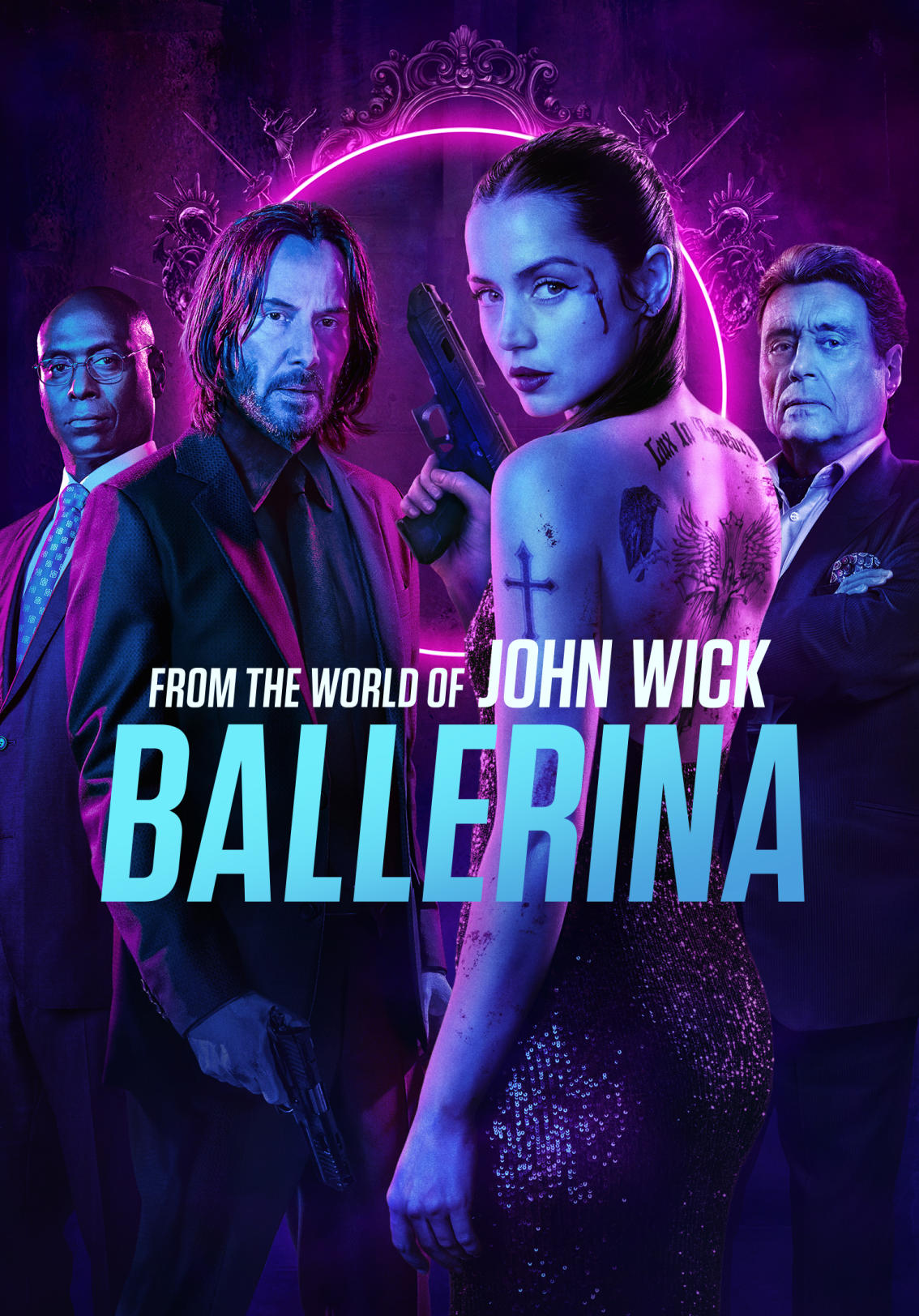 www.kaleidescape.com
#####################################################################
How to Train Your Dragon 2025:
slow.pics
- Better grain retention than iTunes (not hard to beat)
- Again, HDR10 metadata makes no sense and will force TV to use the strongest 10 000nits tone mapping curve...
Brightness:


 www.kaleidescape.com
28 Years Later 2025 KSCAPE HDR vs itunes HDR vs Amazon SDR | Slowpoke Pics
Slowpoke Pics image comparison service
slow.pics
- RED push compared to iTunes HDR10 and Amazon SDR.
- DV version has the same red push
- SDR version has the same red push -- Does KS make artistic decisions, or are there two masters? Or are both iTunes and Amazon wrong? Kscape has 1:1 the same HDR10 metadata as iTunes. Very strange...
- Macroblocking artifacts in the white areas of the image (not the first time I see this, it happens a LOT on KS)
This movie proves that they crop everything at 2.40 regardless of the video's actual AR... They cropped this one at 2.40 (280/280) when the movie has a much larger letterbox than that (2.76). Even listed as 2.40 on the website.
Also, this movie shows very well how their DV to HDR10 conversion lifts black levels. Look at the letterbox in this comparison, you can see the raised black exactly at 2.40, where they improperly cropped the black bars. Never watch DV in HDR10 with this device!!!
Macroblocking example:
Brightness:
KSCAPE HDR10 metadata:

itunes HDR10 metadata:


itunes HDR10 metadata:
28 Years Later
A young man braves a countryside overrun with the rage-virus infected for a doctor who might help with his mother's illness. Directed by Danny Boyle. Starring Jodie Comer, Aaron Taylor-Johnson, Ralph Fiennes, and Jack O'Connell. Purchase and download today in 4K Dolby Vision with Dolby Atmos audio.
www.kaleidescape.com
#####################################################################
Ballerina 2025
- Better grain retention than iTunes (not hard to beat)
Brightness:
Ballerina: From the World of John Wick
A young woman trains with a famed school for assassins to gain the skills she needs to avenge her father's murder. Directed by Len Wiseman. Starring Ana de Armas, Anjelica Huston, Gabriel Byrne, and Lance Reddick. Purchase and download today in 4K Dolby Vision with Dolby Atmos audio.
www.kaleidescape.com
#####################################################################
How to Train Your Dragon 2025:
How.to.Train.Your.Dragon.2025 kscape vs itunes | Slowpoke Pics
Slowpoke Pics image comparison service
slow.pics
- Better grain retention than iTunes (not hard to beat)
- Again, HDR10 metadata makes no sense and will force TV to use the strongest 10 000nits tone mapping curve...
Brightness:
How to Train Your Dragon
Vikings and dragons have battled for generations, but that won't stop Hiccup from building an unlikely bond with the feared dragon, Toothless. Action, Adventure, Fantasy, Family. Purchase and download today in 4K Dolby Vision with Dolby Atmos audio.
www.kaleidescape.com
28 Years Later 2025:
28 Years Later 2025 KSCAPE HDR vs itunes HDR vs Amazon SDR | Slowpoke Pics
Slowpoke Pics image comparison service
- RED push compared to iTunes HDR10 and Amazon SDR.
- DV version has the same red push
- SDR version has the same red push -- Does KS make artistic decisions, or are there two masters? Or are both iTunes and Amazon wrong? Kscape has 1:1 the same HDR10 metadata as iTunes. Very strange...
- Macroblocking artifacts in the white areas of the image (not the first time I see this, it happens a LOT on KS)
This movie proves that they crop everything at 2.40 regardless of the video's actual AR... They cropped this one at 2.40 (280/280) when the movie has a much larger letterbox than that (2.76). Even listed as 2.40 on the website.
Also, this movie shows very well how their DV to HDR10 conversion lifts black levels. Look at the letterbox in this comparison, you can see the raised black exactly at 2.40, where they improperly cropped the black bars. Never watch DV in HDR10 with this device!!!
Macroblocking example:
View attachment 8146
Brightness:
KSCAPE HDR10 metadata:
View attachment 8141
itunes HDR10 metadata:
View attachment 8151
View attachment 8144
28 Years Later
A young man braves a countryside overrun with the rage-virus infected for a doctor who might help with his mother's illness. Directed by Danny Boyle. Starring Jodie Comer, Aaron Taylor-Johnson, Ralph Fiennes, and Jack O'Connell. Purchase and download today in 4K Dolby Vision with Dolby Atmos audio.
#####################################################################
Interesting. Ever since I first got my Strato V i have noticed something not quite write when I downloaded the DV version of several titles and played them back non my non-DV system (JVC Projector). I now choose to only download the HDR10 versions for my system.

More reasons that I think the C is still the best player for anyone not using a DV flat panel.
28 Years Later was shot mainly with phones, so I wouldn't be surprised if some of the artifacts in bright whites are in the content from the capture. I saw digital artifacts when I saw it theatrically.
It is my understanding that the same mezzanine file is provided to all digital services (iTunes, K, etc) and that K is only doing compression work on it, no re-mastering of color or anything like that.
28 Years Later was shot mainly with phones, so I wouldn't be surprised if some of the artifacts in bright whites are in the content from the capture. I saw digital artifacts when I saw it theatrically.
It is my understanding that the same mezzanine file is provided to all digital services (iTunes, K, etc) and that K is only doing compression work on it, no re-mastering of color or anything like that.