• Thanks for visiting the Kaleidescape Owners' Forum

    This forum is for the community of Kaleidescape owners, and others interested in learning about the system, equipment, services, and the company itself.

    It is run by a group of enthusiastic Kaleidescape owners and dealers purely as a service to this community.

    This board is not affiliated in any way with Kaleidescape, Inc.
    For official technical support, product information, or customer service, please visit www.kaleidescape.com

    You can dismiss this box forever by clicking the "X" in the upper right corner of this message.
  • You are currently in "Guest" mode and not logged in with a registered account.

    The forum is free to use and most of the forum can be used by guests who are not registered....

    ... but we strongly encourage you to register for a full account. There is no cost to register for a full account.

    Benefits of registering for a full account:

    • Participate in the discussions! You must have a registered account to make posts on the forums. You will be able to start your own thread on a topic or question, or you can reply to other threads/discussions.
    • Use the "Conversation" feature (known as "private messaging" on other forums) to communicate directly with any of the other users here.
    • Access the Files area. The "resources" area of the forum contains many "Favorite Scene" and Script files that can dramatically increase the enjoyment of your Kaleidescape system. Go directly to great scenes in your favorite movies, created by other owners, and add automation to playback of your system with Scripts.
    • You won't see this annoying notice at the top of every screen!😊

    It's easy and free to register for the forum. Just click the "Register" button in the upper right corner of this page, and follow the instructions there.

    This box goes away for registered users.

Built a portrait "Now Playing" digital poster display that reads from my Kaleidescape

alcogz

Active member
Joined
Oct 1, 2024
Messages
30
Location
Bethlehem, PA
Hi all, I wanted to share a side project that's turned into my favorite part of the theater.

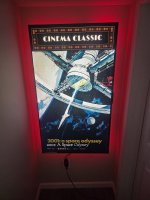
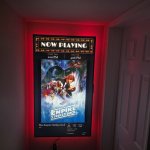
I mounted a 55" TCL Google TV in portrait in the hallway outside the theater, with red bias lighting behind it, and wrote a web app that turns it into a lobby-style marquee display.
20261124_140300.jpg

When a movie is playing, the screen switches to a NOW PLAYING marquee with chasing bulbs. It shows:

  • The poster
  • Start time and calculated end time
  • Year, TMDB score, MPAA rating, runtime and genres
  • Elapsed time, plus which source is playing

The Kaleidescape side uses a small Node.js bridge on my PC. It talks to the player over the control protocol (port 10000), so the display flips over within seconds of pressing play and goes back when the movie ends.
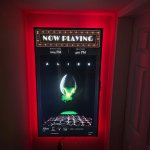
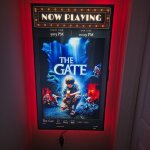
20261124_140425.jpg20261107_210344.jpg20261124_140533.jpg

Other sources: I'm also adding Apple TV support. It already picks up titles from some apps, like Disney+ and Prime Video, but it isn't fully working yet. Netflix doesn't share what's playing, for example, so for now it's mostly a Kaleidescape display.

20261124_134220.jpg

When the theater is idle, it works as a poster screensaver. Posters rotate with slow Ken Burns pans and cross-fades, and each one gets a marquee sign that fits the title: Coming Soon for upcoming releases, Cinema Classic, Retro Favorite and so on. Every so often it plays the official trailer in a window under the poster.

20261023_152428.jpg20261023_152519.jpg
20261023_152933.jpg
How it's built:

  • One HTML file hosted on GitHub Pages, with metadata and artwork from TMDB
  • Fully Kiosk Browser on the TV
  • A few small bridge scripts on a PC for Kaleidescape, Apple TV and the TV itself (it forces portrait rotation and relaunches the app after a reboot)

Here's a short video of it in action:


I'm happy to answer questions. If there's interest, I can write up how the Kaleidescape bridge works for anyone who wants to try something similar.
 
Hi all, I wanted to share a side project that's turned into my favorite part of the theater.

I mounted a 55" TCL Google TV in portrait in the hallway outside the theater, with red bias lighting behind it, and wrote a web app that turns it into a lobby-style marquee display.

View attachment 12756

When a movie is playing, the screen switches to a NOW PLAYING marquee with chasing bulbs. It shows:

  • The poster
  • Start time and calculated end time
  • Year, TMDB score, MPAA rating, runtime and genres
  • Elapsed time, plus which source is playing

The Kaleidescape side uses a small Node.js bridge on my PC. It talks to the player over the control protocol (port 10000), so the display flips over within seconds of pressing play and goes back when the movie ends.
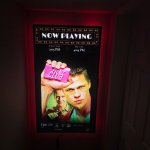
View attachment 12757View attachment 12758View attachment 12759

Other sources: I'm also adding Apple TV support. It already picks up titles from some apps, like Disney+ and Prime Video, but it isn't fully working yet. Netflix doesn't share what's playing, for example, so for now it's mostly a Kaleidescape display.
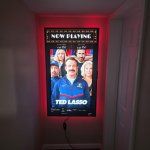
View attachment 12760

When the theater is idle, it works as a poster screensaver. Posters rotate with slow Ken Burns pans and cross-fades, and each one gets a marquee sign that fits the title: Coming Soon for upcoming releases, Cinema Classic, Retro Favorite and so on. Every so often it plays the official trailer in a window under the poster.
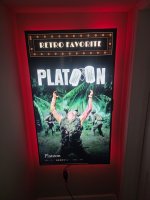
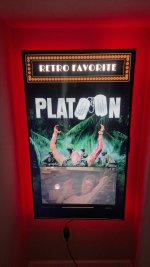
View attachment 12761View attachment 12762
View attachment 12763
How it's built:

  • One HTML file hosted on GitHub Pages, with metadata and artwork from TMDB
  • Fully Kiosk Browser on the TV
  • A few small bridge scripts on a PC for Kaleidescape, Apple TV and the TV itself (it forces portrait rotation and relaunches the app after a reboot)

Here's a short video of it in action:


I'm happy to answer questions. If there's interest, I can write up how the Kaleidescape bridge works for anyone who wants to try something similar.
Nice. I would be interested to install myself. Yours looks amazing -and it would look amazing at the entrance of my HT :)
 
Nice. I would be interested to install myself. Yours looks amazing -and it would look amazing at the entrance of my HT :)
Thanks! It's been a fun build, and it really does set the mood walking into the theater.

Right now it's set up pretty specifically for my system. It runs a few bridge scripts on a PC, and my settings are hardcoded. I'm looking at cleaning it up so other owners can run it. What would you be running it on: a TV with Android/Google TV, or something else? That'll help me figure out how to package it.
 
Back
Top