• Thanks for visiting the Kaleidescape Owners' Forum

    This forum is for the community of Kaleidescape owners, and others interested in learning about the system, equipment, services, and the company itself.

    It is run by a group of enthusiastic Kaleidescape owners and dealers purely as a service to this community.

    This board is not affiliated in any way with Kaleidescape, Inc.
    For official technical support, product information, or customer service, please visit www.kaleidescape.com

    You can dismiss this box forever by clicking the "X" in the upper right corner of this message.
  • You are currently in "Guest" mode and not logged in with a registered account.

    The forum is free to use and most of the forum can be used by guests who are not registered....

    ... but we strongly encourage you to register for a full account. There is no cost to register for a full account.

    Benefits of registering for a full account:

    • Participate in the discussions! You must have a registered account to make posts on the forums. You will be able to start your own thread on a topic or question, or you can reply to other threads/discussions.
    • Use the "Conversation" feature (known as "private messaging" on other forums) to communicate directly with any of the other users here.
    • Access the Files area. The "resources" area of the forum contains many "Favorite Scene" and Script files that can dramatically increase the enjoyment of your Kaleidescape system. Go directly to great scenes in your favorite movies, created by other owners, and add automation to playback of your system with Scripts.
    • You won't see this annoying notice at the top of every screen!😊

    It's easy and free to register for the forum. Just click the "Register" button in the upper right corner of this page, and follow the instructions there.

    This box goes away for registered users.

Bitstream Atmos audio delay (lip-sync issue)

I also tried with the HDFury now. it's better but not bang on.
with PCM Stereo its exact and with
normal route its the following (240 fpm when I recorded)
48 frames = 48 × 4.167 ms ≈ 200 ms

HDFury EDID spoofing:
30 frames = 30 × 4.167 ms ≈ 125 ms

So almost watchable but not really there yet.

So thinking of the JVC projector that seems to add some delay to eliminate this problem, what would you guys go with in a dark cinema room, JVC - DLANZ500 or keep the Epson LS11000?

Also the other solution is the Lumagen, but it's 4900 and to get the JVC would only cost me another 1k.
 
What are you settings on the Denon? Kaleidescape doesn’t have any changeable settings so if it’s happening on the monitor then it can only be the Denon.

What are you settings for stuff like ARC/eARC, auto lipsync, Dolby loudness etc. and then have you checked the individual settings per hdmi input?

Also things like HDMI control/CEC, video mode (where it switches to specific presets), the upscaled, signal format etc.

What sound modes do you have set as well?

Do you have anything else other displays other than the Denon plugged in normally? If yes which HDMI output is set as the primary one?

It could be it’s picking up a bad EDID and not syncing properly, have you tried unplugging all HDMI cables and powering off, leaving it for a bit and plugging them all back in and turning on as this would reset any EDID?
Hmm, I think I have tried it all. I have changed to JVC NZ500 projector that didnt change anything. Apple TV Atmos is perfect but I assume that is because Apple TV Atmos is DD+ not full bitstream audio. All movies are noticeable. So this should be consistent with all K-scape users that use an AVR and not more expensive stuff like trinnov etc that has advanced delay settings.
But also some members has noticed it and use HDFury etc.

it would be interesting if other members also test. Do a good scene where a door closes or something. Take a video slow-mo 240 fps and record in Atmos and other format such as Dolby 5.1 or PCM stereo. then see if there is a difference. or if its just me?

Cant think of any other setting but will check some more.
 
Hmm, I think I have tried it all. I have changed to JVC NZ500 projector that didnt change anything. Apple TV Atmos is perfect but I assume that is because Apple TV Atmos is DD+ not full bitstream audio. All movies are noticeable. So this should be consistent with all K-scape users that use an AVR and not more expensive stuff like trinnov etc that has advanced delay settings.
But also some members has noticed it and use HDFury etc.

it would be interesting if other members also test. Do a good scene where a door closes or something. Take a video slow-mo 240 fps and record in Atmos and other format such as Dolby 5.1 or PCM stereo. then see if there is a difference. or if its just me?

Cant think of any other setting but will check some more.
I’ve watched all those videos properly now, there looks to be audio delay in pretty much every video except for the headphones from Apple TV in Atmos and stereo and stereo with the Kaleidescape.

Have you tried Direct mode which disables all audio processing and if so what happens to delay?

Secondly I also realised you did a folder with settings and looked through those, the video mode is set to movie, have you tried bypass? It will lose the OSD but curious if it changes anything, theoretically should make it worse with less video processing.

What about HDMI cables have you tried swapping any of those?

The fact it’s also happening with Kaleidescape using Atmos on headphones makes me think it’s a dodgy HDMI cable potentially.

Clearly somewhere something is delaying the audio particularly with the Denon, besides the AppleTV what else have you got plugged in and are you using HDMI CEC anywhere else because believe it or not anything other device connected via hdmi can mess with any other connected device?
 
I also have an issue with the K. A/V are not in sync.


All other sources zero issues. ATV,Zidoo and PS5.
 
I have switched to the Strato V and the JVC NZ500 and after going like crazy it seems like it's not any hardware. it seems it's the movie itself. like I tried the movie Driver and there is no difference in Atmos and DTS 5.1, but then I try the movie Michael and there is a huge difference. I cannot watch that in Dolby Atmos. So I guess without like a Lumagen device I have to accept that some movies are unwatchable in Dolby Atmos, which to me is absolutely crazy with a system like Kaleidescape.

and again it can't only be me? I know I am very sensitive to sync but this is ridiculous. Let's see in the future how many movies are like this? But again Driver was absolutely fine.
 
I have switched to the Strato V and the JVC NZ500 and after going like crazy it seems like it's not any hardware. it seems it's the movie itself. like I tried the movie Driver and there is no difference in Atmos and DTS 5.1, but then I try the movie Michael and there is a huge difference. I cannot watch that in Dolby Atmos. So I guess without like a Lumagen device I have to accept that some movies are unwatchable in Dolby Atmos, which to me is absolutely crazy with a system like Kaleidescape.

and again it can't only be me? I know I am very sensitive to sync but this is ridiculous. Let's see in the future how many movies are like this? But again Driver was absolutely fine.
Nope you are not the only one. I have noticed it also! It is not on every movie but so far Atmos is not watchable on Springsteen: Deliver Me From Nowhere, Marty Supreme, Michael, and Disclosure Day. I have to set mine in PCM and loose atmos to be able to watch them... I have a denon A10h with JVC NZ500.

I got the Strato E because of some playback issues with UHD on some devices. I am thinking of trashing this system and just doing discs again.
 
Nope you are not the only one. I have noticed it also! It is not on every movie but so far Atmos is not watchable on Springsteen: Deliver Me From Nowhere, Marty Supreme, Michael, and Disclosure Day. I have to set mine in PCM and loose atmos to be able to watch them... I have a denon A10h with JVC NZ500.

I got the Strato E because of some playback issues with UHD on some devices. I am thinking of trashing this system and just doing discs again.
Interesting, do you notice much difference in overall sound quality with PCM vs Atmos, aside from losing the Atmos object/height information?
 
Interesting, do you notice much difference in overall sound quality with PCM vs Atmos, aside from losing the Atmos object/height information?
Yes. I have a 13.3.6 (6 heights) system in a large room calibrated with DIRAC Art/Live. If is close my eyes and listen the room is much better with Atmos. Unwatchable in atmos on 155in screen. The delay is rough. Frustrating buying this system for lossless audio and not being able to use it.
 
Yeah, the common denominator here is the Denon. It would be interesting to try another AVR just to rule out Denon as the culprit, although I don’t think it is. When I was testing, I routed the K-Scape directly to a monitor with Atmos output and still had the same delay. That makes me think it’s more likely an encoding/decoding issue somewhere in the Atmos track or playback chain.
 
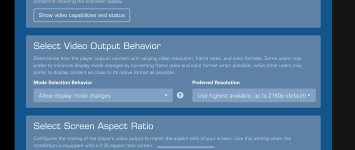
I don't know if this is the fix for everyone but it seems to have worked for me. I have a C connected to a Denon A10H to a JVC NZ700.

What I did is go into the web based settings and changed mode section behavior to allow display mode changes. This allows the player to send a 24fps signal instead of the 60fps.
Screenshot_20260815_211759_Chrome.jpg

I hope this helps everyone else having issues.
 
Yeah, the common denominator here is the Denon. It would be interesting to try another AVR just to rule out Denon as the culprit, although I don’t think it is. When I was testing, I routed the K-Scape directly to a monitor with Atmos output and still had the same delay. That makes me think it’s more likely an encoding/decoding issue somewhere in the Atmos track or playback chain.
Support seems to be blaming the Denon also. I will have to try with another atmos receiver. Hard to believe Denons flagship receivers are the problem when every other source works fine on the receiver for atmos.
 
I don't know if this is the fix for everyone but it seems to have worked for me. I have a C connected to a Denon A10H to a JVC NZ700.

What I did is go into the web based settings and changed mode section behavior to allow display mode changes. This allows the player to send a 24fps signal instead of the 60fps.
View attachment 11351

I hope this helps everyone else having issues.
I tried this it helps a tiny bit actually but not a lot. I did the low latency dolby vision thing and OSD on screen as well. But it's still not fully synced. Also if some settings actually change the audio/video sync coming from the K-Scape there must be a software fix they could add ? at least a way to delay the image out from the box ?
 
Support seems to be blaming the Denon also. I will have to try with another atmos receiver. Hard to believe Denons flagship receivers are the problem when every other source works fine on the receiver for atmos.
Let me know if you try another receiver and how that goes!
 
Just chiming in here to state I’ve had the exact same issue with a Strato V and Arcam AVR 21 going to an LG C1 display. Other sources, notably a UB820, have zero issues with bitstream atmos, and in fact require a slight audio delay from the receiver.

In a way I’m relieved to hear it’s popped up with other AVR makes, as I was concluding it was the Arcam. But it absolutely sucks. I would say on mine it’s typically right on the threshold of being detectable, and by that I mean I’m the only one that seems to notice it. Though it very much varies by title which was what had me running in circles initially. (Check out American Graffiti if you wanna see a truly unwatchable example.)

I currently have mine permanently set to PCM audio, which I’m fine with for now in a 7.2 layout. But I really don’t know what I’ll do when I’m ready to add heights. It does seem like the Strato is becoming the least common denominator. I sure hope those brand new K players aren’t shipping with the same issue 😬
 
Just chiming in here to state I’ve had the exact same issue with a Strato V and Arcam AVR 21 going to an LG C1 display. Other sources, notably a UB820, have zero issues with bitstream atmos, and in fact require a slight audio delay from the receiver.

In a way I’m relieved to hear it’s popped up with other AVR makes, as I was concluding it was the Arcam. But it absolutely sucks. I would say on mine it’s typically right on the threshold of being detectable, and by that I mean I’m the only one that seems to notice it. Though it very much varies by title which was what had me running in circles initially. (Check out American Graffiti if you wanna see a truly unwatchable example.)

I currently have mine permanently set to PCM audio, which I’m fine with for now in a 7.2 layout. But I really don’t know what I’ll do when I’m ready to add heights. It does seem like the Strato is becoming the least common denominator. I sure hope those brand new K players aren’t shipping with the same issue 😬
We need to make a list of the bad movies. Im sure they are the same across all the systems.
 
We need to make a list of the bad movies. Im sure they are the same across all the systems.
Agree, maybe with a group effort we can match the enthusiasm (and bankroll) of the buyer’s guide thread for video.

The worst offenders seem to be older movies in 4K. I should note, for the American Graffiti example, even switching to PCM didn’t fully resolve the delay on the 4K 5.1 soundtrack. Only the HD 2.0 track was correctly synched. Every newish release that I’ve watched has been very subtle but noticeable if you’re looking for it.
 
So to trickle this down. looking at the thread (and now im guessing wildly here)
its either one of these two or a combination of them.
  • the individual movie asset has incorrect A/V timing, or
  • the Strato software handles certain Atmos/TrueHD tracks incorrectly.
And if it should be any of these (or both), that is very strange to me due to the fact that the entire business idea of Kaleidescape is to have the best audio and video you can get!!??

I'm confused.
 
I just experienced my first noticeable A/V lip sync issue this past weekend with the original Batman movie - 4k HDR10 Dolby Atmos version. i was able to change my settings in my receiver to get it better but was noticeable throughout the movie. First time I've had to play around with A/V sync with the Strato E. My equipment was Strato E, Onkyo RZ70, Hisense 100 inch U8K.
 
I have a Marantz AVR and I'm a new V owner. I've been noticing an EVER SO SLIGHT lip sync issue. Maybe 250ms at most.
 
Back
Top