That is disappointing...could be deal breaker since while I would be ok having to switch the remote to whatever...family is used to using Alexa and harmony being functional.I'm not seeing anything exposed in HA from the remote itself. It's basically as if the remote is an Android device that you're running HA on. Your phone doesn't necessarily send anything back to HA and neither does this. Yet, anyway.


-
Thanks for visiting the Kaleidescape Owners' Forum
This forum is for the community of Kaleidescape owners, and others interested in learning about the system, equipment, services, and the company itself.It is run by a group of enthusiastic Kaleidescape owners and dealers purely as a service to this community.
This board is not affiliated in any way with Kaleidescape, Inc.
For official technical support, product information, or customer service, please visit www.kaleidescape.com
You can dismiss this box forever by clicking the "X" in the upper right corner of this message. -
You are currently in "Guest" mode and not logged in with a registered account.
The forum is free to use and most of the forum can be used by guests who are not registered....
... but we strongly encourage you to register for a full account. There is no cost to register for a full account.
Benefits of registering for a full account:
- Participate in the discussions! You must have a registered account to make posts on the forums. You will be able to start your own thread on a topic or question, or you can reply to other threads/discussions.
- Use the "Conversation" feature (known as "private messaging" on other forums) to communicate directly with any of the other users here.
- Access the Files area. The "resources" area of the forum contains many "Favorite Scene" and Script files that can dramatically increase the enjoyment of your Kaleidescape system. Go directly to great scenes in your favorite movies, created by other owners, and add automation to playback of your system with Scripts.
- You won't see this annoying notice at the top of every screen!😊
This box goes away for registered users.
You are using an out of date browser. It may not display this or other websites correctly.
You should upgrade or use an alternative browser.
You should upgrade or use an alternative browser.
Astrion Remote for HA?
- Thread starter rafaelsmith
- Start date

Well, I don’t think you need it.That is disappointing...could be deal breaker since while I would be ok having to switch the remote to whatever...family is used to using Alexa and harmony being functional.
You would essentially be asking Alexa to tell the remote to have HA run a script. Why not just have Alexa tell HA to run the script?
Currently have a HA script: Watch Movie...which turns on the K...turns on the projector...turns on the AVR, sets inputs, etc...In HA I have that script triggered either from the Harmony changing to Watch Movie activity or a Alexa Voice command... So the script it triggered one of two ways...I have an automation that ...if it was triggered via Voice....then it commands the Harmony to switch to appropriate harmony activity...that way regardless of how everything it activated...the harmony is on the correct activity and remote works (correct source navigation, etc). If the Astrion cannot be told which "card" to be switched too...then if someone uses Alexa to activate the script...the remote wont work...unless I am missing something?\Well, I don’t think you need it.
You would essentially be asking Alexa to tell the remote to have HA run a script. Why not just have Alexa tell HA to run the script?
...Wife walks into theater...says "Alex, Watch Movie"...sits down...remote is already to go and works...no need to activate anything on the remote.
I didn’t quite have everything set up tonight but I launched an activity with the UCR3 and then tried to control it with the Astrion. The Kaleidescape remote in HA only has a handful of commands so it didn’t work so well but then I flipped over to AppleTV and it controlled it pretty well.
Screen is not as nice as the UC.
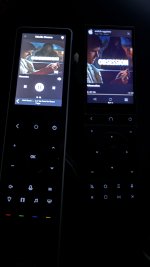
Screen is not as nice as the UC.
Been browsing the Astrion community forums: Topics tagged astrion-remoteI'm not seeing anything exposed in HA from the remote itself. It's basically as if the remote is an Android device that you're running HA on. Your phone doesn't necessarily send anything back to HA and neither does this. Yet, anyway.
Under recent firmware & RosCard updates:
Version 1.3.0
Code:
You can now trigger page navigation directly from:

-Home Assistant Automations

-Scripts

-Scenes

“Movie Time” scene → Turn on TV → Dim lights → Switch Astrion to your TV control page

“Good Night” → Lock doors → Turn off lights → Automatically display the Security dashboard

Create activity-based experiences similar to Harmony or other high-end universal remotes.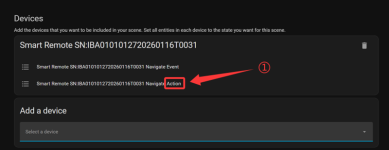
This implies that control of the Remote from HA...at least telling to switch to a specific page is possible.
With regards to the Kaleidescape commands, I have had issues in the past due to the stock integration only having 11 stock commands. Did some research and should be possible to manual create a secondary remote entity that can send play, pause, stop, next, previous, intermission_toggle, go_movie_list, go_movie_collections, go_movies, and status_and_settings alongside the 11 the stock integration already gives you. Was beyond my level of comfort to try to implement thou.I didn’t quite have everything set up tonight but I launched an activity with the UCR3 and then tried to control it with the Astrion. The Kaleidescape remote in HA only has a handful of commands so it didn’t work so well but then I flipped over to AppleTV and it controlled it pretty well.
Screen is not as nice as the UC.
View attachment 10665
@thrillcat ...what versions of the Astrion remote firmware, ROS Card and Astrion Home integration are you running?... I believe all 3 need to be 1.3 for the new "2-way....Remote exposed to HA" functionality to work.
reference: Internal testing in progress-Astrion Adds UI Automation
reference: Internal testing in progress-Astrion Adds UI Automation
I'm on 1.3.0.
Looks like they introduced a lot of bugs with 1.4.0. I must say reading their forums is interesting...on one hand they seem responsive...on the other most answers sound like written by AI.
Looks like they introduced a lot of bugs with 1.4.0. I must say reading their forums is interesting...on one hand they seem responsive...on the other most answers sound like written by AI.
I'm sure they're being translated which would make it sound like AI.
I reached out and requested a "generic" TV source with more customization capability for adding the Kaleidescape and they responded within an hour saying they could easily create that and would start working on it.
From glancing over the various discussions and their response...its clear that initially their focus was on home automation...not home theater so much but I think they are seeing that HT is a big reason people are interested in the product.I'm sure they're being translated which would make it sound like AI.
I reached out and requested a "generic" TV source with more customization capability for adding the Kaleidescape and they responded within an hour saying they could easily create that and would start working on it.
I also see a few discussions about using the Astrion along with Harmony hub...which seems odd to me...to me the whole purpose of this is to get rid of Harmony. In my case, I do not have a single device that can only do IR.
Also, I noticed that using the existing TV card...binding the Kaleidescape to the buttons that it defaults to all caps for the remote commaneds...like UP/DOWN, etc...which when testing do not work...they need to be lower case....luckily can change that easily in the TV card widget. Also some commands are not correct...but again ...we can basically replace the command with whatever.
Based on what I have experimented with without having the actual remote but being able to build the ROS cards...I think I will be ordering one this week. Pretty sure I can make it do what I need it to do and then some.. I already have "telnet" scripts for my Marantz and JVC to handle things that the default HA integrations do not.
example: The Denon/Marantz remote entity does not have the Info button....but can create a script:
Code:
action: denonavr.get_command
target:
  entity_id: media_player.marantz_cinema_30
data:
  command: /goform/formiPhoneAppDirect.xml?MNINF
And then assign that to a button on the TV-Card.
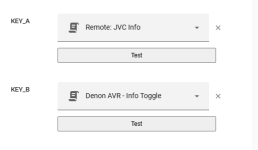
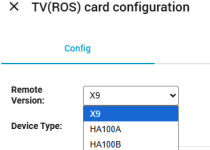
I noticed latest version of their ROS Card has selection for remote version? Do they have different versions? Curious which one is the current?I'm sure they're being translated which would make it sound like AI.
I reached out and requested a "generic" TV source with more customization capability for adding the Kaleidescape and they responded within an hour saying they could easily create that and would start working on it.
Ordered...could not resist..may not be the ultimate solution but iam excited to see what I can do with it and HA.
Curious if you got the remote yet? if so how long did it take?Great video. Just ordered!

madolfsson
Active member
It just arrived today. It is so close to being great, but needs a few more firmware revisions. Will share some thoughts later in the week.Curious if you got the remote yet? if so how long did it take?
Looking forward to hearing your thoughts. I ordered mine on 7/5 so probably another week or so. Their tracking system is pretty useless.It just arrived today. It is so close to being great, but needs a few more firmware revisions. Will share some thoughts later in the week.
The current remote is the HA100A, at least that's what they sent me.I noticed latest version of their ROS Card has selection for remote version? Do they have different versions? Curious which one is the current?
View attachment 10742
madolfsson
Active member
Some quick thoughts after living with the Astrion remote for a bit: the hardware is solid, the software is still weak, but they're iterating fast. It does everything I need right now once you work around a few limitations.
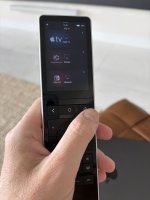
You install the RosCard plugin in Home Assistant, then build a dedicated dashboard with one or several tabs using their card types. Those cards sync their metadata to the remote, they're not web views, and the remote's native Android app renders them locally.
Available card types include: air conditioning, shades, fans, lights, media player, scene/script (flexible), statistics, switch, weather, and the TV card - the one you'll use the most.
My main dashboard is built around multiple TV cards - one for each source. Inside HA you assign events to both the physical keys and the soft keys, per card. On my Kaleidescape card, volume up/down/mute route to the Sonos, and the directional pad (up, down, OK) and menu keys plus some virtual keys go to the Kaleidescape itself.
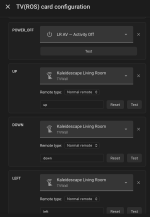
An HA script monitors which page the remote is on (the remote exposes this). Navigate to the Apple TV card and it fires the Apple TV sequence; same for the Kaleidescape and Nintendo cards. Since my power-on logic is tied to the navigation, the power button on each card is only linked to turn-off. One caveat - volume and power keys only work while you are on a TV card. They're not yet global; they're tied to the TV card.
You can't add custom virtual keys on the UI yet, but each TV card has an "app list" feature. On the Apple TV card I use it to launch apps and direct-tuning Spectrum TV channels. On the Kaleidescape card I built a list of buttons that each trigger a specific Kaleidescape event in HA. Works ok as a workaround.
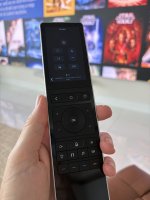
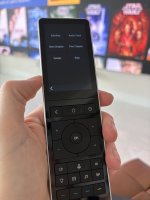
Further down the remote you get physical Light / Shades / Music / AC buttons, mappable to either remote pages or scenes. I have them pull up pop-up overlays of my other dashboards:
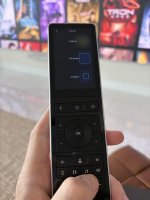
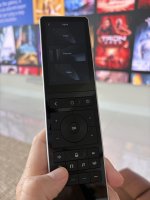
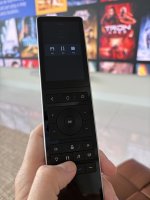
You can also reach those via a drop-down on the dashboard, but it's a tiny touch target, the overlay pop-ups are the better path for me.
There's no dedicated play/pause key on my version (I've seen variants with media keys down by the light/shade buttons). Not a big deal - Apple TV and Kaleidescape use the center button for play/pause anyway, and I remapped the red custom button at the bottom to play/pause too. Most buttons can map to any HA event.
The remote has IR functionality but my gear lives in a rack out of line-of-sight, so everything routes through Home Assistant. Think of the Astrion as a physical remote for Home Assistant actions, not a traditional universal remote.
Customizability on the layout is limited right now . You can't rearrange card layouts, and I'd like more control over the TV card's screen layout. I expect that'll come in future releases.
But if you can live with the current constraints: for controlling media, scenes and shades from one device, it's a bargain at the price, and it works well. Excited to see where they take it.
You install the RosCard plugin in Home Assistant, then build a dedicated dashboard with one or several tabs using their card types. Those cards sync their metadata to the remote, they're not web views, and the remote's native Android app renders them locally.
Available card types include: air conditioning, shades, fans, lights, media player, scene/script (flexible), statistics, switch, weather, and the TV card - the one you'll use the most.
My main dashboard is built around multiple TV cards - one for each source. Inside HA you assign events to both the physical keys and the soft keys, per card. On my Kaleidescape card, volume up/down/mute route to the Sonos, and the directional pad (up, down, OK) and menu keys plus some virtual keys go to the Kaleidescape itself.
An HA script monitors which page the remote is on (the remote exposes this). Navigate to the Apple TV card and it fires the Apple TV sequence; same for the Kaleidescape and Nintendo cards. Since my power-on logic is tied to the navigation, the power button on each card is only linked to turn-off. One caveat - volume and power keys only work while you are on a TV card. They're not yet global; they're tied to the TV card.
You can't add custom virtual keys on the UI yet, but each TV card has an "app list" feature. On the Apple TV card I use it to launch apps and direct-tuning Spectrum TV channels. On the Kaleidescape card I built a list of buttons that each trigger a specific Kaleidescape event in HA. Works ok as a workaround.
Further down the remote you get physical Light / Shades / Music / AC buttons, mappable to either remote pages or scenes. I have them pull up pop-up overlays of my other dashboards:
- Light → scene card pop-up (Bright / Entertain / Relax / Off)
- Shades → shade controls
- Music → repurposed for my screen controls using the scene card (brightness, full screen / compact view)
- AC → climate overlay
You can also reach those via a drop-down on the dashboard, but it's a tiny touch target, the overlay pop-ups are the better path for me.
There's no dedicated play/pause key on my version (I've seen variants with media keys down by the light/shade buttons). Not a big deal - Apple TV and Kaleidescape use the center button for play/pause anyway, and I remapped the red custom button at the bottom to play/pause too. Most buttons can map to any HA event.
The remote has IR functionality but my gear lives in a rack out of line-of-sight, so everything routes through Home Assistant. Think of the Astrion as a physical remote for Home Assistant actions, not a traditional universal remote.
Customizability on the layout is limited right now . You can't rearrange card layouts, and I'd like more control over the TV card's screen layout. I expect that'll come in future releases.
But if you can live with the current constraints: for controlling media, scenes and shades from one device, it's a bargain at the price, and it works well. Excited to see where they take it.
Thank for the info. Looks like it will do what I need.Some quick thoughts after living with the Astrion remote for a bit: the hardware is solid, the software is still weak, but they're iterating fast. It does everything I need right now once you work around a few limitations.
View attachment 10833
You install the RosCard plugin in Home Assistant, then build a dedicated dashboard with one or several tabs using their card types. Those cards sync their metadata to the remote, they're not web views, and the remote's native Android app renders them locally.
Available card types include: air conditioning, shades, fans, lights, media player, scene/script (flexible), statistics, switch, weather, and the TV card - the one you'll use the most.
My main dashboard is built around multiple TV cards - one for each source. Inside HA you assign events to both the physical keys and the soft keys, per card. On my Kaleidescape card, volume up/down/mute route to the Sonos, and the directional pad (up, down, OK) and menu keys plus some virtual keys go to the Kaleidescape itself.
View attachment 10832
An HA script monitors which page the remote is on (the remote exposes this). Navigate to the Apple TV card and it fires the Apple TV sequence; same for the Kaleidescape and Nintendo cards. Since my power-on logic is tied to the navigation, the power button on each card is only linked to turn-off. One caveat - volume and power keys only work while you are on a TV card. They're not yet global; they're tied to the TV card.
You can't add custom virtual keys on the UI yet, but each TV card has an "app list" feature. On the Apple TV card I use it to launch apps and direct-tuning Spectrum TV channels. On the Kaleidescape card I built a list of buttons that each trigger a specific Kaleidescape event in HA. Works ok as a workaround.
View attachment 10834View attachment 10835
Further down the remote you get physical Light / Shades / Music / AC buttons, mappable to either remote pages or scenes. I have them pull up pop-up overlays of my other dashboards:
View attachment 10836View attachment 10837View attachment 10838
- Light → scene card pop-up (Bright / Entertain / Relax / Off)
- Shades → shade controls
- Music → repurposed for my screen controls using the scene card (brightness, full screen / compact view)
- AC → climate overlay
You can also reach those via a drop-down on the dashboard, but it's a tiny touch target, the overlay pop-ups are the better path for me.
There's no dedicated play/pause key on my version (I've seen variants with media keys down by the light/shade buttons). Not a big deal - Apple TV and Kaleidescape use the center button for play/pause anyway, and I remapped the red custom button at the bottom to play/pause too. Most buttons can map to any HA event.
The remote has IR functionality but my gear lives in a rack out of line-of-sight, so everything routes through Home Assistant. Think of the Astrion as a physical remote for Home Assistant actions, not a traditional universal remote.
Customizability on the layout is limited right now . You can't rearrange card layouts, and I'd like more control over the TV card's screen layout. I expect that'll come in future releases.
But if you can live with the current constraints: for controlling media, scenes and shades from one device, it's a bargain at the price, and it works well. Excited to see where they take it.
Question...is there a way to command the remote to switch to a view/card from HA (script,etc) ? I have read conflicting info on that.
madolfsson
Active member
Yes, it can do a page jump but print up a modal (overlay).
Code:
  - action: select.select_option
    target:
      entity_id: select.astrion_navigate_action
    data:
      option: "Room:Lights"      # any page below

  Addressable pages on my configuration

  Room:AV · Room:Lights · Room:Shades · Room:Screen · Room:Climate
  Device:Apple TV · Device:Kscape · Device:Nintendo
  Device:LR Shades · Device:Living Room AC · Device:Ceiling Fan
  Wake:Wake Up · Screen:On · Screen:Off