• Thanks for visiting the Kaleidescape Owners' Forum

    This forum is for the community of Kaleidescape owners, and others interested in learning about the system, equipment, services, and the company itself.

    It is run by a group of enthusiastic Kaleidescape owners and dealers purely as a service to this community.

    This board is not affiliated in any way with Kaleidescape, Inc.
    For official technical support, product information, or customer service, please visit www.kaleidescape.com

    You can dismiss this box forever by clicking the "X" in the upper right corner of this message.
  • You are currently in "Guest" mode and not logged in with a registered account.

    The forum is free to use and most of the forum can be used by guests who are not registered....

    ... but we strongly encourage you to register for a full account. There is no cost to register for a full account.

    Benefits of registering for a full account:

    • Participate in the discussions! You must have a registered account to make posts on the forums. You will be able to start your own thread on a topic or question, or you can reply to other threads/discussions.
    • Use the "Conversation" feature (known as "private messaging" on other forums) to communicate directly with any of the other users here.
    • Access the Files area. The "resources" area of the forum contains many "Favorite Scene" and Script files that can dramatically increase the enjoyment of your Kaleidescape system. Go directly to great scenes in your favorite movies, created by other owners, and add automation to playback of your system with Scripts.
    • You won't see this annoying notice at the top of every screen!😊

    It's easy and free to register for the forum. Just click the "Register" button in the upper right corner of this page, and follow the instructions there.

    This box goes away for registered users.

NEWS: Strato K Movie Player with 8K capability and new "4K Cinematic" full-chroma & higher bitrate support

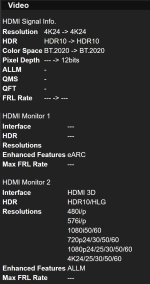
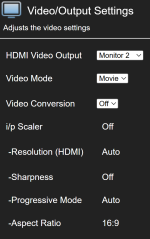
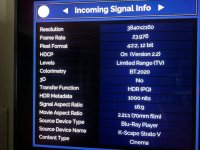
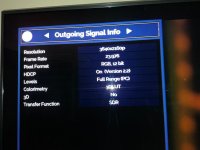
Is it the Kaleidescape that is converting 4:2:0 to 4:2:2? I’m curious if K always does that or if it’s best left alone (if possible) assuming the madVR might do it better? Should you als look at the input and output of downstream devices? So, show the Denon’s input and output as reported by the Denon’s Info button, and what the madVR Envy reports as its input and output. Did you disable the Denon’s video processing?
I hope these are the settings you asked for. It appears the Denon is not doing any video processing since "Video Conversion" is Off. I'm showing the settings for both the Denon and the MadVR:

DenonInfo.png
DenonVideo.png
MadVRInput.jpg
MadVROutput.jpg
 
Last edited by a moderator:
You guys spurred me to look into the FARAD Super 10. While intrigued, I think I am better off putting those funds toward another Terra since I sense a Strato K motivated storage crunch coming on!

This. I've never filled up my Terra before. Now I'm spinning plates. Glad I have my Plex up and running to shunt over those faded old-fashioned sepia-toned 4K HDR movies to. And glad I kept all my crates of 4K HDR discs to keep the ripping queue running.

How ridiculous is this. Delivery today (which is already delayed from the original estimate) but last scan is still from way earlier this morning some 3 hours away from my home. It is already 12:30... I don't think it is happening unless somehow my delivery vehicle was dispatched to Michigan from Indiana directly. Ugh. I need this ASAP or my ability to do anything with it goes to zero for like the next 3 days.

We need a dedicated thread for bashing Fedex. 😂

View attachment 10535

Yours will come soon! Of course, we'll probably all have the Strato Q and be dusting off our Strato Ks for resale. ;)

[Sorry bud, couldn't resist, yours in coming and I'll be sure to like and subscribe!]

They (self proclaimed enthusiasts: some out here but many on another popular forum) complain about complacency regarding pushing the envelope on the home cinema front. But then quickly want to rain on the parade of any new developments. Happens everywhere. Much worse on automobile forums. These outbursts (interspersed with a generous dose of skepticism), only ends when they land the same product in their hands. Then you notice a massive 360 flip. 🤣🤣

Excellent point. This dissonance has been swimming around in my head but you crystallized it.

228GB Return of The King?! Wow. For evaluation, I hope people take a look at Blade Runner 2049, the new Mad Maxes, and the new Dunes. I imagine they’re gorgeous.

I feel your indecision about where to keep the K. I’m starting to think a K Mini might be in my future for my secondary location instead of my “old” V, just so I don’t have to manage needing 4K Cinematic and regular 4K files. You know they’re going to do a K Mini, right?!

I did Dune as my first check-in. Tricky case to differentiate because the Kaleidescape 4K HDR file is already magnificent as is. However, colors are incrementally better and looking at the old file feels like it has a slight gray layer on top of it. Old file is deleted.

Will do! I've got one for you...Elf! I wasn't that excited about that one as I didn't think there would be much more there over the well-authored disc. I mean really...it's a medium budget holiday comedy...right? Wrongo! You've gotta see it. I got like 3 seconds into the first scene and had to go grab my wife so she could check it out. She was annoyed until I hit play. 🙄 Both our jaws were on the floor. I'm not sure if it was my new Bravia 9 II putting in the work also but color, clothing textures, and facial detail were absolutely jaw dropping. 🤯She actually said "that was worth grabbing me for" and if you're married you know that's a rare win. :LOL:

Watched Star Wars: Episode I - The Phantom Menace in its entirety just now in 4K_C DV and it looks as great as it can. If anything, the dated effects stand out even more now. Digital compositing and variability in the CGI are more obvious that I ever remember seeing. Occasionally, live action shots of faces punch way above how they've looked in the past. Go forward 3 minutes and there will be an obviously low-res effect or digitally shot live action scene that will remind you it's the Phantom Menace. 😋 One outstanding thing that stood out was all the multi-colored confetti and streamers flying everywhere during the finale celebration scene...an absolute nightmare for compression...but it was incredibly well composed...dare I say faultless. (y) Quite a testament to what an encode like this gets you. Should be a great test/demo scene.

On the other end of the scale from the excellence of Elf I ran into my first obvious encode issue...lifted blacks (letterboxes and all) in Batman Begins in 4K_C DV. It's VERY obvious as soon as you start a scene. You can't miss it. Letterboxes light right up. Once the scene ends and the UI goes to the "End of Scene" graphic the blacks drop back down to normal, and the hold graphic background looks black as night. I think this is a one-and-done as no other titles I've seen exhibit this (glaring) issue. I've already reported this via email to the content team so hopefully they'll figure it out shortly.

Nice! Glad it's not just me. It is hard to describe, other than to say it made me gasp. That happened 5 years ago when I installed my first JVC 4K HDR projector, then 2 years ago when I installed my Lumagen Radiance Pro, and a week ago when I installed my Strato K. I was expecting "Okay," but instead got "OH, K 🤩!"

=============

In new news, I'm finding the Venn diagram overlap between "$9.99 Special Pricing" and "Recently Updated to 4K Cinematic" impossible to resist. Be warned!
 
Last edited:
I did Dune as my first check-in. Tricky case to differentiate because the Kaleidescape 4K HDR file is already magnificent as is. However, colors are incrementally better and looking at the old file feels like it has a slight gray layer on top of it. Old file is deleted.
Dune was my first check as well. I was a little disappointed at first, but when I compared it against the legacy version I saw the improvement. That said, I felt the DV was a bit more extreme than I remember. Some scenes felt blown out and others overly dark. I need to compare against the disc. I haven’t watched it in a while so my memory of it could be off. Wish I had my Bravia 9 II to get a full experience.

I did check Blade Runner 2049 afterwards and that looked absolutely stunning. So, Dune Part I might not have been the best choice out of the gate.
 
I hope these are the settings you asked for. It appears the Denon is not doing any video processing since "Video Conversion" is Off. I'm showing the settings for both the Denon and the MadVR:

View attachment 10567
View attachment 10568
View attachment 10569
View attachment 10570
Iirc there’s a bypass video processing or something of that nature on D&M equipment. Maybe Video conversion off equates to the same thing.

What’s your advance settings for the V? I think the first step is that you need to ensure that the native media is being captured correctly.
 
Iirc there’s a bypass video processing or something of that nature on D&M equipment. Maybe Video conversion off equates to the same thing.

What’s your advance settings for the V? I think the first step is that you need to ensure that the native media is being captured correctly.
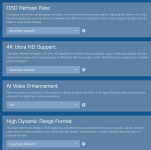
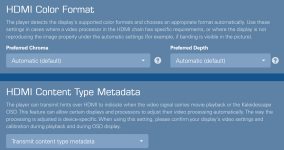
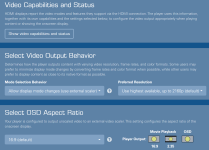
This is the only setting I could find with regard to video processing or anything close to it, so I'm guessing it is the same. Here are the screenshots of the advanced video settings on V:

Advanced1.png
Advanced2.png
 
Last edited by a moderator:
This is the only setting I could find with regard to video processing or anything close to it, so I'm guessing it is the same. Here are the screenshots of the advanced video settings on V:

View attachment 10573
View attachment 10574
Sorry, my fault, I meant the screen just above the advanced settings. I think it’s the video output behavior (allow display mode changes, minimize display mode changes etc.)
 
Is anyone else having issues w/ a Trinnov Altitude w/ the 2.1 board and a strato K? Trying to determine if it’s a me specific issue or something I’m not gonna be able to solve without Kscape/Trinnov support.

I’m using a LG G5, so would be good to know TV vs projector if anyone else has a Trinnov w/ K.

Seems to be a handshake issue. Getting a combination of it working, only shaking at 1080P, or no display.
 
We use an Altitude with the 2.1 board as part of our content review setups, so I know that this can be made to work. I'm not 100% sure that we have one with a G5 as well. We have several different display types. We for sure have LGs in the lab, but I'm unsure whether they're paired with a Trinnov. It could be some interaction between them.

The most expeditious thing to do may be to open a support ticket and let our team take a look at what the player's diagnostics are reporting.
 
The Nolan films have always had lifted blacks in HDR versions. You have to use the 4K SDR versions for proper black levels. With the way he films it shouldn’t be a big deal in terms of HDR or wide color anyways.
Correct, my calibrator always told me this
 
Temple of Doom 4k DV cinematic version question:

By any chance does anyone that has the Strato K player and also owns temple of doom, could you check to see if it was fixed? (As mentioned in the thread below)


I reported it to kaleidoscape about a year ago, and unfortunately, they still haven’t been able to fix it yet.

Hoping that the new Dolby Vision cinematic version doesnt have the same issue the regular hdr10 version has.

Thank u!
 
Temple of Doom 4k DV cinematic version question:

By any chance does anyone that has the Strato K player and also owns temple of doom, could you check to see if it was fixed? (As mentioned in the thread below)


I reported it to kaleidoscape about a year ago, and unfortunately, they still haven’t been able to fix it yet.

Hoping that the new Dolby Vision cinematic version doesnt have the same issue the regular hdr10 version has.

Thank u!
I can take a look. I’ll report back.
 
Just watched the scene at 19:53 three times and I do not see any color shift. So, that either means it is corrected or I just don’t know what I am looking for. I didn’t see anything unusual in the scene. Hope that helps.
 
Is anyone else having issues w/ a Trinnov Altitude w/ the 2.1 board and a strato K? Trying to determine if it’s a me specific issue or something I’m not gonna be able to solve without Kscape/Trinnov support.

I’m using a LG G5, so would be good to know TV vs projector if anyone else has a Trinnov w/ K.

Seems to be a handshake issue. Getting a combination of it working, only shaking at 1080P, or no display.
As @MikeKobb mentioned, reach out to Trinnov support. You might need a firmware update of the Trinnov´s HDMI board.
 
I've ordered a Strato K....I'd like to see how it performs side-by-side with my Strato C. As I don't have a 4K AV processor I'm limited to 2CH LPCM for audio. The Strato C does not have that limitation. I remain a devotee of the Premiere system. Not just for music playback but video is actually better than my Strato C. The plan would be to run Strato K standalone with 4K Cinematic content, Strato C with 4K content, and the Premiere system does everything else. My projector is only faux 4K eShift but the image with HD content and M700 player just blows me away every time. I hope Kaleidescape continues to support the Premiere system with replacement hard drives for many years to come. I must have accumulated many hundreds of thousands of K-DISC operating time with very few disc failures.
 
I've ordered a Strato K....I'd like to see how it performs side-by-side with my Strato C. As I don't have a 4K AV processor I'm limited to 2CH LPCM for audio. The Strato C does not have that limitation. I remain a devotee of the Premiere system. Not just for music playback but video is actually better than my Strato C. The plan would be to run Strato K standalone with 4K Cinematic content, Strato C with 4K content, and the Premiere system does everything else. My projector is only faux 4K eShift but the image with HD content and M700 player just blows me away every time. I hope Kaleidescape continues to support the Premiere system with replacement hard drives for many years to come. I must have accumulated many hundreds of thousands of K-DISC operating time with very few disc failures.
Interesting. What do you like better about the image quality with the premiere? Do you have the C set to output native or are you using the scaling to output 4K from HD content? Are you using a video processor?
 
I used Lumagen video processors for many years, from XS to Radiance Pro, but they were too problematic for me so now I connect directly to the projector (or the M700 via Krell Foundation 7.1). I calibrated my projector with the JVC auto calibration software and ended up with an image that is so impressive with the M700 I see no reason to upgrade to a native 4K projector. When I bought the Strato C its image was nowhere near as impressive. Particularly in bright scenes (looking into the sun, sun reflecting off water, burning candles, etc) the bright scenes are totally washed out. And in the absence of bright scenes any dark parts of the image are crushed with no detail. Kaleidescape Support was terrific, the logs showed communication errors with the projector and they suspected the 4K certified RUIPRO cable was the issue. RUIPRO replaced the cable with an 8K certified cable which fixed the communication errors but still didn't deliver a better picture than the M700 and a HDMI 1.4 certified cable. There is nothing I've seen with Strato C that throws a better image than M700. The Strato C is connected to a different input on the proector to M700. What I don't know is if the calibration I did gets applied to both inputs. If not, the Strato C is going to an uncalibrated input compared to M700 which is calibrated. If so could explain what I'm seeing, how the M700 is beating the Strato C image.
 
Back
Top