• Thanks for visiting the Kaleidescape Owners' Forum

    This forum is for the community of Kaleidescape owners, and others interested in learning about the system, equipment, services, and the company itself.

    It is run by a group of enthusiastic Kaleidescape owners and dealers purely as a service to this community.

    This board is not affiliated in any way with Kaleidescape, Inc.
    For official technical support, product information, or customer service, please visit www.kaleidescape.com

    You can dismiss this box forever by clicking the "X" in the upper right corner of this message.
  • You are currently in "Guest" mode and not logged in with a registered account.

    The forum is free to use and most of the forum can be used by guests who are not registered....

    ... but we strongly encourage you to register for a full account. There is no cost to register for a full account.

    Benefits of registering for a full account:

    • Participate in the discussions! You must have a registered account to make posts on the forums. You will be able to start your own thread on a topic or question, or you can reply to other threads/discussions.
    • Use the "Conversation" feature (known as "private messaging" on other forums) to communicate directly with any of the other users here.
    • Access the Files area. The "resources" area of the forum contains many "Favorite Scene" and Script files that can dramatically increase the enjoyment of your Kaleidescape system. Go directly to great scenes in your favorite movies, created by other owners, and add automation to playback of your system with Scripts.
    • You won't see this annoying notice at the top of every screen!😊

    It's easy and free to register for the forum. Just click the "Register" button in the upper right corner of this page, and follow the instructions there.

    This box goes away for registered users.

Help figuring out what I have, how to use/test a Kaleidescape system.

ilikeboats

New member
Joined
Apr 13, 2026
Messages
4
Location
San Diego
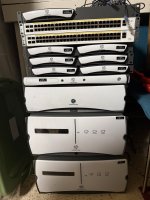
Hello! Just like the title suggests I am here because I was recently given a system and really had no clue what it was until I looked it up and saw that it is a type of media server, which led me here! I have done some digging around and figured out that this is an older system but struggled to find much set up information. With that I am not sure how to test it, if I need an account, or possibly information from the previous owner, or really just where to go from here. I have some pictures posted some pictures below, could someone possibly give me an idea of what I would need to do to plug this in the simplest way possible just to get it running? Thanks!
 

Attachments

  • IMG_4330.JPG
    IMG_4330.JPG
    2.5 MB · Views: 50
I'm sending you a DM (check the "envelope" top right side of your screen) with my phone number. It's easier to explain the system, and answer any questions by phone. I will also explain how to set it up and test the components. (This is NOT a sales call, ignore me being a dealer, just looking to help you understand what you have there, and how it works.

Jim
 
Based on the photo, you have (from top to bottom):
7 x M300 Movie Players
1 x M500 Movie Player (missing the power, import, and eject button caps)
1 x 3U Server
2 x M700 or DV700 Disc Vaults (can't tell from front panel whether they are M700s or DV700s. Would need to see the back panels of them to determine)

So what you have here is a Premiere system that supports up to 7 (or 9 if the vaults are M700s) separate playback zones.

Hopefully, by the time you read this you'll have had a good conversation with Jim and he'll have explained everything to you. However, here are some links that might be useful:
The Premiere System Installation Guide: https://www.kaleidescape.com/wp-content/uploads/kaleidescape-installation-guide.pdf
The Disc Vaults Installation and Operations Guide: https://www.kaleidescape.com/wp-con...c-vaults-installation-and-operation-guide.pdf
 
Last edited:
I'm sending you a DM (check the "envelope" top right side of your screen) with my phone number. It's easier to explain the system, and answer any questions by phone. I will also explain how to set it up and test the components. (This is NOT a sales call, ignore me being a dealer, just looking to help you understand what you have there, and how it works.

Jim
Thank you! I will reach out soon!
 
Based on the photo, you have (from top to bottom):
7 x M300 Movie Players
1 x M500 Movie Player (missing the power, import, and eject buttons)
1 x 3U Server
2 x M700 or DV700 Disc Vaults (can't tell from front panel whether they are M700s or DV700s. Would need to see the back panels of them to determine)

So what you have here is a Premiere system that supports up to 7 (or 9 if the vaults are M700s) separate playback zones.

Hopefully, by the time you read this you'll have had a good conversation with Jim and he'll have explained everything to you. However, here are some links that might be useful:
The Premiere System Installation Guide: https://www.kaleidescape.com/wp-content/uploads/kaleidescape-installation-guide.pdf
The Disc Vaults Installation and Operations Guide: https://www.kaleidescape.com/wp-con...c-vaults-installation-and-operation-guide.pdf
Thank you John! I will have to take a look but I believe that there is one of each of the DV700 and M700. Also the 3U has 14 of the 4tb Hard Drives in it, that thing is heavy!
 
Thank you John! I will have to take a look but I believe that there is one of each of the DV700 and M700. Also the 3U has 14 of the 4tb Hard Drives in it, that thing is heavy!
A fully loaded 3U server is definitely a heavy beast. It's not recommended that you try to move the chassis with the drives installed. It's much easier and safer -- both from a weight and a hard drive longevity perspective -- to remove the drives from the server chassis before moving the chassis.

If/when you do decide to remove the drives keep in mind:
  • power off the server first before removing the disk cartridges;
  • there's no need to pay close attention to which disk was in which slot; you can reinsert them in any order; and,
  • ensure all of the disks have been reinserted and are fully seated before powering the server back up.
 
As a recent K convert, I'm pretty envious of that setup you've inherited. As Premiere systems go, that's a solid one. And 2 48 port Ethernet switches as icing.

Do you have a need to play videos in 7-9 "rooms"?

I'm particularly covetous of the x700s :)
 
Hey @ilikeboat,

You’ve already gotten some solid info and @cinelife may have covered this with you on the phone, but I’ll chime in with where I'd start.

The main thing: start with the 3U Server. That’s the brain of the system. If it’s not booting properly, nothing else is going to work—no playback, no video, nothing. If it isn't booting, you’ve basically got a stack of once-expensive paperweights.

If it is booting, try hitting the IP on the sticker in a browser (looks like 192.168.14.70). Those labels are a good sign the system was set up with static IPs, so if you can’t connect right away, it’s likely just a network mismatch—not something more serious.

You may need to temporarily get your laptop onto the same IP range to access it. Once you’re in, you can sort out the network settings (DHCP or a new IP) and things should start opening up from there.

The M-Class players can be reset with the pinhole on the back if needed, but honestly, the server is the starting point—until that’s accessible, the rest doesn’t matter much.


Good luck,
Andy
 
...

If it is booting, try hitting the IP on the sticker in a browser (looks like 192.168.14.70). Those labels are a good sign the system was set up with static IPs, so if you can’t connect right away, it’s likely just a network mismatch—not something more serious.
...
I got some 1Us with static IPs that took me some time to reset. In doing so, I found a trick using a laptop and some low level network utilities to see what the server was trying to use as IP addresses. If you need that and are comfortable with a linux CLI, drop me a line.
 
I got some 1Us with static IPs that took me some time to reset. In doing so, I found a trick using a laptop and some low level network utilities to see what the server was trying to use as IP addresses. If you need that and are comfortable with a linux CLI, drop me a line.
Alternately -- and more easily -- you can just connect to the server's serial port with a DB-9 cable and determine the current network settings the command:
01/1/GET_NETWORK_SETTINGS:

use the following to set the server to use DHCP:
01/1/SET_NETWORK_SETTINGS:0::::::

More detail available at: https://support.kaleidescape.com/su...he-serial-port-of-a-Premiere-system-component
 
Alternately -- and more easily -- you can just connect to the server's serial port with a DB-9 cable and determine the current network settings the command:
01/1/GET_NETWORK_SETTINGS:

use the following to set the server to use DHCP:
01/1/SET_NETWORK_SETTINGS:0::::::

More detail available at: https://support.kaleidescape.com/su...he-serial-port-of-a-Premiere-system-component
Oh, yeah! I just didn't have a serial cable nor any type of computer that works reliably with one to do that.
 
I got some 1Us with static IPs that took me some time to reset. In doing so, I found a trick using a laptop and some low level network utilities to see what the server was trying to use as IP addresses. If you need that and are comfortable with a linux CLI, drop me a line.
Hey @ilikeboat,

You’ve already gotten some solid info and @cinelife may have covered this with you on the phone, but I’ll chime in with where I'd start.

The main thing: start with the 3U Server. That’s the brain of the system. If it’s not booting properly, nothing else is going to work—no playback, no video, nothing. If it isn't booting, you’ve basically got a stack of once-expensive paperweights.

If it is booting, try hitting the IP on the sticker in a browser (looks like 192.168.14.70). Those labels are a good sign the system was set up with static IPs, so if you can’t connect right away, it’s likely just a network mismatch—not something more serious.

You may need to temporarily get your laptop onto the same IP range to access it. Once you’re in, you can sort out the network settings (DHCP or a new IP) and things should start opening up from there.

The M-Class players can be reset with the pinhole on the back if needed, but honestly, the server is the starting point—until that’s accessible, the rest doesn’t matter much.


Good luck,
Andy
Thank you for all of the info! I plugged the server in today and it seems to start up but eventually one of the hard drives begins flashing a blue light and the power button turns orange. The ethernet port is sending signal out but not receiving anything on my computer though. I am guessing that it is the bad bay? I swapped the hard drive spaces a couple of times and it didn't make a difference.
As a recent K convert, I'm pretty envious of that setup you've inherited. As Premiere systems go, that's a solid one. And 2 48 port Ethernet switches as icing.

Do you have a need to play videos in 7-9 "rooms"?

I'm particularly covetous of the x700s :)
Ha, if you count my closets and bathrooms maybe. Not sure this is something I am going to keep around just based on the shear size of everything!
 
Thank you for all of the info! I plugged the server in today and it seems to start up but eventually one of the hard drives begins flashing a blue light and the power button turns orange. The ethernet port is sending signal out but not receiving anything on my computer though. I am guessing that it is the bad bay? I swapped the hard drive spaces a couple of times and it didn't make a difference.
The flashing blue LED on one drive is a good thing. That's the disk that is designated as the hot spare. It's space is not currently included in the filesystem's available storage. If one of the other disks in the filesystem fails, that hot spare will activate (the blue LED will stop flashing and go solid) and the data from the missing/failed disk will get rebuilt onto the hot spare. Since the hot spare is blinking it is almost certain that all of the other drives in the file system are fine but to be sure, you could look at their LEDs; they should all be solid blue.

If the filesystem is fine, then the amber power button (and front panel if you close it) is likely indicating a network problem rather than a problem with the file system. Since it's not showing up on the network, the next step would be to attempt retrieving diagnostic information via the serial port. Instructions are available here:
 
A disk being designated the hot spare (indicated by the flashing blue light) is essentially the last step in the boot-up process, and most likely means the server is booting successfully. Do NOT start moving disk cartridges around in this state, especially when the server is powered on. There is no telling what the health of the file system is and you don't want to trigger a rebuild (which could put the server in a state of risk).

As @J.Green mentioned, an orange (or amber) power button indicates that you're likely looking at a network issue. Without knowing for sure, my guess is the server is still on that static IP (192.168.14.70) and you're network is in a different range. You'll need to temporarily change your laptop's IP to a static address on the same 192.168.14.xxx neighborhood to access the browser interface, and then change the server to an address on your network (with DHCP or a fixed address).

It is worth mentioning that if both the server and a player are set to static IP addresses (which seems likely considering the stickers), you can connect the server and one player direct to each other (with an Ethernet cable) and expect to see video and attempt playback (assuming you have a K remote). This is not a long term solution, but would at least be a way to get peace of mind that the server is working.

Andy
 
Back
Top