• Thanks for visiting the Kaleidescape Owners' Forum

    This forum is for the community of Kaleidescape owners, and others interested in learning about the system, equipment, services, and the company itself.

    It is run by a group of enthusiastic Kaleidescape owners and dealers purely as a service to this community.

    This board is not affiliated in any way with Kaleidescape, Inc.
    For official technical support, product information, or customer service, please visit www.kaleidescape.com

    You can dismiss this box forever by clicking the "X" in the upper right corner of this message.
  • You are currently in "Guest" mode and not logged in with a registered account.

    The forum is free to use and most of the forum can be used by guests who are not registered....

    ... but we strongly encourage you to register for a full account. There is no cost to register for a full account.

    Benefits of registering for a full account:

    • Participate in the discussions! You must have a registered account to make posts on the forums. You will be able to start your own thread on a topic or question, or you can reply to other threads/discussions.
    • Use the "Conversation" feature (known as "private messaging" on other forums) to communicate directly with any of the other users here.
    • Access the Files area. The "resources" area of the forum contains many "Favorite Scene" and Script files that can dramatically increase the enjoyment of your Kaleidescape system. Go directly to great scenes in your favorite movies, created by other owners, and add automation to playback of your system with Scripts.
    • You won't see this annoying notice at the top of every screen!😊

    It's easy and free to register for the forum. Just click the "Register" button in the upper right corner of this page, and follow the instructions there.

    This box goes away for registered users.

DigitalMovieBoards feedback?

rafaelsmith

Well-known member
⭐️ Premium ⭐️
Joined
Jul 31, 2024
Messages
809
Location
Central Florida
Curious if anyone has any experience with DigitalMovieBoards products? Especially with regards to standalone Strato V integration?

I have been striking out lately with all the various "diy" solutions. Family really likes having something in the lobby to our theater.

I have been eyeing the DMBPro kit since I already have a display mounted.

 
I saw these and wanted one. Went so far as to leave the browser open to that window repeatedly before Christmas, but no luck on my family taking the hint. I would also be interested in feedback from somebody who has tried them out.
 
What makes me suspicious is trying to look up reviews,etc on youtube....only returns videos put out by the company...no independent reviews or feedback videos. I would think someone would have put one out by now.
 
Well, you might find somebody who has one, but the Venn diagram intersection with Kaleidescape owners is a much smaller pool...
 
I have one. I love it. You can have it linked to Kaleidescape and have movie posters play through it. Personally, I use a website called CineMaterial - #1 Movie Poster Database. It has rare high-quality posters you can download and link to your digital movie board. For example, I don't like all the white Bond posters. On the website, I downloaded all the original bond posters and use those. Great Tarantino posters and getting your favorite movie poster used in foreign countries. I think it's around $ 20 for 500 poster downloads. Don't quote me, but it's really low.

The downside I found is when I add new posters, for some reason, it won't upload all the time, and I have to call customer support. The good news is that their customer support is very responsive and always resolves the issue during the call.

You can also personalize the banner with your name or even get an AMC or Alamo Drafthouse banner. Lots of options, and it can play trailers within your poster. I prefer the standard version without the trailer dialogue playing. My daughter is having a slumber party and using the board to create her own posters for the party.

So yes, I'm a fan, even with the occasional hiccups.
 
I have one. I love it. You can have it linked to Kaleidescape and have movie posters play through it. Personally, I use a website called CineMaterial - #1 Movie Poster Database. It has rare high-quality posters you can download and link to your digital movie board. For example, I don't like all the white Bond posters. On the website, I downloaded all the original bond posters and use those. Great Tarantino posters and getting your favorite movie poster used in foreign countries. I think it's around $ 20 for 500 poster downloads. Don't quote me, but it's really low.

The downside I found is when I add new posters, for some reason, it won't upload all the time, and I have to call customer support. The good news is that their customer support is very responsive and always resolves the issue during the call.

You can also personalize the banner with your name or even get an AMC or Alamo Drafthouse banner. Lots of options, and it can play trailers within your poster. I prefer the standard version without the trailer dialogue playing. My daughter is having a slumber party and using the board to create her own posters for the party.

So yes, I'm a fan, even with the occasional hiccups.
Nice! I'm certainly leaning in this direction. Which of the various options did you go with? There's the all-in-one board, the kit, and the nano. The latter two involve providing your own TV. The kit and nano plus your own TV seem like more cost-effective solutions, but the all-in-one appears to be less hassle.
 
Nice! I'm certainly leaning in this direction. Which of the various options did you go with? There's the all-in-one board, the kit, and the nano. The latter two involve providing your own TV. The kit and nano plus your own TV seem like more cost-effective solutions, but the all-in-one appears to be less hassle.
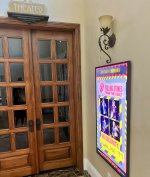
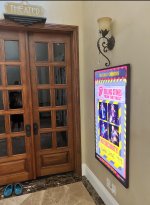
I thought I was getting the all-in, but just the device came in the mail. I got a Samsung 55-inch "The Frame", so it knows how to turn the image. I also went that way because The Frame with your choice of bezel had a better quality look, and it's slimmer than the one they sell and I didn't want it to stick out too much. My theater guy did the install, so I have no insight there. I'm happy with it! Love passing by it at night, and it gets my daughter curious about my collection, and movies.

1748823099924.jpeg
1748822934974.jpeg
 

Attachments

  • 1748822427803.jpeg
    1748822427803.jpeg
    612.6 KB · Views: 3
That's really nice. I like the direction of selecting exactly the TV you want. And the fun set of visuals over the more basic setups. I put on a summer film festival for my family, and I think this would amp up the fun of it.
 
I thought I was getting the all-in, but just the device came in the mail. I got a Samsung 55-inch "The Frame", so it knows how to turn the image. I also went that way because The Frame with your choice of bezel had a better quality look, and it's slimmer than the one they sell and I didn't want it to stick out too much. My theater guy did the install, so I have no insight there. I'm happy with it! Love passing by it at night, and it gets my daughter curious about my collection, and movies.

View attachment 7602
View attachment 7601
It looks absolutely outstanding.
 
I thought I was getting the all-in, but just the device came in the mail. I got a Samsung 55-inch "The Frame", so it knows how to turn the image. I also went that way because The Frame with your choice of bezel had a better quality look, and it's slimmer than the one they sell and I didn't want it to stick out too much. My theater guy did the install, so I have no insight there. I'm happy with it! Love passing by it at night, and it gets my daughter curious about my collection, and movies.

View attachment 7602
View attachment 7601
How much storage did you get and how much are you actually using?
 
I thought I was getting the all-in, but just the device came in the mail. I got a Samsung 55-inch "The Frame", so it knows how to turn the image. I also went that way because The Frame with your choice of bezel had a better quality look, and it's slimmer than the one they sell and I didn't want it to stick out too much. My theater guy did the install, so I have no insight there. I'm happy with it! Love passing by it at night, and it gets my daughter curious about my collection, and movies.

View attachment 7602
View attachment 7601
Do you happen to know if when linked to a standalone Strato V....does it pull posters from from what is only on the V or can it access the library online?
 
I have a Strato V, and I was told that was an option, but I decided to create my own library of posters and link it. I added some posters from the K library, mostly concerts that I couldn't find elsewhere.
 
I have a Strato V, and I was told that was an option, but I decided to create my own library of posters and link it. I added some posters from the K library, mostly concerts that I couldn't find elsewhere.
Best I can gather is that yes it is "compatible" with the V since the V uses the same commands....what I am not clear on is if that just means it can only see what is stored on the V or can it actually access the library of owned movies. If its the former then not very useful for standalone V since its at most maybe 8 or 10 movies. I sent email to company while ago asking but have yet to get a response...which does not make me warm and fuzzy about the product or company.
 
Best I can gather is that yes it is "compatible" with the V since the V uses the same commands....what I am not clear on is if that just means it can only see what is stored on the V or can it actually access the library of owned movies. If it’s the former then not very useful for standalone V since it’s at most maybe 8 or 10 movies. I sent email to company while ago asking but have yet to get a response...which does not make me warm and fuzzy about the product or company.
Yes, it’s the former. Alternatively, you can display non K motion-related content you’ve purchased, your own uploaded posters, or preloaded artwork.
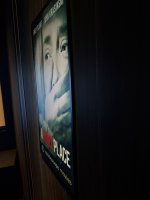
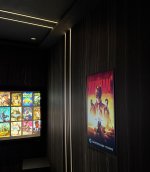
Posters shown on the Samsung Frame look great and are often mistaken for real prints at first glance by first time viewers.
 

Attachments

  • IMG_9348.jpeg
    IMG_9348.jpeg
    2.1 MB · Views: 25
  • IMG_9853.jpeg
    IMG_9853.jpeg
    2.5 MB · Views: 25
Yes, it’s the former. Alternatively, you can display non K motion-related content you’ve purchased, your own uploaded posters, or preloaded artwork.
Posters shown on the Samsung Frame look great and are often mistaken for real prints at first glance by first time viewers.

Thanks for the answer.

Is the system able to handle multiple active "plugins"...i.e if I setup the K plugin but also a Plex plugin. If I play a move on K will it show the K now playing?
 
Thanks for the answer.

Is the system able to handle multiple active "plugins"...i.e if I setup the K plugin but also a Plex plugin. If I play a move on K will it show the K now playing?
There’s a drop down option to select the playback plugin. Only one option can be selected at a time.
 
Yes, it’s the former. Alternatively, you can display non K motion-related content you’ve purchased, your own uploaded posters, or preloaded artwork.
Posters shown on the Samsung Frame look great and are often mistaken for real prints at first glance by first time viewers.
From their site -

"Kaleidescape Strato-V Total Library Memory feature. Stores all your Kaleidescape movies even over the 10 internally stored movies."

Really like the idea of using a Samsung Frame with one of these!

If possible, could you please advise on storage size? I can't see anything on their site that mentions memory requirements. The base 256GB sounds like a lot of storage for posters - is there really any need to go for one of the more expensive options?
 
From their site -

"Kaleidescape Strato-V Total Library Memory feature. Stores all your Kaleidescape movies even over the 10 internally stored movies."

Really like the idea of using a Samsung Frame with one of these!

If possible, could you please advise on storage size? I can't see anything on their site that mentions memory requirements. The base 256GB sounds like a lot of storage for posters - is there really any need to go for one of the more expensive options?
It depends on the content. If you’re planning on storing posters then 256gb should be fine. I’ve seen motion posters range from 1-5mb and posters with trailers embedded around the 30-150mb mark.
 
Back
Top