• Thanks for visiting the Kaleidescape Owners' Forum

    This forum is for the community of Kaleidescape owners, and others interested in learning about the system, equipment, services, and the company itself.

    It is run by a group of enthusiastic Kaleidescape owners and dealers purely as a service to this community.

    This board is not affiliated in any way with Kaleidescape, Inc.
    For official technical support, product information, or customer service, please visit www.kaleidescape.com

    You can dismiss this box forever by clicking the "X" in the upper right corner of this message.
  • You are currently in "Guest" mode and not logged in with a registered account.

    The forum is free to use and most of the forum can be used by guests who are not registered....

    ... but we strongly encourage you to register for a full account. There is no cost to register for a full account.

    Benefits of registering for a full account:

    • Participate in the discussions! You must have a registered account to make posts on the forums. You will be able to start your own thread on a topic or question, or you can reply to other threads/discussions.
    • Use the "Conversation" feature (known as "private messaging" on other forums) to communicate directly with any of the other users here.
    • Access the Files area. The "resources" area of the forum contains many "Favorite Scene" and Script files that can dramatically increase the enjoyment of your Kaleidescape system. Go directly to great scenes in your favorite movies, created by other owners, and add automation to playback of your system with Scripts.
    • You won't see this annoying notice at the top of every screen!😊

    It's easy and free to register for the forum. Just click the "Register" button in the upper right corner of this page, and follow the instructions there.

    This box goes away for registered users.

Strato V Dynamic Range and Colorspace Issues

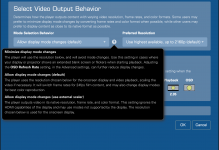
@HarperVision please disregard the post above. I finally nailed down the culprit; I had actually engaged the “minimize display changes” option at that time. That probably forced everything to output in Dolby vision.

That aforementioned mode is incorrect and should never be used, even if it makes your UI look nice with fake hdr. Just keep it at “allow display mode changes” ( default mode) permanently.
 
@Broncowrangler, I raised the overlay issue with the engineering team, and they noted that we saw an issue during testing with certain Marantz receivers. We were able to resolve it with the following steps:
  1. Access the Marantz Settings
  2. Video
  3. Output format
  4. Turn off output/video conversion
Perhaps give that a try and see if it changes anything?

I can check with our support folks to make sure your request arrived. Did you use email to support@kaleidescape.com? They may just be a bit backed up.
@MikeKobb that didn’t work for me as there is no option to turn off output / video conversion. There is only the bypass option. Still waiting for support to get in touch so I could reach resolution. Thanks for your support.
 
@HarperVision please disregard the post above. I finally nailed down the culprit; I had actually engaged the “minimize display changes” option at that time. That probably forced everything to output in Dolby vision.

That aforementioned mode is incorrect and should never be used, even if it makes your UI look nice with fake hdr. Just keep it at “allow display mode changes” ( default mode) permanently.
Yeah it’s kind of a personal choice how you output. With the right combination of settings, converting SDR and HDR10 to LLDV can look absolutely fabulous!
 
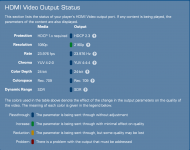
So just as I had suspected when I chose “prefer HDR10” everything worked fine; no blackouts and correct metadata was captured on the OSD. Smooth operation all around.

At this point I will be quite wary of engaging Dolby Vision during playback.
 
So just as I had suspected when I chose “prefer HDR10” everything worked fine; no blackouts and correct metadata was captured on the OSD. Smooth operation all around.

At this point I will be quite wary of engaging Dolby Vision during playback.
FWIW, I owned an LG E6, which was a 2016 model, and it could not handle LLDV properly, just TV Led. Oddly though, it handled DV through my ATV which is LLDV. So the lack of metadata may be the big issue with LLDV with some TV brands. On my Sony A90J, it handles LLDV and TV-Led DV just fine, although TV Led is a lot better on the A90J.
 
FWIW, I owned an LG E6, which was a 2016 model, and it could not handle LLDV properly, just TV Led. Oddly though, it handled DV through my ATV which is LLDV. So the lack of metadata may be the big issue with LLDV with some TV brands. On my Sony A90J, it handles LLDV and TV-Led DV just fine, although TV Led is a lot better on the A90J.
At this point I have decided there is no point sweating it out, it is definitely a Dolby Vision bug. I’m sure they will investigate and eventually figure it out.

It’s quite bizarre that all my other sources work flawlessly except for the V. There is nothing wrong with the cables or any of the Marantz & Denon processors / receivers; If that were the case other sources would have struggled as well. Anyways for now I’m going to stick with watching my content in HDR10 until the Dolby vision bug gets ironed out.
 
Wondering if anyone has experience with playing HD movies whose resolution is automatically increased to 2160, which does not look great on Sony X95L 85" (with Sony STR-AZ7000ES receiver). It appears that the only option is to change setting on Strato V to "Allow display mode changes (use external scaler)" from default choice "Allow display mode changes."

Anyone experiment with these settings with HD titles? Given that I have more than 1,000 HD titles, others' experiences would be appreciated.

Thanks.
 

Attachments

  • screenshot 1.png
    screenshot 1.png
    200.8 KB · Views: 21
  • screenshot 2.png
    screenshot 2.png
    236.4 KB · Views: 24
Last edited:
Wondering if anyone has experience with playing HD movies whose resolution is automatically increased to 2160, which does not look great on Sony X95L 85" (with Sony STR-AZ7000ES receiver). It appears that the only option is to change setting on Strato V to "Allow display mode changes (use external scaler)" from default choice "Allow display mode changes."

Anyone experiment with these settings with HD titles? Given that I have more than 1,000 HD titles, others' experiences would be appreciated.

Thanks.
Not quite clear on what you're asking here.

The Kaleidescape does a pretty good job of upscaling HD to UHD. I found it to be better quality than the upscaling on my (older) JVC e-shift projector, so I used the "Allow Display Mode Changes (default) mode". Then I added a Lumagen which outperforms either of them, so I now use the "Allow Display Mode Changes (Use External Scaler)" option.
 
Wondering if anyone has experience with playing HD movies whose resolution is automatically increased to 2160, which does not look great on Sony X95L 85" (with Sony STR-AZ7000ES receiver). It appears that the only option is to change setting on Strato V to "Allow display mode changes (use external scaler)" from default choice "Allow display mode changes."

Anyone experiment with these settings with HD titles? Given that I have more than 1,000 HD titles, others' experiences would be appreciated.

Thanks.
With the madVR in my theater, I run the K as "Allow Display Mode Changes (Use External Scaler)" so the madVR can scale, but the K still outputs using frame rate change to match content. That's what you're looking for, if you feel your TV is a better scalar than the player.
 
Could they do that with the older models too? It's been 3 years since I owned that tv, and I had an older ATV that did DV.
Not really sure, but LLDV did come later. I believe the Sony A1E was the first display that used it.

It was a format that Sony and Microsoft collaborated with Dolby on for Sony’s TVs which at the time didn’t have the horsepower or chipset to do standard DV.

Microsoft needed it for gaming since standard DV resulted in super high lag. Hence the name, “Low Latency” Dolby Vision.
 
Not really sure, but LLDV did come later. I believe the Sony A1E was the first display that used it.

It was a format that Sony and Microsoft collaborated with Dolby on for Sony’s TVs which at the time didn’t have the horsepower or chipset to do standard DV.

Microsoft needed it for gaming since standard DV resulted in super high lag. Hence the name, “Low Latency” Dolby Vision.
Thanks. I forgot all about that. LLDV didnt even exist when the 2016 LG OLED came out. A FW update later in 2016 enabled DV on the LG E6, and LG was the only company using DV.
 
@thrillcat @Techthusiasm

Thanks for reply re: HD upscaling. I'm not a pro: In this new location with the V, I simply use Sony X95L set to enhanced frame rate Dolby Vision and Sony STR-AZ7000ES receiver. In my home location, I'm using Strato C and Terra system. I won't combine the two systems until I have a better idea of title compatibility, etc.

I watched part of Childe (HD) last night, and thought the upscaling looked inconsistent and, at times, overdone. Not even as good as HD on streaming services. Since I don't have a madVR or Lumagen, I rely on Sony and K-Scape. So, you both seem to think that, without an external processor, I should leave the default (display mode changes)? I did not realize that the reference to external scaler in the option required an actual additional processor.
 
Not really sure, but LLDV did come later. I believe the Sony A1E was the first display that used it.

It was a format that Sony and Microsoft collaborated with Dolby on for Sony’s TVs which at the time didn’t have the horsepower or chipset to do standard DV.

Microsoft needed it for gaming since standard DV resulted in super high lag. Hence the name, “Low Latency” Dolby Vision.
I am in the process of setting mine up. In the Advanced video settings, do I leave content type metadata at default (do not transmit metadata) or set to "send content metadata"?
 
@thrillcat @Techthusiasm

Thanks for reply re: HD upscaling. I'm not a pro: In this new location with the V, I simply use Sony X95L set to enhanced frame rate Dolby Vision and Sony STR-AZ7000ES receiver. In my home location, I'm using Strato C and Terra system. I won't combine the two systems until I have a better idea of title compatibility, etc.

I watched part of Childe (HD) last night, and thought the upscaling looked inconsistent and, at times, overdone. Not even as good as HD on streaming services. Since I don't have a madVR or Lumagen, I rely on Sony and K-Scape. So, you both seem to think that, without an external processor, I should leave the default (display mode changes)? I did not realize that the reference to external scaler in the option required an actual additional processor.
I would only leave it at the default option. It will be congruent with the native content. Do not use “Minimize display changes” as it forces content to be displayed in Dolby Vision, just like I observed above.

I don’t know about others, but i absolutely despise fake HDR Intervention/ application. Keep it at default and let your Sony handle the upscale function. Sony’s upscaling/ picture processing algorithms are class leading anyways.
 
I am in the process of setting mine up. In the Advanced video settings, do I leave content type metadata at default (do not transmit metadata) or set to "send content metadata"?
You will only send metadata if you use an external processor/ Hdfury.
 
I did not realize that the reference to external scaler in the option required an actual additional processor.
It doesn’t “require” an outboard processor. It’s basically just saying that it’ll send everything out at its native resolution, refresh and dynamic range to allow your processor (if you have one) to do all the heavy lifting/processing of the signal.

As long as your downstream devices and displays can handle all the different signal types, you can choose that option regardless of having a video processor or not.
 
I don’t know about others, but i absolutely despise fake HDR Intervention
For what it's worth, we don't do "fake HDR" if the player is outputting SDR content as Dolby Vision. i.e., we don't try to boost the dynamic range or anything. SDR's color and dynamic range are a true subset of Dolby Vision, so the player just outputs the SDR content within the larger Dolby Vision colorspace and dynamic range.

How this looks compared to outputting as SDR will depend on your display's processing. Some displays will boost SDR brightness to utilize more of the display's brightness capability, for example, and that could make SDR output in its native format look brighter than SDR output as Dolby Vision.
 
Back
Top