• Thanks for visiting the Kaleidescape Owners' Forum

    This forum is for the community of Kaleidescape owners, and others interested in learning about the system, equipment, services, and the company itself.

    It is run by a group of enthusiastic Kaleidescape owners and dealers purely as a service to this community.

    This board is not affiliated in any way with Kaleidescape, Inc.
    For official technical support, product information, or customer service, please visit www.kaleidescape.com

    You can dismiss this box forever by clicking the "X" in the upper right corner of this message.
  • You are currently in "Guest" mode and not logged in with a registered account.

    The forum is free to use and most of the forum can be used by guests who are not registered....

    ... but we strongly encourage you to register for a full account. There is no cost to register for a full account.

    Benefits of registering for a full account:

    • Participate in the discussions! You must have a registered account to make posts on the forums. You will be able to start your own thread on a topic or question, or you can reply to other threads/discussions.
    • Use the "Conversation" feature (known as "private messaging" on other forums) to communicate directly with any of the other users here.
    • Access the Files area. The "resources" area of the forum contains many "Favorite Scene" and Script files that can dramatically increase the enjoyment of your Kaleidescape system. Go directly to great scenes in your favorite movies, created by other owners, and add automation to playback of your system with Scripts.
    • You won't see this annoying notice at the top of every screen!😊

    It's easy and free to register for the forum. Just click the "Register" button in the upper right corner of this page, and follow the instructions there.

    This box goes away for registered users.

Strato V Dynamic Range and Colorspace Issues

Update: Things haven’t changed. Still getting those dreaded pinks and missing metadata on both LL and auto. Additionally I’m experiencing frequent blank screens and a couple of audio dropouts. I don’t understand why this is happening when playback is not dependent on the internet. I reached out to support a couple of days ago, but unfortunately not heard back from them. Getting a bit concerned now.

Just wondering what the ideal distance should be between the V and receiver/display (if that makes any difference) currently the distance is around 3 feet and cable is stock pixelgen which is a 6 feet cable i believe. I have tried various other cables as well, fwiw.
 
Update: Things haven’t changed. Still getting those dreaded pinks and missing metadata on both LL and auto. Additionally I’m experiencing frequent blank screens and a couple of audio dropouts. I don’t understand why this is happening when playback is not dependent on the internet. I reached out to support a couple of days ago, but unfortunately not heard back from them. Getting a bit concerned now.

Just wondering what the ideal distance should be between the V and receiver/display (if that makes any difference) currently the distance is around 3 feet and cable is stock pixelgen which is a 6 feet cable i believe. I have tried various other cables as well, fwiw.
Have you tried with the V connected directly to tv. You can rule out cables and the V if it works fine that way.
 
@Broncowrangler, I raised the overlay issue with the engineering team, and they noted that we saw an issue during testing with certain Marantz receivers. We were able to resolve it with the following steps:
  1. Access the Marantz Settings
  2. Video
  3. Output format
  4. Turn off output/video conversion
Perhaps give that a try and see if it changes anything?

I can check with our support folks to make sure your request arrived. Did you use email to support@kaleidescape.com? They may just be a bit backed up.
 
Thanks a lot @MikeKobb. I have the Denon A1H, but they share the same menus. Appreciate it.

Yes I did use the same email and even received an auto-reply stating someone from support would get back.
 
Have you tried with the V connected directly to tv. You can rule out cables and the V if it works fine that way.
Yes i did briefly. It worked but i prefer my existing arrangement, as i need access to the receiver’s OSD to make changes on the fly, plus I get a snapshot of what’s happening under the hood. I lose the ability to that if I connect directly to the display.
 
@Broncowrangler, I raised the overlay issue with the engineering team, and they noted that we saw an issue during testing with certain Marantz receivers. We were able to resolve it with the following steps:
  1. Access the Marantz Settings
  2. Video
  3. Output format
  4. Turn off output/video conversion
Perhaps give that a try and see if it changes anything?

I can check with our support folks to make sure your request arrived. Did you use email to support@kaleidescape.com? They may just be a bit backed up.
My Marantz AV10 doesn't have a "conversion" setting.

Now if the recommendation is to set the video mode to "bypass" that won't fly as it removes the OSD. No other components in my setup require the OSD to be removed to operate properly with DV - Oppo 203, Apple TV 4K, Roku Ultra, Nvidia Shield - they all have no issue displaying the OSD overlay while watching DV content. Engineering needs to figure out what about the KScape's DV configuration is non-standard.
 
Yes i did briefly. It worked but i prefer my existing arrangement, as i need access to the receiver’s OSD to make changes on the fly, plus I get a snapshot of what’s happening under the hood. I lose the ability to that if I connect directly to the display.
Have a you tried a different HDMI port out of the Marantz? Maybe that HDMI port is wonky.
 
Have a you tried a different HDMI port out of the Marantz? Maybe that HDMI port is wonky.
I tried 3 different ports to remove that variable out of the equation. Same outcome.
 
Yes i did briefly. It worked but i prefer my existing arrangement, as i need access to the receiver’s OSD to make changes on the fly, plus I get a snapshot of what’s happening under the hood. I lose the ability to that if I connect directly to the display.
Which HDMI cable were you using when you went directly to TV? I'm assuming the Pixelgen?

I've seen numerous professional opinions that the minimum HDMI length should be 3m each to prevent high edge rates (whatever those are) from overloading some HDMI inputs.
 
Which HDMI cable were you using when you went directly to TV? I'm assuming the Pixelgen?

I've seen numerous professional opinions that the minimum HDMI length should be 3m each to prevent high edge rates (whatever those are) from overloading some HDMI inputs.
Yes the supplied pixelgen.
 
Yes the supplied pixelgen.
They're not cheap but I'd suggest grabbing another Pixelgen (now official THX brand) to put on the other side of the AVR. I replaced all my HDMI cables with Pixelgen a little over 2 years ago and haven't had a single dropout or bandwidth issue at all. And I'd keep it at 3m or longer.
 
My Marantz AV10 doesn't have a "conversion" setting.

Now if the recommendation is to set the video mode to "bypass" that won't fly as it removes the OSD. No other components in my setup require the OSD to be removed to operate properly with DV - Oppo 203, Apple TV 4K, Roku Ultra, Nvidia Shield - they all have no issue displaying the OSD overlay while watching DV content. Engineering needs to figure out what about the KScape's DV configuration is non-standard.
Yeah, I don't think anybody was suggesting the bypass option. The video conversion option was what we found to be problematic on the Marantz receivers we had. I will let the team know that this is not a viable option on some of the affected receivers.
 
My Marantz AV10 doesn't have a "conversion" setting.

Now if the recommendation is to set the video mode to "bypass" that won't fly as it removes the OSD. No other components in my setup require the OSD to be removed to operate properly with DV - Oppo 203, Apple TV 4K, Roku Ultra, Nvidia Shield - they all have no issue displaying the OSD overlay while watching DV content. Engineering needs to figure out what about the KScape's DV configuration is non-standard.
My guess it’s probably because they convert LLDV to RGB 8-bit DV for the output when in standard DV Mode. I think you mentioned that when you force the output to LLDV, then all is well. If so that pretty much proves this theory, and for some reason your Marantz/Denon receivers don’t like this converted signal.

I’m sure your other sources are sending true standard 8-bit RGB DV, which is why with those it works properly.
 
My guess it’s probably because they convert LLDV to RGB 8-bit DV for the output when in standard DV Mode. I think you mentioned that when you force the output to LLDV, then all is well. If so that pretty much proves this theory, and for some reason your Marantz/Denon receivers don’t like this converted signal.

I’m sure your other sources are sending true standard 8-bit RGB DV, which is why with those it works properly.
For me even forcing it in LLDV is causing issues. The color (pink) issue on the osd is showing up correctly, but missing metadata persists. Plus a few blackouts which is now happening quite frequently on both modes. I also believe the V is not playing well with D&M products.
 
For me even forcing it in LLDV is causing issues. The color (pink) issue on the osd is showing up correctly, but missing metadata persists. Plus a few blackouts which is now happening quite frequently on both modes. I also believe the V is not playing well with D&M products.
I hope that a fix to the metadata not being reported will occur soon, as that would eliminate that reason if it were to persist afterwards.
 
I wonder if the “prefer hdr10” option eliminates these issues and helps mitigate those irritating blackouts.
 
For me even forcing it in LLDV is causing issues. The color (pink) issue on the osd is showing up correctly, but missing metadata persists. Plus a few blackouts which is now happening quite frequently on both modes. I also believe the V is not playing well with D&M products.
I’m not sure you’ll see metadata when playing LLDV natively. The only time I see it is when we inject HDR10 metadata into the LLDV stream so non-DV displays can see the signal as HDR10 and go into their proper mode which uses BT2020 and ST2084 PQ.

The issue of missing metadata being discussed is for HDR10 metadata if I’m not mistaken.

Maybe I can take my V and HDFury into my living room where I have an LG OLED that does do DV natively and see what DV metadata it’s giving me…..or not.
 
I’m not sure you’ll see metadata when playing LLDV natively. The only time I see it is when we inject HDR10 metadata into the LLDV stream so non-DV displays can see the signal as HDR10 and go into their proper mode which uses BT2020 and ST2084 PQ.

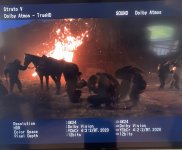
Meta data did show up when playing LLDV (kingdom of the planet of the apes). Matter of fact I have also been able to get metadata for Auto. I have captured them all thru pics on the previous pages.

It comes and goes…essentially all over the place right now.

IMG_2820.jpeg
 
Meta data did show up when playing LLDV (kingdom of the planet of the apes). Matter of fact I have also been able to get metadata for Auto. I have captured them all thru pics on the previous pages.

It comes and goes…essentially all over the place right now.

View attachment 5424
Oh OK, you’re talking about the graphical representation of the metadata on your GUI.

Sorry for the confusion. I was speaking about the embedded metadata stream that can be captured and seen on a device like HDFury.
 
@HarperVision I forgot to mention that while watching Kill (4k/SDR) I was on the LLDV setting. It forced Dolby Vision during playback. I had to change back to Auto(default) to view it correctly in its native 4k SDR format.

So I don’t think LLDV is the correct option for certain scenarios. It might behave well with my receiver, but I’m more concerned about not being able to playback content in its native format.
 
Back
Top