• Thanks for visiting the Kaleidescape Owners' Forum

    This forum is for the community of Kaleidescape owners, and others interested in learning about the system, equipment, services, and the company itself.

    It is run by a group of enthusiastic Kaleidescape owners and dealers purely as a service to this community.

    This board is not affiliated in any way with Kaleidescape, Inc.
    For official technical support, product information, or customer service, please visit www.kaleidescape.com

    You can dismiss this box forever by clicking the "X" in the upper right corner of this message.
  • You are currently in "Guest" mode and not logged in with a registered account.

    The forum is free to use and most of the forum can be used by guests who are not registered....

    ... but we strongly encourage you to register for a full account. There is no cost to register for a full account.

    Benefits of registering for a full account:

    • Participate in the discussions! You must have a registered account to make posts on the forums. You will be able to start your own thread on a topic or question, or you can reply to other threads/discussions.
    • Use the "Conversation" feature (known as "private messaging" on other forums) to communicate directly with any of the other users here.
    • Access the Files area. The "resources" area of the forum contains many "Favorite Scene" and Script files that can dramatically increase the enjoyment of your Kaleidescape system. Go directly to great scenes in your favorite movies, created by other owners, and add automation to playback of your system with Scripts.
    • You won't see this annoying notice at the top of every screen!😊

    It's easy and free to register for the forum. Just click the "Register" button in the upper right corner of this page, and follow the instructions there.

    This box goes away for registered users.

Strato V Dynamic Range and Colorspace Issues

It’s definitely worth trying a direct connection to the display as a diagnostic step. It will help narrow down where the issue may lie. Since this has moved from what I’d say is perhaps a nuisance issue with the AVR OSD color to playback issues, I would suggest that you also consider opening a support ticket. The support team have lots of tools to look at diagnostic information logged by the player, and they can escalate to engineering if necessary.
 
Is the Denon HDMI set to 8K enhanced? (You mentioned A1H?)

You have Strato V going into A1H? Then A1H going to an HDFury? (If so which)Then HDFury going to LG OLED?

Trying to follow the chain here.
 
Is the Denon HDMI set to 8K enhanced? (You mentioned A1H?)

You have Strato V going into A1H? Then A1H going to an HDFury? (If so which)Then HDFury going to LG OLED?

Trying to follow the chain here.

Why would he need an HDFury if he has an LG OLED, which can natively do DV and HDR10?
 
What he said.

You don’t need 8k enhanced unless you have:
A) 8k display
B) Gaming needs.
 
No idea… I’m trying to piece together what he has going on. I see an HDfury interface in some pictures, I see mention of the Denon, an OLED and HDFury..
 
Sounds to me like you’re having issues with it getting confused about which version of Dolby Vision it wants to send. The V can send either the original 8-bit Tunneled RGB which gets decoded by the display (Display Led DV) or it can do Low Latency Dolby Vision (LLDV) Profile 5 (Player Led DV)

When you saw it as SDR on the receiver, that’s most likely LLDV because when it isn’t recognized by a display for some reason, such as not being LLDV capable, then it will be reported as being SDR. This is the reason we need to add HDR10 metadata to the signal for projector and Samsung TV users, so they display properly using their HDR modes with a PQ “gamma” curve and BT2020 colorspace.

Then when you see the hot pink, that’s most likely the RGB tunneled DV not being recognized properly. It shows up as that pinkish purple screen.

My first suggestion to try is to turn it off of Auto in the Settings menu and then I would select “Prefer Dolby Vision Low Latency” and see what happens.
New here and soon to be owner of the V. Curious how this will affect us Samsung users? Will we not get HDR without that metadata? Thanks for helping a rookie.
 
New here and soon to be owner of the V. Curious how this will affect us Samsung users? Will we not get HDR without that metadata? Thanks for helping a rookie.

You should have no issues getting normal HDR10 on your Samsung UHDTV. Someone reported no HDR Metadata being sent from the V, but you should still get HDR10. It just may not tone map properly if your Samsung needs that to do so.

You can even get Dolby Vision on your Samsung if you add an HDFury or maybe even a cheap EZCoo HDMI switcher for $30 (if there’s a way to manually turn on HDR10 in your Samsung).
 
You should have no issues getting normal HDR10 on your Samsung UHDTV. Someone reported no HDR Metadata being sent from the V, but you should still get HDR10. It just may not tone map properly if your Samsung needs that to do so.

You can even get Dolby Vision on your Samsung if you add an HDFury or maybe even a cheap EZCoo HDMI switcher for $30 (if there’s a way to manually turn on HDR10 in your Samsung).
Thanks. Just upgraded to a 77S95D, so good to know that I should have no issues. I have a few UHD discs that dont show the metadata on my Panasonic 9000 UHD player and have no issues. I also have a Sony 65A90J, and will get a chance to see how DV looks on that.
 
Thanks. Just upgraded to a 77S95D, so good to know that I should have no issues. I have a few UHD discs that dont show the metadata on my Panasonic 9000 UHD player and have no issues. I also have a Sony 65A90J, and will get a chance to see how DV looks on that.
I use my Strato V on a Sony 77A95L and have no issues.

The only setting I changed was transmit content type metadata for when I am using the MadVR MK2.

@Broncowrangler, I forgot to add (and didn’t see here posted yet) that when you are having your blackout/audio dropout issues you can go into the webgui advanced video capabilities and determine if it audio or video related (or both).

They should all be blue boxes with no issues for each. This is how I discovered my EDID issues with my Strato c.

I don’t know what voodoo magic worked in my case with the Strato V but so far so good, including on all test scenes from my Strato c problem films 🤞🏻

I will add that many of those films were DTS:X or DTS-MA (Harry Potter, boss baby, polar express to name a few) and I believe some additional support was added for these areas in the Strato V, but need to go back and check this thread….
 
Did the colors look muted and washed out with the contrast and gamma not high enough?

If so that’s how LLDV presents when it doesn’t have HDR metadata applied and is seen by the display as SDR.

Longish post, I apologize in advance. 😫

The colors didn’t look muted and washed out. Please note that even though the metadata is missing on the receiver’s osd, it is being reported correctly by my OLEd as Dolby vision…and not SDR

I was going back and forth between LLDV and auto (default) last night, and I have to say that auto seems to provide the best pq, even though it’s not playing nice with the AVR. LLDV mode was causing lot of blackouts/flickering like I mentioned earlier.

The biggest conundrum imho, is that even though the HDR meta data is not being reported (on the receiver’s end), it is being captured correctly by the display. If the metadata was missing, the display should be reporting SDR, but that’s not the case.

In some cases the metadata was missing even in LLDV mode. (See the pic posted above). So this condition is not exclusive to auto(default) mode.

Another curve ball: the HDR metadata appeared mysteriously in auto mode just before I called it a night. So it’s all over the place. I have contacted support like @MikeKobb suggested, so let’s see.

Maybe those who have it hooked it directly to the display are not experiencing these issues? I would love to get some feedback from those have this routed through their AVR/ AVP. I haven’t got a chance to hook this directly to the display.
 
@ZeroDarkFuga Have you hooked this directly to the A95L or via receiver/ processor? I checked advance settings and everything was blue.
 
@ZeroDarkFuga Have you hooked this directly to the A95L or via receiver/ processor? I checked advance settings and everything was blue.
I have it going into my Nakamichi Dragon 11.4.6.

When I had the Strato C, I had video going into the AC-Mx-42X matrix switch and audio going into the dragon. This eliminated the audio dropouts but I still had some video blackouts here and there…..
 
I was going back and forth between LLDV and auto (default) last night, and I have to say that auto seems to provide the best pq, even though it’s not playing nice with the AVR.

This only matters with HDR10 being converted to LLDV. When the source video is DV, it will come out the same whether you choose Auto or prefer LLDV.
 
As stated you do have to manually write in “/scripts” to access it.

As far as the limited titles available for the scripts, I found that if I deleted a movie being used for a scene, then the script reflects that in its itinerary and just automatically skips those sections during script playback.

I also noticed that if you upgrade a movie from HDR10 to DV, such as Fury Road and TG: Maverick, which I just reloaded as DV since they were just updated, then the scenes you personally made and the scripts for that movie are deleted so you have to redo them manually.


This only matters with HDR10 being converted to LLDV. When the source video is DV, it will come out the same whether you choose Auto or prefer LLDV.
Gotcha. Anyways I’m hoping to see more posts from folks who have routed the V through their processors. So far most reviews / discussions on YouTube have been centered around direct display connection.
 
I also noticed that if you upgrade a movie from HDR10 to DV, such as Fury Road and TG: Maverick, which I just reloaded as DV since they were just updated, then the scenes you personally made and the scripts for that movie are deleted so you have to redo them manually.


This only matters with HDR10 being converted to LLDV. When the source video is DV, it will come out the same whether you choose Auto or prefer LLDV.
So DV will always be LLDV no matter what? What if you set to Prefer DV Standard?
 
I could be mistaken but that would force everything to output in DoVi. Maybe Dave could elaborate further.
 
I could be mistaken but that would force everything to output in DoVi. Maybe Dave could elaborate further.
I was wondering if you set it to standard for your LG, you would get correct standard DV TV LED and not LLDV Player LED.
 
I was wondering if you set it to standard for your LG, you would get correct standard DV TV LED and not LLDV Player LED.
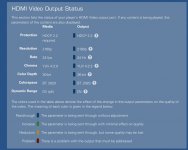
This is auto (default)

IMG_2824.jpeg

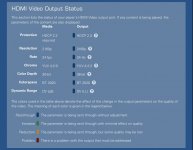
LLDV

IMG_2823.jpeg

The output has been generated correctly, its just the receiver playing Jedi mind tricks with me.
 
I was wondering if you set it to standard for your LG, you would get correct standard DV TV LED and not LLDV Player LED.

The engineers would know for sure, but since the native source DV video coming from KScape is Profile 5 DV/LLDV, then I would think that if you chose Standard DV as the output format, then it will just convert that Profile 5 LLDV to the RGB 8-bit tunneled format (Standard DV) just for compatibility purposes so the video quality itself should be the same or similar, without the added benefits most would think you’d get if it were mastered in standard Profile 7 DV which has FEL or MEL associated with it.
 
Back
Top