• Thanks for visiting the Kaleidescape Owners' Forum

    This forum is for the community of Kaleidescape owners, and others interested in learning about the system, equipment, services, and the company itself.

    It is run by a group of enthusiastic Kaleidescape owners and dealers purely as a service to this community.

    This board is not affiliated in any way with Kaleidescape, Inc.
    For official technical support, product information, or customer service, please visit www.kaleidescape.com

    You can dismiss this box forever by clicking the "X" in the upper right corner of this message.
  • You are currently in "Guest" mode and not logged in with a registered account.

    The forum is free to use and most of the forum can be used by guests who are not registered....

    ... but we strongly encourage you to register for a full account. There is no cost to register for a full account.

    Benefits of registering for a full account:

    • Participate in the discussions! You must have a registered account to make posts on the forums. You will be able to start your own thread on a topic or question, or you can reply to other threads/discussions.
    • Use the "Conversation" feature (known as "private messaging" on other forums) to communicate directly with any of the other users here.
    • Access the Files area. The "resources" area of the forum contains many "Favorite Scene" and Script files that can dramatically increase the enjoyment of your Kaleidescape system. Go directly to great scenes in your favorite movies, created by other owners, and add automation to playback of your system with Scripts.
    • You won't see this annoying notice at the top of every screen!😊

    It's easy and free to register for the forum. Just click the "Register" button in the upper right corner of this page, and follow the instructions there.

    This box goes away for registered users.

Strato V Dynamic Range and Colorspace Issues

Same here on my Denon A1H. Fwiw I did try “prefer LLDV” as @HarperVision was alluding to. It worked but I’m losing played led option which for all intents and purposes is a superior DoVi implementation/ experience, especially when you have native DoVi support.
I meant losing display led, for some reason i couldn’t edit my message.
 
Thanks a lot for all that. It worked for me well. But I always thought display led Dolby Vision is the superior implementation especially when you have native DoVi support. LLDV is inevitable when you don’t have prerequisite native support especially HDFury environment. But I could be mistaken.

However I’m still struggling to understand how after plugging out / plugging back the cables brought the OSD to function normally and also report correct metadata. The nasty pink color went away and it was correctly displaying bright white which is the normal OSD color. It stayed that way during that particular viewing session. I checked multiples times. However it started acting up again during subsequent sessions. So there is some glitch somewhere which I feel could be addressed via a future Sw update.

Display led can be better, but two caveats here…..

1. Dolby themselves are moving away from display led and more towards player led and profiles such as 5 and 8.

2. And most important here in this instance, the KScape Strato V and the Movie Store are using Profile 5 LLDV Dolby Vision for its DV encoding, so using this as the method to send to your display shouldn’t result in any quality loss whatsoever.

After much testing, I’m seeing that they’re mastering the DV content at 4,000 nits, most likely using a Dolby Pulsar Mastering Monitor since that’s what it is capable of. So if you have a way of sending 4,000 nits Max Luminance (using an HDFury maybe?) that’s what I’d do.
 
Display led can be better, but two caveats here…..

1. Dolby themselves are moving away from display led and more towards player led and profiles such as 5 and 8.

2. And most important here in this instance, the KScape Strato V and the Movie Store are using Profile 5 LLDV Dolby Vision for its DV encoding, so using this as the method to send to your display shouldn’t result in any quality loss whatsoever.

After much testing, I’m seeing that they’re mastering the DV content at 4,000 nits, most likely using a Dolby Pulsar Mastering Monitor since that’s what it is capable of. So if you have a way of sending 4,000 nits Max Luminance (using an HDFury maybe?) that’s what I’d do.
That right there is some of the most useful and helpful information I have come across. In that case it makes perfect sense to have player led DoVi.
 
Last edited:
My processor's OSD coloring also appears to be all over the place - Marantz AV10 (which can pass through all the latest HDMI formats).
Please clarify something for me so that I can relay accurate info to the team — when you say “my processor’s OSD coloring”, what exactly do you mean? Your processor has an OSD? Or are you referring to the Strato V OSD being passed through the processor? Or…?

Perhaps a quick cell phone photo would be helpful if you wouldn’t mind.

I do know that pink where there should be no pink is often a symptom of a mismatch between YCbCr and RGB (one being treated as the other), but we’d need to see the symptom to be sure.
 
Please clarify something for me so that I can relay accurate info to the team — when you say “my processor’s OSD coloring”, what exactly do you mean? Your processor has an OSD? Or are you referring to the Strato V OSD being passed through the processor? Or…?

Perhaps a quick cell phone photo would be helpful if you wouldn’t mind.

I do know that pink where there should be no pink is often a symptom of a mismatch between YCbCr and RGB (one being treated as the other), but we’d need to see the symptom to be sure.
It's the OSD generated/overlayed by the Marantz processor as the signal passes through; for instance, the pop up when you change the processor's volume level.

Signal chain is Strato V -> Marantz AV10 -> Sony Z9K HDMI 3 (set to "enhanced mode" to properly accept the DV signal).
 
Fwiw, the OSD is correctly capturing the audio component I.e Dolby TruHd/ atmos.

You have access to the AVR/AVP OSd only if the component is routed through them. For example the OSD will not work if the V is plugged directly to the display. I will try to take pics as well when I get home.
 
I do know that pink where there should be no pink is often a symptom of a mismatch between YCbCr and RGB (one being treated as the other), but we’d need to see the symptom to be sure.

Yes this what I was alluding to with the Display Led (RGB) vs Player Led (YCbCr from iTP) Dolby Vision.
 
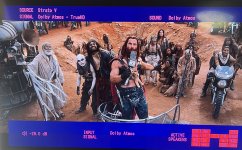
Another issue cropped up; I was demoing a scene from Furiosa (citadel), when the video starting flickering and blanking out intermittently. I unplugged the power, waited few minutes and plugged it back in. it worked perfectly subsequently.
 
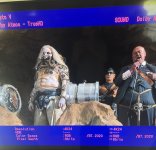
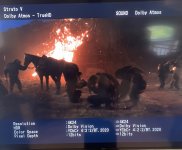
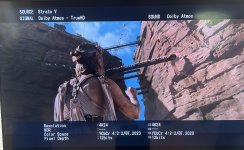
From the V notice the crazy pink, plus missing info in the HdR section.

IMG_2807.jpeg

IMG_2810.jpeg


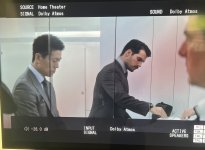
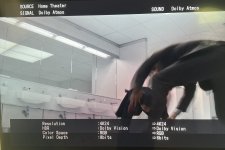
Apple TV 4K (3rd Gen) everything is exhibited correctly and notice the white font.

IMG_2813.jpeg


IMG_2816.jpeg
 
From the V notice the crazy pink, plus missing info in the HdR section.

IMG_2807.jpeg


IMG_2810.jpeg

From the signal info saying it’s RGB 8-Bit DV, it appears that’s using display Led DV. Does it do the same thing with LLDV, which should show it as YCbCr 10/12 bit DV?
 
The pic on the previous page (for the V with LLDV enabled) was a scene from the new planet of the apes. But there were a couple of audio dropouts, when I resumed playback.

Unfortunately, furiosa is not showing any HDR info. This is with LLDV.

IMG_2822.jpeg


Plus I’m encountering a lot of blanking and flickering with the video for this title. It is most noticeable on the 1st 2 demo scenes, citadel in particular.

Bad Boys: Ride or Die, has been the most stable experience so far. Can’t say the same for the other aforementioned titles.
 
The pic on the previous page (for the V with LLDV enabled) was a scene from the new planet of the apes. But there were a couple of audio dropouts, when I resumed playback.

Unfortunately, furiosa is not showing any HDR info. This is with LLDV.

View attachment 5392


Plus I’m encountering a lot of blanking and flickering with the video for this title. It is most noticeable on the 1st 2 demo scenes, citadel in particular.

Bad Boys: Ride or Die, has been the most stable experience so far. Can’t say the same for the other aforementioned titles.
I had similar issues with my Strato C on a variety of titles.

In every case (even with remote monitoring by K-Scape support) it was an EDID issue.

I think there may be an issue with the EDID or HDCP communication between your AVR (or device connected to it via an input) and the display, as this was the case with my maxtrix switch. In almost all cases the culprit tends to be satellite/cable tv I believe if I remember correctly, but it sounds similar to prior issues I was having.

Do you have the same issue when you take the AVR out of the chain and go Strato v direct to display?
 
I had similar issues with my Strato C on a variety of titles.

In every case (even with remote monitoring by K-Scape support) it was an EDID issue.

I think there may be an issue with the EDID or HDCP communication between your AVR (or device connected to it via an input) and the display, as this was the case with my maxtrix switch. In almost all cases the culprit tends to be satellite/cable tv I believe if I remember correctly, but it sounds similar to prior issues I was having.

Do you have the same issue when you take the AVR out of the chain and go Strato v direct to display?
I haven’t tried that. I have always used the AVR as the central hub with a single connection to the display. Plus i would lose the OSD if I do that. But I can try it out later and see if it behaves differently.

Fwiw, i don’t have cable and none of my other components (4k Bluray players, atv and shield pro) have had any issues like this.
 
Unfortunately, furiosa is not showing any HDR info. This is with LLDV.

Did the colors look muted and washed out with the contrast and gamma not high enough?

If so that’s how LLDV presents when it doesn’t have HDR metadata applied and is seen by the display as SDR.
 
Did the colors look muted and washed out with the contrast and gamma not high enough?

If so that’s how LLDV presents when it doesn’t have HDR metadata applied and is seen by the display as SDR.
I don’t know if it’s placebo effect, but i felt that the PQ looked spectacular when it was in auto mode (display led I suspect). Even though the AVR struggled to reflect correct information, the display was on point indicating Dolby vision signal.

Conversely, It looked a bit scaled down with LLDV. The HDR impact (or pop) was lacking just a tad. I might just have to go down the Rabbit hole with this. Lol.
 
Back
Top