• Thanks for visiting the Kaleidescape Owners' Forum

    This forum is for the community of Kaleidescape owners, and others interested in learning about the system, equipment, services, and the company itself.

    It is run by a group of enthusiastic Kaleidescape owners and dealers purely as a service to this community.

    This board is not affiliated in any way with Kaleidescape, Inc.
    For official technical support, product information, or customer service, please visit www.kaleidescape.com

    You can dismiss this box forever by clicking the "X" in the upper right corner of this message.
  • You are currently in "Guest" mode and not logged in with a registered account.

    The forum is free to use and most of the forum can be used by guests who are not registered....

    ... but we strongly encourage you to register for a full account. There is no cost to register for a full account.

    Benefits of registering for a full account:

    • Participate in the discussions! You must have a registered account to make posts on the forums. You will be able to start your own thread on a topic or question, or you can reply to other threads/discussions.
    • Use the "Conversation" feature (known as "private messaging" on other forums) to communicate directly with any of the other users here.
    • Access the Files area. The "resources" area of the forum contains many "Favorite Scene" and Script files that can dramatically increase the enjoyment of your Kaleidescape system. Go directly to great scenes in your favorite movies, created by other owners, and add automation to playback of your system with Scripts.
    • You won't see this annoying notice at the top of every screen!😊

    It's easy and free to register for the forum. Just click the "Register" button in the upper right corner of this page, and follow the instructions there.

    This box goes away for registered users.

Strato V Dynamic Range and Colorspace Issues

JWort93

Well-known member
Joined
Mar 12, 2019
Messages
332
Location
Ohio
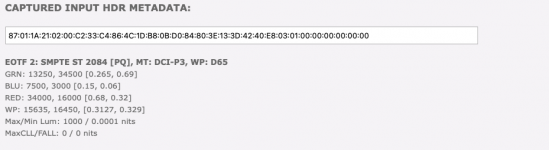
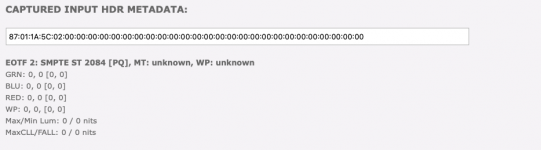
@MikeKobb Sorry to be a bother haha. But I believe I found another issue with the Strato V. It doesn't seem to be passing through the HDR10 metadata to the display. I hooked up my HDFury to the Strato V, and noticed that for every HDR10 movie I tried, it was reporting blank values for the HDR10 metadata that it was receiving/passing through to the display.

Attached pictures of the metadata from the same movie on 4K Blu-ray vs Kaleidescape, comparing the metadata output of my Panasonic UB9000 (which passes through the values), to the Strato V.

It's been a while since I tested this on the Strato C, but I definitely remember it passing through the metadata the last time I did, and I know this is important for TVs to select the correct color space to display the movie in, as well as what tone curve to use when doing static tone mapping, instead of dynamic tone mapping.
 

Attachments

  • Panasonic UB9000 HDR Metadata.png
    Panasonic UB9000 HDR Metadata.png
    42 KB · Views: 30
  • Strato V HDR Metadata.png
    Strato V HDR Metadata.png
    32.2 KB · Views: 16
@MikeKobb Sorry to be a bother haha. But I believe I found another issue with the Strato V. It doesn't seem to be passing through the HDR10 metadata to the display. I hooked up my HDFury to the Strato V, and noticed that for every HDR10 movie I tried, it was reporting blank values for the HDR10 metadata that it was receiving/passing through to the display.

Attached pictures of the metadata from the same movie on 4K Blu-ray vs Kaleidescape, comparing the metadata output of my Panasonic UB9000 (which passes through the values), to the Strato V.

It's been a while since I tested this on the Strato C, but I definitely remember it passing through the metadata the last time I did, and I know this is important for TVs to select the correct color space to display the movie in, as well as what tone curve to use when doing static tone mapping, instead of dynamic tone mapping.
Hmmm, that does seem odd. I will pass that along to the video team, thank you!
I believe I recall seeing a menu selection in the web GUI settings interface to send or not send metadata.
 
I believe I recall seeing a menu selection in the web GUI settings interface to send or not send metadata.
That is a different type of metadata, unrelated to HDR10 metadata. HDR10 metadata should always be passed. I believe that's for stuff like aspect ratio and possibly other video descriptors, and is used by control systems for handling things like dynamic screen masking if your projector screen supports that.

Just to be sure though, I did just enable that, and can confirm that the HDR10 metadata still isn't being passed.
 
That is a different type of metadata, unrelated to HDR10 metadata. HDR10 metadata should always be passed. I believe that's for stuff like aspect ratio and possibly other video descriptors, and is used by control systems for handling things like dynamic screen masking if your projector screen supports that.

Just to be sure though, I did just enable that, and can confirm that the HDR10 metadata still isn't being passed.

OK thanks for clarifying. I’ll try to test mine when I get the chance later with my HDFury.
 
I just hooked up my player with my 83” oled. I’m able to get the Dolby Vision confirmation through my display, but the receiver info is showing 4k SDR. I’m using the supplied pixelgen hdmi cable. Could this be attributed to the cable?

Secondly I made 3 purchases through the app with the firm belief that I would be using my $100 credit which I received (referral code). However my balance is still reflecting $100. I thought those purchases were covered via the balance. Does the account reconciliation happen immediately or will this update eventually?

Thanks for all the help/support.

Edit: the balance did update after 30 mins. Anyways, this might be useful to someone else as well, who might freak out like I did initially…🤣
 
I doubt it's the cable. Can you describe how HDMI is routed? Do you go to the display first and then back to the receiver via HDMI ARC?
 
I doubt it's the cable. Can you describe how HDMI is routed? Do you go to the display first and then back to the receiver via HDMI ARC?
Through the receiver. All the components are plugged into my receiver. Single eArc out from the receiver to the display.
 
If you see the TV switch to indicating Dolby Vision when you play a Dolby Vision title, then I wouldn't worry about it. Do you have other Dolby Vision-capable devices connected to the receiver, like an Apple TV or something? What does your receiver display when you play Dolby Vision content from it, if so?
 
If you see the TV switch to indicating Dolby Vision when you play a Dolby Vision title, then I wouldn't worry about it. Do you have other Dolby Vision-capable devices connected to the receiver, like an Apple TV or something? What does your receiver display when you play Dolby Vision content from it, if so?
I just shut down everything, unplugged the hdmi cable, plugged it back in again and everything is fixed. Everything now is being displayed correctly (Display and receiver). Sometimes a simple old school fix delivers the goods.
 
If you see the TV switch to indicating Dolby Vision when you play a Dolby Vision title, then I wouldn't worry about it. Do you have other Dolby Vision-capable devices connected to the receiver, like an Apple TV or something? What does your receiver display when you play Dolby Vision content from it, if so?
Unfortunately it is acting up again. Back to 4k/sdr info when I try to obtain the same from the AVR. Quite frustrating because I usually obtain the relevant audio/video data from the receiver’s gui.

I tried the apple TV, my shield along with my 4k Blu-ray player and the info was being transmitted correctly through the receiver. Plus the font (via receiver info) is for some strange reason displayed in neon pink for the V. All other components are displayed in bold white, which is normal.
 
For those of you who have plugged their V into the receiver/ processor; I would request and really appreciate, if you could check if the AVR/ processor OSD is displaying the correct A/V info. Plus the OsD is being displayed in some funky pink neon color. This is not the case with the other components like I mentioned earlier. As a reminder all components are plugged into the receiver.

I feel the V is not being able to correctly translate the relevant info. to the receiver. I was able to make it work for a while, after unplugging/ plugging the cable, but unfortunately it reverted back to its previous erroneous state and stayed there. I tried different hdmi terminals on the receiver, along with a bunch of different ultra high speed hdmi cables (Zezkit Maya, Rui pro etc) but kept getting the same outcome. So we can comfortably eliminate those variables out of the equation.

Fwiw my oled is correctly detecting it as Dolby vision and everything is playing correctly as intended. There appears to be a disconnect or incompatibility issue somewhere.
 
For those of you who have plugged their V into the receiver/ processor; I would request and really appreciate, if you could check if the AVR/ processor OSD is displaying the correct A/V info. Plus the OsD is being displayed in some funky pink neon color. This is not the case with the other components like I mentioned earlier. As a reminder all components are plugged into the receiver.

I feel the V is not being able to correctly translate the relevant info. to the receiver. I was able to make it work for a while, after unplugging/ plugging the cable, but unfortunately it reverted back to its previous erroneous state and stayed there. I tried different hdmi terminals on the receiver, along with a bunch of different ultra high speed hdmi cables (Zezkit Maya, Rui pro etc) but kept getting the same outcome. So we can comfortably eliminate those variables out of the equation.

Fwiw my oled is correctly detecting it as Dolby vision and everything is playing correctly as intended. There appears to be a disconnect or incompatibility issue somewhere.
Had the exact same pink font osd with a new mono price hdmi cable. LG 83 OLED and the V are struggling with htcp 2.3 compatibility. I’ve ordered a 33ft thx cable to see if it fixes the problem
 
For those of you who have plugged their V into the receiver/ processor; I would request and really appreciate, if you could check if the AVR/ processor OSD is displaying the correct A/V info. Plus the OsD is being displayed in some funky pink neon color. This is not the case with the other components like I mentioned earlier. As a reminder all components are plugged into the receiver.

I feel the V is not being able to correctly translate the relevant info. to the receiver. I was able to make it work for a while, after unplugging/ plugging the cable, but unfortunately it reverted back to its previous erroneous state and stayed there. I tried different hdmi terminals on the receiver, along with a bunch of different ultra high speed hdmi cables (Zezkit Maya, Rui pro etc) but kept getting the same outcome. So we can comfortably eliminate those variables out of the equation.

Fwiw my oled is correctly detecting it as Dolby vision and everything is playing correctly as intended. There appears to be a disconnect or incompatibility issue somewhere.
What receiver are you using?
 
For those of you who have plugged their V into the receiver/ processor; I would request and really appreciate, if you could check if the AVR/ processor OSD is displaying the correct A/V info. Plus the OsD is being displayed in some funky pink neon color. This is not the case with the other components like I mentioned earlier. As a reminder all components are plugged into the receiver.

I feel the V is not being able to correctly translate the relevant info. to the receiver. I was able to make it work for a while, after unplugging/ plugging the cable, but unfortunately it reverted back to its previous erroneous state and stayed there. I tried different hdmi terminals on the receiver, along with a bunch of different ultra high speed hdmi cables (Zezkit Maya, Rui pro etc) but kept getting the same outcome. So we can comfortably eliminate those variables out of the equation.

Fwiw my oled is correctly detecting it as Dolby vision and everything is playing correctly as intended. There appears to be a disconnect or incompatibility issue somewhere.

Sounds to me like you’re having issues with it getting confused about which version of Dolby Vision it wants to send. The V can send either the original 8-bit Tunneled RGB which gets decoded by the display (Display Led DV) or it can do Low Latency Dolby Vision (LLDV) Profile 5 (Player Led DV)

When you saw it as SDR on the receiver, that’s most likely LLDV because when it isn’t recognized by a display for some reason, such as not being LLDV capable, then it will be reported as being SDR. This is the reason we need to add HDR10 metadata to the signal for projector and Samsung TV users, so they display properly using their HDR modes with a PQ “gamma” curve and BT2020 colorspace.

Then when you see the hot pink, that’s most likely the RGB tunneled DV not being recognized properly. It shows up as that pinkish purple screen.

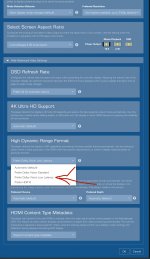
My first suggestion to try is to turn it off of Auto in the Settings menu and then I would select “Prefer Dolby Vision Low Latency” and see what happens.
 

Attachments

  • IMG_0727.jpeg
    IMG_0727.jpeg
    1.1 MB · Views: 26
My processor's OSD coloring also appears to be all over the place - Marantz AV10 (which can pass through all the latest HDMI formats).
Same here on my Denon A1H. Fwiw I did try “prefer LLDV” as @HarperVision was alluding to. It worked but I’m losing played led option which for all intents and purposes is a superior DoVi implementation/ experience, especially when you have native DoVi support.
 
Sounds to me like you’re having issues with it getting confused about which version of Dolby Vision it wants to send. The V can send either the original 8-bit Tunneled RGB which gets decoded by the display (Display Led DV) or it can do Low Latency Dolby Vision (LLDV) Profile 5 (Player Led DV)

When you saw it as SDR on the receiver, that’s most likely LLDV because when it isn’t recognized by a display for some reason, such as not being LLDV capable, then it will be reported as being SDR. This is the reason we need to add HDR10 metadata to the signal for projector and Samsung TV users, so they display properly using their HDR modes with a PQ “gamma” curve and BT2020 colorspace.

Then when you see the hot pink, that’s most likely the RGB tunneled DV not being recognized properly. It shows up as that pinkish purple screen.

My first suggestion to try is to turn it off of Auto in the Settings menu and then I would select “Prefer Dolby Vision Low Latency” and see what happens.

Thanks a lot for all that. It worked for me well. But I always thought display led Dolby Vision is the superior implementation especially when you have native DoVi support. LLDV is inevitable when you don’t have prerequisite native support especially HDFury environment. But I could be mistaken.

However I’m still struggling to understand how after plugging out / plugging back the cables brought the OSD to function normally and also report correct metadata. The nasty pink color went away and it was correctly displaying bright white which is the normal OSD color. It stayed that way during that particular viewing session. I checked multiples times. However it started acting up again during subsequent sessions. So there is some glitch somewhere which I feel could be addressed via a future Sw update.
 
Last edited:
Back
Top