• Thanks for visiting the Kaleidescape Owners' Forum

    This forum is for the community of Kaleidescape owners, and others interested in learning about the system, equipment, services, and the company itself.

    It is run by a group of enthusiastic Kaleidescape owners and dealers purely as a service to this community.

    This board is not affiliated in any way with Kaleidescape, Inc.
    For official technical support, product information, or customer service, please visit www.kaleidescape.com

    You can dismiss this box forever by clicking the "X" in the upper right corner of this message.
  • You are currently in "Guest" mode and not logged in with a registered account.

    The forum is free to use and most of the forum can be used by guests who are not registered....

    ... but we strongly encourage you to register for a full account. There is no cost to register for a full account.

    Benefits of registering for a full account:

    • Participate in the discussions! You must have a registered account to make posts on the forums. You will be able to start your own thread on a topic or question, or you can reply to other threads/discussions.
    • Use the "Conversation" feature (known as "private messaging" on other forums) to communicate directly with any of the other users here.
    • Access the Files area. The "resources" area of the forum contains many "Favorite Scene" and Script files that can dramatically increase the enjoyment of your Kaleidescape system. Go directly to great scenes in your favorite movies, created by other owners, and add automation to playback of your system with Scripts.
    • You won't see this annoying notice at the top of every screen!😊

    It's easy and free to register for the forum. Just click the "Register" button in the upper right corner of this page, and follow the instructions there.

    This box goes away for registered users.

NEWS: Strato V Player Announced

You don't need to buy two copies. Your Kaleidescape store account allows you to activate up to 5 separate systems on the same account. Movies purchased from the store can be downloaded to all 5 of those systems.

Makes the V the perfect holiday gift for four of your family and friends that buy movies! :p
 
Hey folks, the Dolby Vision is a great improvement, but what about this audio upgrade.

Of course, my projector doesn't have Dolby Vision, but I run a 7.2.4 Atmos setup and this sounds like a pretty sweet upgrade.

Was this a typo by K or is the C only capable of lossy 5.1, because I thought I was decoding lossless 7.1 channels on my Strato C (with my Marantz SR8015, but I could be misunderstanding.

Thoughts? Can anyone elaborate on this?


View attachment 5247
Believe that’s for PCM and or DTS-HD, but yes it seems to be an upgrade in those categories. Dolby TrueHD and Atmos in bitstream are still the same.
 
You don't need to buy two copies. Your Kaleidescape store account allows you to activate up to 5 separate systems on the same account. Movies purchased from the store can be downloaded to all 5 of those systems.

However, in your case above, you don't even need to do that. Since the Strato V and Strato C are in the same household, conceivably, you'd put them on the same network. In that case, you simply group the Strato V to the same Terra you have the Strato C grouped with. All of the content on the Terra that is compatible with your Strato V would be accessible and playable in your Strato V zone and all of the content on the the Terra that is compatible with your Strato C would be accessible and playable in your Strato C zone.

If you go with two Strato V's with no Terra server in the middle, you would activate each of the Strato V's as separate systems on the same store account and then download whatever movies you want to each of the units individually.
@J.Green , thanks for the feedback. I understand I would not need to purchase the title again.
To clarify, my question is with a Strato C and a Strato V, would I need two copies on the server to carry a Dolby Vision and an HDR title, basically taking up double data if I want to view it from both players in the highest quality possible?

The Dolby Vision title will not down convert for playing on the Strato C and my projector, correct? The best solution is double data or just use the HDR title on both players, right?
 
Does it share between Strato V’s? Meaning without a Terra in the system, just for example 2-3 Strato V’s (standalone)
 
Will the Strato V switch to grouped mode or the traditional interface with a Terra (Non-Prime) server?
 
John, thanks for the feedback. I understand I would not need to purchase the title again.
To clarify, my question is with a Strato C and a Strato V, would I need two copies on the server to carry a Dolby Vision and an HDR title, basically taking up double data if I want to view it from both players in the highest quality possible?

The Dolby Vision title will not down convert for playing on the Strato C and my projector, correct? The best solution is double data or just use the HDR title on both players, right?
Ah! Apologies for the misunderstanding.

Yes. In a mixed system (Strato C and Strato V), the Strato C will only be able to play 4K SDR and 4K HDR10. The Strato V can play all three (4K SDR, 4K HDR10, and 4K Dolby Vision). So you have the following options:

  • Download both an HDR10 and a Dolby Vision version of the movie so that each player plays the highest quality they support; or,
  • Download just the HDR10 version and let the Strato V play it either as HDR10 or convert it to a Dolby Vision-compatible output depending on how you have the Strato V's video settings configured.
 
Does it share between Strato V’s? Meaning without a Terra in the system, just for example 2-3 Strato V’s (standalone)
No. Strato V in standalone mode operates as a single system and cannot be grouped with other players. It requires a Terra or Terra Prime server to group with.
 
Will the Strato V switch to grouped mode or the traditional interface with a Terra (Non-Prime) server?
Yes. You can group Strato V with a Terra as well as a Terra Prime. You cannot group it with a system that does not have some flavour of Terra in it though.

As for the interface, in grouped mode, the Strato V switches to the full kOS interface (with List, and covers places). The Collections place updates to show user collections however it remains in the new horizontal layout rather than the old text-based Collections view.

It should also be noted that even in grouped mode, the Strato V doesn't currently support the OSD store interface yet.
 
FYI, I'm noticing in the dealer portal that for folks that have existing systems, adding a Strato V can score you $200 of movie store credit on a promo. It was added to the existing add a Terra promotion that is still ongoing.
 
  • Download just the HDR10 version and let the Strato V play it either as HDR10 or convert it to a Dolby Vision-compatible output depending on how you have the Strato V's video settings configured.
@J.Green

So you're saying the display will like my LG G3 with Dolby Vision will upconvert an HDR10 title to output as Dolby Vision? I believe I'm misunderstanding. Sorry for the 20 questions.
 
@J.Green

So you're saying the display will like my LG G3 with Dolby Vision will upconvert an HDR10 title to output as Dolby Vision? I believe I'm misunderstanding. Sorry for the 20 questions.
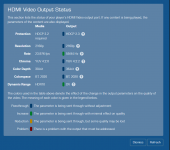
It will, indeed. In fact, I'm using that exact set up here for testing. A Strato V connected to an LG G3 display. If you configure the player for "Minimize display mode changes" and then play an HDR10 title, it will convert the output to a DV signal as you can see here in the HDMI capabilities tool. I'm playing an HDR10 title but it is being converted to DV:
1721145728488.png
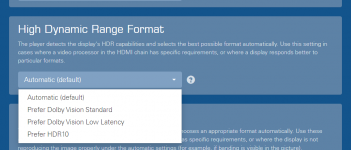
You can also set a preference for HDR if you want to ensure that output is in a specific format. By default, the choice is automatic but you can set it to prefer Dolby Vision Standard, Dolby Vision Low-Latency or even HDR10 if you like:
1721145946222.png
 
Last edited:
It will, indeed. In fact, I'm using that exact set up here for testing. A Strato V connected to an LG G3 display. If you configure the player for "Minimize display mode changes" and then play an HDR10 title, it will convert the output to a DV signal as you can see here in the HDMI capabilities tool. I'm playing an HDR10 title but it is being converted to DV:
View attachment 5249
You can also a preference for HDR if you want to ensure that output is in a specific format. By default, the choice is automatic but you can set it to prefer Dolby Vision Standard, Dolby Vision Low-Latency or even HDR10 if you like:
View attachment 5250
Mind Blown! This is amazing. Have you A/B tested this? On the G3 is there a visual difference between the HDR10>DV conversion vs. Native DV?
 
This will be amazing for in-motion installs, such as cars, RVs etc. It's a compact unit, with SSD, so it can easily be installed in the luggage compartment (Trunk or Boot or Frunk) of a car, and have the kids watch their favorite movie or TV show on the go. Just download while loading the car for that road trip, while parked in the garage, and hours of happy trails for the young'uns.
 
I have said it before, it's been mentioned here again, but please, pretty please, with sugar on top, can we have a local storage management option for moving downloads around on our local storage systems? Or if everything is API driven, can we get the API documentation so some clever person can code an app for it? @MikeKobb just FYI
 
It will, indeed. In fact, I'm using that exact set up here for testing. A Strato V connected to an LG G3 display. If you configure the player for "Minimize display mode changes" and then play an HDR10 title, it will convert the output to a DV signal as you can see here in the HDMI capabilities tool. I'm playing an HDR10 title but it is being converted to DV:
Dolby Vision relies on additional metadata as part of the content file. This metadata is just not included in a HDR10 file, so that doesn´t make any sense IMHO. The other way (DV=> HDR10) is possible as the DV file contains more data than the HDR10 file, hence it can be downconverted.
But the other way round? I´m wondering what this conversion actually does other than triggering a DV flag for the display...
 
@J.Green This is mainly my curiosity, and you may not be able to say, but what Dolby Vision profile are you guys using in the store? Is it similar to UHD Blu-ray's Profile 7, that has an HDR10 base layer with either a Minimum- or Full- Enhancement layer, which can produce either a 10-bit (MEL) or 12-bit (FEL) Dolby Vision video signal, or revert to the base layer for HDR10 only displays? Or is it more similar to the single layer profile 5 used on streaming services (just obviously at a much higher bitrate) that produces only 10-bit video, and then a conversion is done when displayed on an HDR10 only display?

I'm kinda guessing it's the latter (high bitrate profile 5 downloads), given I believe it was mentioned elsewhere, that while the Strato V can display Dolby Vision files on HDR10 displays, the Strato C cannot, so a mixed player system with both Strato Cs and Vs would need two downloads for a given movie
 
Last edited:
Great addition to the kaleidescape family.

Strange that the V doesn’t (currently?) support CEC. I’d think that’s really important to a new-to-kaleidescape user with this standalone, likely sitting next to an AppleTV on a system. Will be a bummer that it doesn’t switch AV inputs on the controller/receiver automatically for this type of user so now they need multiple remotes and/or more advanced programming of their system.

Also begs the question if this comes with the kaleidescape remote control? Sorry if I missed that in the materials.
 
I have wanted this for so long so I’m in
 
Back
Top