• Thanks for visiting the Kaleidescape Owners' Forum

    This forum is for the community of Kaleidescape owners, and others interested in learning about the system, equipment, services, and the company itself.

    It is run by a group of enthusiastic Kaleidescape owners and dealers purely as a service to this community.

    This board is not affiliated in any way with Kaleidescape, Inc.
    For official technical support, product information, or customer service, please visit www.kaleidescape.com

    You can dismiss this box forever by clicking the "X" in the upper right corner of this message.
  • You are currently in "Guest" mode and not logged in with a registered account.

    The forum is free to use and most of the forum can be used by guests who are not registered....

    ... but we strongly encourage you to register for a full account. There is no cost to register for a full account.

    Benefits of registering for a full account:

    • Participate in the discussions! You must have a registered account to make posts on the forums. You will be able to start your own thread on a topic or question, or you can reply to other threads/discussions.
    • Use the "Conversation" feature (known as "private messaging" on other forums) to communicate directly with any of the other users here.
    • Access the Files area. The "resources" area of the forum contains many "Favorite Scene" and Script files that can dramatically increase the enjoyment of your Kaleidescape system. Go directly to great scenes in your favorite movies, created by other owners, and add automation to playback of your system with Scripts.
    • You won't see this annoying notice at the top of every screen!😊

    It's easy and free to register for the forum. Just click the "Register" button in the upper right corner of this page, and follow the instructions there.

    This box goes away for registered users.

Popcorn Ready app for iOS

Thanks! You should be able to manage downloads while not on your home network. 2500 movies is a huge library. Please let me know if you run into any performance issues using any features.
Cataloguing was super fast - the iPhone 18 Pro Max first on my 2.2 GBPS Internet connecting - it took a little bit to catalog (maybe 3 or 4 minutes so not very long at all) - next on my iPad on the same network and it was blazing fast say under 2 minutes - I was thinking you may be using ICLOUD for catalog backup because once the data was on cloud the next device was quick.
 
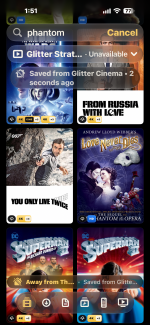
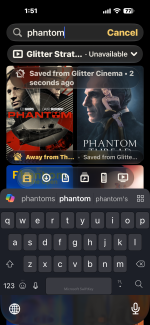
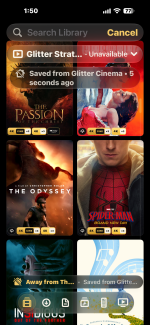
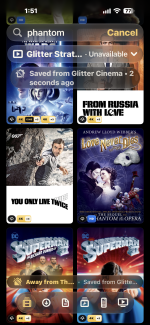
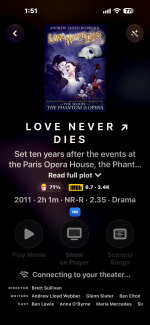
@OUTATIME I am now away from my home network - searched 'phantom' of the few movies which showed up one was Love Never Dies with a little cloud at the bottom right (very nice touch as it means this is not sitting on my Terra) - when I click on the cover Art there is no way to download it to my Terra (while I am away from my network) - am I missing something? Thanks.
 
The 246TB terra is calling your name. Of course you may need to sell your house an move into a box.
I did 'Sell' all my K Terra and 80 TB premier server Blah Blah.... and moved to a SSD Terra as with these many movies best to leave them in the cloud as I can download HD movie in 1or 2 minutes using my 2.2 GBPS internet and Cinematic DV in 6 to 10 minutes - there is never enough hard drive space except in the cloud.
 
@OUTATIME I am now away from my home network - searched 'phantom' of the few movies which showed up one was Love Never Dies with a little cloud at the bottom right (very nice touch as it means this is not sitting on my Terra) - when I click on the cover Art there is no way to download it to my Terra (while I am away from my network) - am I missing something? Thanks.
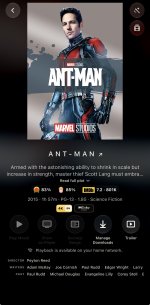
Hmmm....I just disabled my WiFi to get off network and I still see the Manage Download button. Do you not see that button enabled?IMG_8943.jpeg
 
Not in order but I am sure you will know - I even tried by turning off WIFI if my office firewall was goofing
 

Attachments

  • IMG_0227.PNG
    IMG_0227.PNG
    7.4 MB · Views: 11
  • IMG_0228.PNG
    IMG_0228.PNG
    2.2 MB · Views: 9
  • IMG_0227.PNG
    IMG_0227.PNG
    4.2 MB · Views: 9
  • IMG_0226.PNG
    IMG_0226.PNG
    2.4 MB · Views: 9
  • IMG_0225.PNG
    IMG_0225.PNG
    4 MB · Views: 9
Not in order but I am sure you will know - I even tried by turning off WIFI if my office firewall was goofing
Ah, I think from your screenshots that this is an issue with an accessibility feature. I think you must have large text enabled. Looks like that has clipped some available features. Please try disabling, if you can, to confirm. I'll work on this in the next release to make sure this screen works with large text.

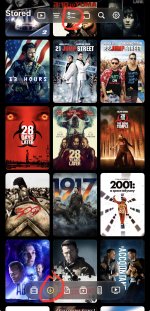
There's another way to download movies for now as well. On the main screen, click the 2nd button on bottom to show your current stored movies. Then on top click the button that looks like a checklist and that will go to download queue. From there you can add titles, remove titles, etc.

IMG_8945.jpeg
 
Changing the Large Text did not help.
I was able to use the 2nd instructions and download a movie YAAAY
 
Changing the Large Text did not help.
I was able to use the 2nd instructions and download a movie YAAAY
Figured out that it’s actually this setting and it needs to be at the default large. • Display & Brightness → Text Size

Also figured out that back on your screenshot of a specific movie you want to download that you should be able to scroll to the right in that row of buttons and Manage Downloads should be just off screen on the right.

I will improve that in the next release. Thanks!
 
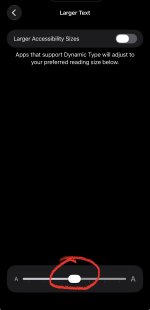
In IOS 27.2.1 Clicking on Display and Settings the last item is More In Accessibility Settings.
When you click this you have Bold Text (mine is on) Larger Text - when you click on this there is a Toggle Larger Accessibility Size I turned that off (it was on) - below that is apps that support dynamic test will adjust and these is a small text to larger slider you can choose.
In summary turning off the toggle off the problem persists (i rebooted the phone just to make sure).
Thanks for helping
 
In IOS 27.2.1 Clicking on Display and Settings the last item is More In Accessibility Settings.
When you click this you have Bold Text (mine is on) Larger Text - when you click on this there is a Toggle Larger Accessibility Size I turned that off (it was on) - below that is apps that support dynamic test will adjust and these is a small text to larger slider you can choose.
In summary turning off the toggle off the problem persists (i rebooted the phone just to make sure).
Thanks for helping
Looks like it moved down to this slider now. I think if you drag this slider back to the middle it should work. That’s my theory anyway.

IMG_8946.jpeg
 
I’ll make the icons scale to a second row so you don’t have to scroll sideways on the single row. Thanks
 
I've got a 1.0.1 build I'm testing that has improved large text handling as well as better support for the streaming trailers. If that build looks good I'll update the version in the App Store soon. Thanks
 
I've got a suggestion if it's possible. From the cover art screen, when you're not connected to the system, you can't click on a movie, and then put it into collections. That would be pretty handy, but I guess might not be possible.
 
I've got a suggestion if it's possible. From the cover art screen, when you're not connected to the system, you can't click on a movie, and then put it into collections. That would be pretty handy, but I guess might not be possible.
That would take a change on Kaleidescape's end...which I would also encourage. Currently, Collections only live on the local system. If they moved that into the Store/Cloud then it would also allow you to include movies that you don't even have downloaded in Collections and that could also make the feature available for standalone Strato customers.


All of that being said........I could potentially handle offline collection changes and then merge them next time you get connected to the system. But I'd really love to see Kaleidescape make the change.
 
Back
Top