Yes, I use the request I made to have "Wishlist" items only so that I can sort them by "Title". He must have added the feature like a day after I requested it. Amazing!I’m constantly amazed at how responsive @OUTATIME is to user requests, and how quickly he does updates!


-
Thanks for visiting the Kaleidescape Owners' Forum
This forum is for the community of Kaleidescape owners, and others interested in learning about the system, equipment, services, and the company itself.It is run by a group of enthusiastic Kaleidescape owners and dealers purely as a service to this community.
This board is not affiliated in any way with Kaleidescape, Inc.
For official technical support, product information, or customer service, please visit www.kaleidescape.com
You can dismiss this box forever by clicking the "X" in the upper right corner of this message. -
You are currently in "Guest" mode and not logged in with a registered account.
The forum is free to use and most of the forum can be used by guests who are not registered....
... but we strongly encourage you to register for a full account. There is no cost to register for a full account.
Benefits of registering for a full account:
- Participate in the discussions! You must have a registered account to make posts on the forums. You will be able to start your own thread on a topic or question, or you can reply to other threads/discussions.
- Use the "Conversation" feature (known as "private messaging" on other forums) to communicate directly with any of the other users here.
- Access the Files area. The "resources" area of the forum contains many "Favorite Scene" and Script files that can dramatically increase the enjoyment of your Kaleidescape system. Go directly to great scenes in your favorite movies, created by other owners, and add automation to playback of your system with Scripts.
- You won't see this annoying notice at the top of every screen!😊
This box goes away for registered users.
You are using an out of date browser. It may not display this or other websites correctly.
You should upgrade or use an alternative browser.
You should upgrade or use an alternative browser.
Popcorn Ready app for iOS
- Thread starter OUTATIME
- Start date

- Joined
- Dec 4, 2024
- Messages
- 447
Here we go!!!! I'm pleased to announce that Popcorn Ready is now officially listed on the Apple App Store! For those of you that have been waiting for the official release before giving it a try, now is your time! And for those of you that have already been using the app you can install the official version of the app and it will replace your TestFlight version automatically and should preserve your existing filters/accounts/etc as long as you don't delete the TestFlight version before installing the official version.
Thank you to all of the users on this forum that contributed ideas and feedback during this process! If you like the app, please leave a review in the App Store as this is my first app and that will be very helpful. Thanks again!!!

 apps.apple.com
Thank you to all of the users on this forum that contributed ideas and feedback during this process! If you like the app, please leave a review in the App Store as this is my first app and that will be very helpful. Thanks again!!!
Popcorn Ready Remote App - App Store
Download Popcorn Ready Remote by KM Projects LLC on the App Store. See screenshots, ratings and reviews, user tips, and more apps like Popcorn Ready Remote.
apps.apple.com


Congratulations, what a fantastic app!
- Joined
- Dec 4, 2024
- Messages
- 447
Here is the iOS App Store link: Popcorn Ready Remote App - App StoreGreat news, but I can't find the app in the iOS App Store. I found it on the Mac App Store, but I'm running Sequoia and it is not compatible. This is strange since it's an iPad app.
Below are the minimum requirements:
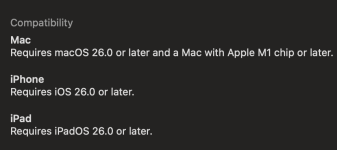
Why it won’t run on Sequoia: The Mac runs the iPad version of Popcorn Ready Remote. Apple maps the app’s iPadOS 26.0 minimum to macOS Tahoe 26.0. Sequoia is macOS 15, and it lacks newer interface features the app uses, including Liquid Glass. So even an M-series Mac running Sequoia needs an OS upgrade to run this release.
I was able to find it, but there are a lot of apps beginning with the word "Popcorn".I can’t seem to find the app by a search only by the link provided. Anyone else find that?

Found the iOS app using your link. Thanks so much !Here is the iOS App Store link: Popcorn Ready Remote App - App Store
Below are the minimum requirements:
View attachment 12696
Why it won’t run on Sequoia: The Mac runs the iPad version of Popcorn Ready Remote. Apple maps the app’s iPadOS 26.0 minimum to macOS Tahoe 26.0. Sequoia is macOS 15, and it lacks newer interface features the app uses, including Liquid Glass. So even an M-series Mac running Sequoia needs an OS upgrade to run this release.
Re: Mac: I understand why the app is not compatible. I just have no desire to update my M-series Mac Studio to liquid.
Thanks again for all your hard and fruitful work, not to mention your kindness and courtesy in so graciously accepting feedback during the beta.
- Joined
- Dec 4, 2024
- Messages
- 447
I also have no idea how the Apple indexing works. There's a good chance it will start showing up a bit better in search in the next few days after some time passes and there are some users.I was able to find it, but there are a lot of apps beginning with the word "Popcorn".
For now, much easier to just share the link though.
- Joined
- Dec 4, 2024
- Messages
- 447
FWIW, with MacOS 27, you can now customize how much or how little transparency you want for Liquid Glass. Not sure if that's the only thing holding you back from upgrading the OS.Found the iOS app using your link. Thanks so much !
Re: Mac: I understand why the app is not compatible. I just have no desire to update my M-series Mac Studio to liquid.
Thanks again for all your hard and fruitful work, not to mention your kindness and courtesy in so graciously accepting feedback during the beta.
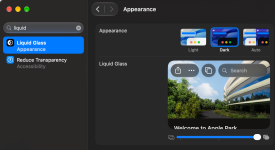
Yes, thanks, I am aware. But, since I did not update to Tahoe, I don't want to update to Golden Gate until a few more versions are released.FWIW, with MacOS 27, you can now customize how much or how little transparency you want for Liquid Glass. Not sure if that's the only thing holding you back from upgrading the OS.
View attachment 12697
- Joined
- Dec 4, 2024
- Messages
- 447
I actually had it for a few releases but got rid of it because too much of the UI was cramped on a phone. I felt like with movie posters being the star of the show, that it makes a lot more sense to use portrait mode on a small device like a phone. I also checked Apple TV and Netflix and neither support landscape on phone so I just removed it instead of trying to come up with alternative designs to work with that layout.@OUTATIME do you it would be feasible to enable landscape mode on the iPhone? Thanks.
Understand thanks. Agree for the phone UI that makes sense. I was trying to mirror to the Apple TV where portrait doesn’t work well.I actually had it for a few releases but got rid of it because too much of the UI was cramped on a phone. I felt like with movie posters being the star of the show, that it makes a lot more sense to use portrait mode on a small device like a phone. I also checked Apple TV and Netflix and neither support landscape on phone so I just removed it instead of trying to come up with alternative designs to work with that layout.
- Joined
- Dec 4, 2024
- Messages
- 447
Oh, that's an interesting use case and maybe worth exploring for me. Do you ever use an iPad or MacBook in the theater or only the iPhone.Understand thanks. Agree for the phone UI that makes sense. I was trying to mirror to the Apple TV where portrait doesn’t work well.
Oh, that's an interesting use case and maybe worth exploring for me. Do you ever use an iPad or MacBook in the theater or only the iPhone.
For my use case it could be any of those depending on which family member. My older son would use his iphone. My younger twins would use their ipads. I would use my macbook or iphone.
What a awesome APP - BRAVO.Oh, that's an interesting use case and maybe worth exploring for me. Do you ever use an iPad or MacBook in the theater or only the iPhone.
Please post a Youtube Video how to use it - I am sure we are missing a lot of usability due to lack of knowledge of what you have built in it.
QUESTION - In the Popcorn App - say I am out at a restaurant with friends - I can see all the 2500 K movies I own and I can search also (love that feature) - can I download a movie to my Terra server also? Or do I have to be in my home network to be able to download the movie to my Terra?
Thanks very much - this will be my GOTO App going forward - it is beautiful.
- Joined
- Dec 4, 2024
- Messages
- 447
Thanks! You should be able to manage downloads while not on your home network. 2500 movies is a huge library. Please let me know if you run into any performance issues using any features.What a awesome APP - BRAVO.
Please post a Youtube Video how to use it - I am sure we are missing a lot of usability due to lack of knowledge of what you have built in it.
QUESTION - In the Popcorn App - say I am out at a restaurant with friends - I can see all the 2500 K movies I own and I can search also (love that feature) - can I download a movie to my Terra server also? Or do I have to be in my home network to be able to download the movie to my Terra?
Thanks very much - this will be my GOTO App going forward - it is beautiful.