• Thanks for visiting the Kaleidescape Owners' Forum

    This forum is for the community of Kaleidescape owners, and others interested in learning about the system, equipment, services, and the company itself.

    It is run by a group of enthusiastic Kaleidescape owners and dealers purely as a service to this community.

    This board is not affiliated in any way with Kaleidescape, Inc.
    For official technical support, product information, or customer service, please visit www.kaleidescape.com

    You can dismiss this box forever by clicking the "X" in the upper right corner of this message.
  • You are currently in "Guest" mode and not logged in with a registered account.

    The forum is free to use and most of the forum can be used by guests who are not registered....

    ... but we strongly encourage you to register for a full account. There is no cost to register for a full account.

    Benefits of registering for a full account:

    • Participate in the discussions! You must have a registered account to make posts on the forums. You will be able to start your own thread on a topic or question, or you can reply to other threads/discussions.
    • Use the "Conversation" feature (known as "private messaging" on other forums) to communicate directly with any of the other users here.
    • Access the Files area. The "resources" area of the forum contains many "Favorite Scene" and Script files that can dramatically increase the enjoyment of your Kaleidescape system. Go directly to great scenes in your favorite movies, created by other owners, and add automation to playback of your system with Scripts.
    • You won't see this annoying notice at the top of every screen!😊

    It's easy and free to register for the forum. Just click the "Register" button in the upper right corner of this page, and follow the instructions there.

    This box goes away for registered users.

New (to me) Strato E not downloading movies

Cshull

Member
Joined
Dec 21, 2023
Messages
23
I bought a used Strato E and reset it using the pinhole on the back, connected it and activated it to my account. It updated the operating system, shows movies I have purchased as being purchased, streams previews, but will not start downloading purchased movies. It is stuck at “0% completed” for some time. I tried restarting it and tried deleting the download and trying another movie but still stuck at 0%. Any thoughts? When I first started it up it as trying to connect to the previous owners system until I reset it with the pinhole, perhaps that has something to do with it?
 
Never mind, I guess in need to learn more patience. After about 30 min or so it started downloading. Carry on…
 
Sound to me like your Strato E was in the process of updating its guide data. If the movie guide on your system is out of date downloads are not allowed to proceed until that update completes. This is to prevent a situation where you download a movie from the store and then can't play it because there are no play item bookmarks available for the title. There's usually an indication on the store download page when a download is blocked due to a guide ball update taking place.

Just as an aside: when the system's download is blocked pending a guide ball update, rebooting it is pretty much the _worst_ thing you can do. When you do that, you are essentially resetting the in-progress guide ball update back to zero and forcing it to start anew. There is no way to speed up the process. You just have to wait it out.

On the upside, guide ball updates on the newer Stratos (V, E, and K) and Terra Primes finish much more quickly than on older Strato/Strato S and Altos.
 
Sound to me like your Strato E was in the process of updating its guide data. If the movie guide on your system is out of date downloads are not allowed to proceed until that update completes. This is to prevent a situation where you download a movie from the store and then can't play it because there are no play item bookmarks available for the title. There's usually an indication on the store download page when a download is blocked due to a guide ball update taking place.

Just as an aside: when the system's download is blocked pending a guide ball update, rebooting it is pretty much the _worst_ thing you can do. When you do that, you are essentially resetting the in-progress guide ball update back to zero and forcing it to start anew. There is no way to speed up the process. You just have to wait it out.

On the upside, guide ball updates on the newer Stratos (V, E, and K) and Terra Primes finish much more quickly than on older Strato/Strato S and Altos.I

I though that using the pinhole on the back of the device only resets the DHCP network settings and that a used device needs to be "Removed from System" using the software button in the Kscape setup software before it is added to a new owner's account. Please clarify.
 
I though that using the pinhole on the back of the device only resets the DHCP network settings and that a used device needs to be "Removed from System" using the software button in the Kscape setup software before it is added to a new owner's account. Please clarify.
The pinhole reset button does different things on different products. For most devices, it only resets the network settings back to DHCP (which is why it's mainly a waste of time when you are troubleshooting issues related to audio or video output).

On the newer Stratos (V, E, M, and K), the pinhole reset button is also used to revert the device back to standalone mode after it has been running in grouped mode. This is documented in the Installation Guides for these Stratos as well as the Frequently Asked Questions articles on the Support site. For example see https://support.kaleidescape.com/support/article/Strato-E-FAQ :
To return Strato E to standalone mode — with the power on — initiate a factory reset by pressing and holding the pinhole reset button on the Strato E back panel for 5 seconds until the internal LEDs begin blinking. The Strato E will reboot and switch to standalone mode. When reactivated in standalone mode, the onboard storage will be empty.
 
Last edited:
...
Just as an aside: when the system's download is blocked pending a guide ball update, rebooting it is pretty much the _worst_ thing you can do. When you do that, you are essentially resetting the in-progress guide ball update back to zero and forcing it to start anew. There is no way to speed up the process. You just have to wait it out.
...
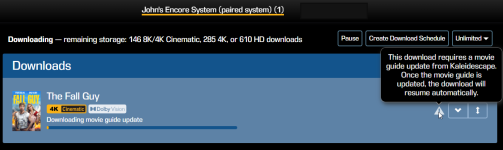
What's the indication on the device that the guide is being updated and to know that patience is required?
 
What's the indication on the device that the guide is being updated and to know that patience is required?
There is no on-device notification. Guide ball updates are normally a background operation and shouldn't interfere with downloads unless your device has been offline for an extended period of time or -- as in this case -- you reset it from grouped mode to standalone mode (which guarantees that your Strato will need a guide ball update because it won't have one at all) and you queue a download to it immediately after the reset.

The indication is on the downloads page of the web store:
1793283907682.png
 
The pinhole reset button does different things on different products. For the most devices, it only resets the network settings back to DHCP (which is why it's mainly a waste of time when you are troubleshooting issues related to audio or video output).

On the newer Stratos (V, E, M, and K), the pinhole reset button is also used to revert the device back to standalone mode after it has been running in grouped mode. This is documented in the Installation Guides for these Stratos as well as the Frequently Asked Questions articles on the Support site. For example see https://support.kaleidescape.com/support/article/Strato-E-FAQ :
This what I had to do on my V to put it back in stand alone.
 
Back
Top