No - what you probably read is that occassionally the tracks offered to K are the same as to the streaming platforms (lossy immersive), but where that happens K refuse the lossy format and use a lossless alternatve, usually DTS-HD MA. This is why you see cases where disc/streaming has an immersive track, but K doesn't.I thought I read that they only have access to whatever the streaming platforms have for audio - which is lossy dolby audio.


-
Thanks for visiting the Kaleidescape Owners' Forum
This forum is for the community of Kaleidescape owners, and others interested in learning about the system, equipment, services, and the company itself.It is run by a group of enthusiastic Kaleidescape owners and dealers purely as a service to this community.
This board is not affiliated in any way with Kaleidescape, Inc.
For official technical support, product information, or customer service, please visit www.kaleidescape.com
You can dismiss this box forever by clicking the "X" in the upper right corner of this message. -
You are currently in "Guest" mode and not logged in with a registered account.
The forum is free to use and most of the forum can be used by guests who are not registered....
... but we strongly encourage you to register for a full account. There is no cost to register for a full account.
Benefits of registering for a full account:
- Participate in the discussions! You must have a registered account to make posts on the forums. You will be able to start your own thread on a topic or question, or you can reply to other threads/discussions.
- Use the "Conversation" feature (known as "private messaging" on other forums) to communicate directly with any of the other users here.
- Access the Files area. The "resources" area of the forum contains many "Favorite Scene" and Script files that can dramatically increase the enjoyment of your Kaleidescape system. Go directly to great scenes in your favorite movies, created by other owners, and add automation to playback of your system with Scripts.
- You won't see this annoying notice at the top of every screen!😊
This box goes away for registered users.
You are using an out of date browser. It may not display this or other websites correctly.
You should upgrade or use an alternative browser.
You should upgrade or use an alternative browser.
Thoughts as a new Kaleidescape User
- Thread starter BLC
- Start date
Certainly where the tracks are like for like then that shouldn't be the case. Can you provide any examples and the audio formats?Understand and agreed 100%. It’s very subjective. I do not have a “high-end system”, having said that, and from the little testing I’ve done, A/B, I have a found a title or two that just doesn’t cut the mustard compared to disc. Shouldn’t be that way.

JonProphet
Well-known member
DTS-MA Interstellar. I A/B’d this heavily for video and audio. Another user confirmed my suspicions.Certainly where the tracks are like for like then that shouldn't be the case. Can you provide any examples and the audio formats?
Not one I'm overly familiar with - but I have both disc and K so I can have a listen and report back.DTS-MA Interstellar. I A/B’d this heavily for video and audio. Another user confirmed my suspicions.
Had my standalone Strato V since 3/2025. Got it at a good price used and have mostly moved from Plex to K-scape with all new purchases on K unless not available like some of the boutique studios releasing catalogue 4K transfers or when object based audio not available on K . So I still maintain my Plex server for that purpose. Have over 500 movies now through D2D and new purchases! Overall I still enjoy it. One thing I continue to find annoying, and I seem to be in the minority, is that there is no good way to browse all owned (not downloaded) movies within the GUI in a feasible way. Only by mobile device or web UI. The store video wall is useless as it's just randomly sorted. When we sit down as a family to to choose a movie it's still nice to all look at the big screen and browse our own library by title or genre or purchase date. Last night my son had a bunch of friends over and they all sat in the theater still undecided what to watch. I sent him a PDF list of titles I generated from the Popcorn Ready chrome plugin that he could share to make it easier. There are some work arounds like screen sharing a device to Apple TV. But to me there is no reason not to implement a sortable owned movie wall/list within the GUI. The only sort of option for this is with a server you can sort all downloaded movies but still not all owned movies. With any other service (Netflix, Prime, etc) aren't people browsing available options on their screen and not phone?
JonProphet
Well-known member
Sorry I didn’t read your entire post. If I’m understanding you is that there is no good way through the app, to browse owned movies that are not downloaded?Had my standalone Strato V since 3/2025. Got it at a good price used and have mostly moved from Plex to K-scape with all new purchases on K unless not available like some of the boutique studios releasing catalogue 4K transfers or when object based audio not available on K . So I still maintain my Plex server for that purpose. Have over 500 movies now through D2D and new purchases! Overall I still enjoy it. One thing I continue to find annoying, and I seem to be in the minority, is that there is no good way to browse all owned (not downloaded) movies within the GUI in a feasible way. Only by mobile device or web UI. The store video wall is useless as it's just randomly sorted. When we sit down as a family to to choose a movie it's still nice to all look at the big screen and browse our own library by title or genre or purchase date. Last night my son had a bunch of friends over and they all sat in the theater still undecided what to watch. I sent him a PDF list of titles I generated from the Popcorn Ready chrome plugin that he could share to make it easier. There are some work arounds like screen sharing a device to Apple TV. But to me there is no reason not to implement a sortable owned movie wall/list within the GUI. The only sort of option for this is with a server you can sort all downloaded movies but still not all owned movies. With any other service (Netflix, Prime, etc) aren't people browsing available options on their screen and not phone?
Just making sure, you have gone to the store. Clicked upper right hand corner, manage. My movies. At the top there is a selection that says, not downloaded.
Attachments
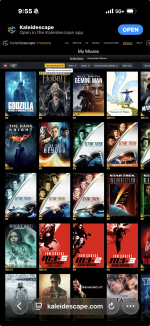
No the onscreen GUI.Sorry I didn’t read your entire post. If I’m understanding you is that there is no good way through the app, to browse owned movies that are not downloaded?
Just making sure, you have gone to the store. Clicked upper right hand corner, manage. My movies. At the top there is a selection that says, not downloaded.
Just demoed the “wormhole” scene on both and I find no difference in the audio ( both DTS-HD MA tracks). They both shook the room to foundation disturbance levelsDTS-MA Interstellar. I A/B’d this heavily for video and audio. Another user confirmed my suspicions.
 . Typical Nolan mix, but to my ears identical.
Kit
Storm ISR Fusion
Perlisten R5i (LCR)
Perlisten R4i (Surrounds and Rears)
Perlisten D15s x 4 (Subwoofers)
JonProphet
Well-known member
Gotcha. I’d submit a feature regret via Email.No the onscreen GUI.

Funny typo..Gotcha. I’d submit a feature regret via Email.

Had my standalone Strato V since 3/2025. Got it at a good price used and have mostly moved from Plex to K-scape with all new purchases on K unless not available like some of the boutique studios releasing catalogue 4K transfers or when object based audio not available on K . So I still maintain my Plex server for that purpose. Have over 500 movies now through D2D and new purchases! Overall I still enjoy it. One thing I continue to find annoying, and I seem to be in the minority, is that there is no good way to browse all owned (not downloaded) movies within the GUI in a feasible way. Only by mobile device or web UI. The store video wall is useless as it's just randomly sorted. When we sit down as a family to to choose a movie it's still nice to all look at the big screen and browse our own library by title or genre or purchase date. Last night my son had a bunch of friends over and they all sat in the theater still undecided what to watch. I sent him a PDF list of titles I generated from the Popcorn Ready chrome plugin that he could share to make it easier. There are some work arounds like screen sharing a device to Apple TV. But to me there is no reason not to implement a sortable owned movie wall/list within the GUI. The only sort of option for this is with a server you can sort all downloaded movies but still not all owned movies. With any other service (Netflix, Prime, etc) aren't people browsing available options on their screen and not phone?
Agree and it would be helpful to have the ability to "hide" certain movies that may be inappropriate for young children based on parental choice, not movie Rating.
I don’t think you’re in the minority here. But it does seem like K regard the movie wall along with 2.5Gb Ethernet ports as the two principal incentives to support server sales, so I doubt such a feature would find its way into the OSD anytime soon for standalone players. Same for the case with insufficient storage in a server system.One thing I continue to find annoying, and I seem to be in the minority, is that there is no good way to browse all owned (not downloaded) movies within the GUI in a feasible way.
It would be nice though if there was some kind of share feature, within either the K mobile app or Popcorn Ready, that could export certain library data that circumvents other devices needing to log in to the account.
- Joined
- Nov 27, 2023
- Messages
- 2,512
Some come to K from discs where they're seeking greater convenience while others come from digital where they're seeking higher quality. From an audio perspective K should match discs for the same audio track but discs often have more audio options than digital.I'm wondering why people feel the audio quality of kscape is a big draw. Are there any examples where it outperforms physical media? I ask because I've only heard reports of the opposite (e.g. lack of Atmos, lossy audio etc).
- Joined
- Nov 27, 2023
- Messages
- 2,512
Just FYI you're not in a minority and this is probably the most requested enhancement throughout the history of K. Having said that, K has spoken on it multiple times. They are aware, they understand, but we're talking about something resulting from the fundamental architecture of K's file system. So, while it's oft requested it hasn't appeared yet and likely only will alongside a massive overhaul of K's software. In the meantime we may see smaller enhancements like the ability to sort the Movie Store listing, so that's where to focus enhancement requests.One thing I continue to find annoying, and I seem to be in the minority, is that there is no good way to browse all owned (not downloaded) movies within the GUI in a feasible way. Only by mobile device or web UI.
I am sure they walk a fine line on what features to offer with the standalone version of GUI considering sales of Terra servers is their primary goal as a business. Personally I find the GUI on my standalone V to be basic...it gets the job of playing a movie done but that is about it. For any searching and actual move purchasing, etc it is severely lacking and I have to use web or app which is not ideal.
In the meantime we may see smaller enhancements like the ability to sort the Movie Store listing, so that's where to focus enhancement requests.
That's really all that's needed. The my movies section within the store does indeed show all owned movies already just not in any sortable way, just endless scrolling in random order. I'm confused why adding a sort option within the software would require much on their end unless they simply don't want to and are trying to drive people to buy servers to hold all owned content. With 500+ movies that's just not in the cards though. Sorting should be a very basic feature regardless of how you enter the K-scape ecosystem.
I'm wondering why people feel the audio quality of kscape is a big draw. Are there any examples where it outperforms physical media? I ask because I've only heard reports of the opposite (e.g. lack of Atmos, lossy audio etc).
When I made my remark, I was thinking about Kscape versus streaming.
- Joined
- Nov 27, 2023
- Messages
- 2,512
The first stop when determining K's motivation for anything should be "TINY company, THOUSANDS of requests." I'm sure the movie wall has been a motivator for Terra sales that keep the company existing. However, I also don't doubt when they say it's a massive effort. Every owner has their own list of desired enhancements and K has to balance them. There are some on this board that want a new metadata field for "Encode Last Updated" whereas I'd MUCH rather have "Sort Title." I don't envy K.'m confused why adding a sort option within the software would require much on their end unless they simply don't want to and are trying to drive people to buy servers to hold all owned content... Sorting should be a very basic feature regardless of how you enter the K-scape ecosystem.
My gripe with the My Movies wall is the repetition of movie covers.
When I first owned only something like 10 movies I would look at the My Movies section and I would get a wall populated with those movies, but the entire wall was filled with double or tripled up images of the same movie covers.
This made it very confusing in terms of getting a quick understanding of how many movies were actually available.
And even now that I’ve got over 50 movies, if I’m scrolling through them on the wall the wall never ends. It just keeps randomly doubling movie covers simply to keep the movie wall filled. But that makes it very confusing to navigate visually to say the least! I need to see only the movies I have available, individually, so that when I finish scrolling the movies I know I’ve come to the end of my movie library. But as it is, the scrolling is atlas, so I’m never quite sure if I’ve seen everything or if I’m now seeing doubles of what I’ve seen already.
BTW, just to follow up on another issue I mentioned having: AVATAR chapter skipping not working properly, being stuck in chapters, and also the chapter skips missing the mark I’m going to the wrong parts of the movie. I did some more troubleshooting and it looks like this only affects the HD version (I’m watching the HD versions until I upgrade my HDMI cable cables). So I suspect this has to do with some defective chapter flagging on that particular version by Kscape.
When I first owned only something like 10 movies I would look at the My Movies section and I would get a wall populated with those movies, but the entire wall was filled with double or tripled up images of the same movie covers.
This made it very confusing in terms of getting a quick understanding of how many movies were actually available.
And even now that I’ve got over 50 movies, if I’m scrolling through them on the wall the wall never ends. It just keeps randomly doubling movie covers simply to keep the movie wall filled. But that makes it very confusing to navigate visually to say the least! I need to see only the movies I have available, individually, so that when I finish scrolling the movies I know I’ve come to the end of my movie library. But as it is, the scrolling is atlas, so I’m never quite sure if I’ve seen everything or if I’m now seeing doubles of what I’ve seen already.
BTW, just to follow up on another issue I mentioned having: AVATAR chapter skipping not working properly, being stuck in chapters, and also the chapter skips missing the mark I’m going to the wrong parts of the movie. I did some more troubleshooting and it looks like this only affects the HD version (I’m watching the HD versions until I upgrade my HDMI cable cables). So I suspect this has to do with some defective chapter flagging on that particular version by Kscape.
Yep, it's totally useless. Now when it's just me watching, which is most of the time, no issue. I use my iOS app, web UI, or the Popcorn Ready extension on my laptop which is really nice. This mainly comes into play when choosing what to watch as a group. And if I'm in that group I could choose to mirror my laptop to ATV and get sorting options even though this is suboptimal. Last night when it was just my son and his friends was the worst case scenario and thankfully not very common although still sort of riduculous that he couldn't show what movies we had. Otherwise I've been very happy with my standalone V and ~10min downloads over 1gig fiber.My gripe with the My Movies wall is the repetition of movie covers.
When I first owned only something like 10 movies I would look at the My Movies section and I would get a wall populated with those movies, but the entire wall was filled with double or tripled up images of the same movie covers.
This made it very confusing in terms of getting a quick understanding of how many movies were actually available.
And even now that I’ve got over 50 movies, if I’m scrolling through them on the wall the wall never ends. It just keeps randomly doubling movie covers simply to keep the movie wall filled. But that makes it very confusing to navigate visually to say the least! I need to see only the movies I have available, individually, so that when I finish scrolling the movies I know I’ve come to the end of my movie library. But as it is, the scrolling is atlas, so I’m never quite sure if I’ve seen everything or if I’m now seeing doubles of what I’ve seen already.
BTW, just to follow up on another issue I mentioned having: AVATAR chapter skipping not working properly, being stuck in chapters, and also the chapter skips missing the mark I’m going to the wrong parts of the movie. I did some more troubleshooting and it looks like this only affects the HD version (I’m watching the HD versions until I upgrade my HDMI cable cables). So I suspect this has to do with some defective chapter flagging on that particular version by Kscape.