• Thanks for visiting the Kaleidescape Owners' Forum

    This forum is for the community of Kaleidescape owners, and others interested in learning about the system, equipment, services, and the company itself.

    It is run by a group of enthusiastic Kaleidescape owners and dealers purely as a service to this community.

    This board is not affiliated in any way with Kaleidescape, Inc.
    For official technical support, product information, or customer service, please visit www.kaleidescape.com

    You can dismiss this box forever by clicking the "X" in the upper right corner of this message.
  • You are currently in "Guest" mode and not logged in with a registered account.

    The forum is free to use and most of the forum can be used by guests who are not registered....

    ... but we strongly encourage you to register for a full account. There is no cost to register for a full account.

    Benefits of registering for a full account:

    • Participate in the discussions! You must have a registered account to make posts on the forums. You will be able to start your own thread on a topic or question, or you can reply to other threads/discussions.
    • Use the "Conversation" feature (known as "private messaging" on other forums) to communicate directly with any of the other users here.
    • Access the Files area. The "resources" area of the forum contains many "Favorite Scene" and Script files that can dramatically increase the enjoyment of your Kaleidescape system. Go directly to great scenes in your favorite movies, created by other owners, and add automation to playback of your system with Scripts.
    • You won't see this annoying notice at the top of every screen!😊

    It's easy and free to register for the forum. Just click the "Register" button in the upper right corner of this page, and follow the instructions there.

    This box goes away for registered users.

Download preferences incomplete

joshuaboyd615

New member
Joined
Jul 30, 2025
Messages
4
Location
Nashville
I got excited about the new download preferences feature today only to be disappointed to see that you can't get granular on your preferences. For example, on my Strato K I would like for it to default to 4K Cinematic HDR10, but there's not a way to do that. Why when implementing this feature, would they not allow that?
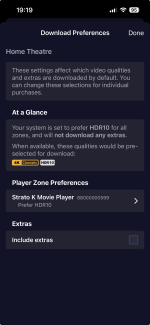
 
I got excited about the new download preferences feature today only to be disappointed to see that you can't get granular on your preferences. For example, on my Strato K I would like for it to default to 4K Cinematic HDR10, but there's not a way to do that. Why when implementing this feature, would they not allow that?
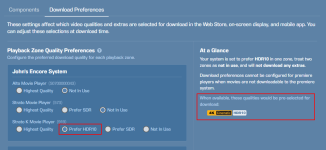
Is this in the App? If so it can be down like that. That’s how I have mine set up.

1789582808021.png
 
If you select Highest Quality for your Strato K, what does the "At a Glance" section display as the default quality selection? The default selection for "Highest Quality" is dependent on the EDID information reported by your Strato K zone.

If the EDID reported by your Strato K indicates no support for Dolby Vision, then "Highest Quality" would already default to HDR10 and there would be no "Prefer HDR10" option.
Similarly, if the EDID reported by your Strato K indicates no support for HDR, then "Highest Quality" would default to SDR and there would still be no "Prefer HDR10" option.
 
"At a Glance" shows 4K Cinematic SDR 4K HDR10. Doesn't make sense as I'm currently downloading my collection to a new Server and everything is downloading as I requested. 4K Cinematic HDR where available, 4K HDR10, HD, and SD files based on content. I have Strato K for Theater room and Strato C for living room.
 
Last edited:
If you select Highest Quality for your Strato K, what does the "At a Glance" section display as the default quality selection? The default selection for "Highest Quality" is dependent on the EDID information reported by your Strato K zone.

If the EDID reported by your Strato K indicates no support for Dolby Vision, then "Highest Quality" would already default to HDR10 and there would be no "Prefer HDR10" option.
Similarly, if the EDID reported by your Strato K indicates no support for HDR, then "Highest Quality" would default to SDR and there would still be no "Prefer HDR10" option.
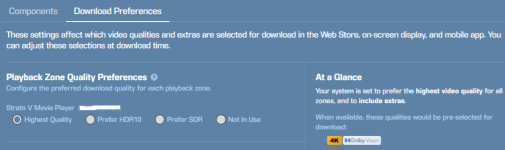
I do not have a Strato K so maybe its different for the Strato V....but on my V hooked to a JVC Projector ...so not DV capable...If I select Highest Quality...the At a Glance picks DV? So even thou the EDID should indicate non-DV it still would pick DV as default?

1789665982757.png
 
I do not have a Strato K so maybe its different for the Strato V....but on my V hooked to a JVC Projector ...so not DV capable...If I select Highest Quality...the At a Glance picks DV? So even thou the EDID should indicate non-DV it still would pick DV as default?
Correct, newer players all default to DV as the highest quality. That is what led to this feature in the first place. The intention has always been that a newer player can send an HDR10 signal from a DV file, but there were previously bugs in the conversion that caused people to favor the HDR10 files. Supposedly these bugs are fixed, though there still may be some issues with select (Disney?) DV encodes that have folks preferring HDR10. Theoretically, with the bugs fixed and encode errors addressed, newer players would prefer DV by default.
 
Correct, newer players all default to DV as the highest quality. That is what led to this feature in the first place. The intention has always been that a newer player can send an HDR10 signal from a DV file, but there were previously bugs in the conversion that caused people to favor the HDR10 files. Supposedly these bugs are fixed, though there still may be some issues with select (Disney?) DV encodes that have folks preferring HDR10. Theoretically, with the bugs fixed and encode errors addressed, newer players would prefer DV by default.
I am glad for the option since I still find something is off with the DV->HDR10 "conversion" in my system. I really think something is altering the way the JVCs DTM works ...thus producing what to me seems like a dimmer image in some titles. Maybe metadata...who knows...but with the options available...I just force to HDR10. :) Actually as of late I have been preferring SDR so I might just change defaultto SDR. Just do not think my system has the nits to benefit from HDR.
 
"At a Glance" shows 4K Cinematic SDR 4K HDR10. Doesn't make sense as I'm currently downloading my collection to a new Server and everything is downloading as I requested. 4K Cinematic HDR where available, 4K HDR10, HD, and SD files based on content. I have Strato K for Theater room and Strato C for living room.
Based on that, it sounds like the headend hasn't received an HDR EDID from your Strato K yet (hence the Cinematic SDR default) and is selecting 4K HDR10 for your Strato C zone.
 
J.Green,

I didn't turn the Theater Room system on until all my movies downloaded. Once downloads were completed, I discovered I had to do a reset on the Strato K. Everything shows up now under "At A Glance" and all is good.

Thanks again for you trying to assist.

Kim
 
Last edited:
Back
Top