• Thanks for visiting the Kaleidescape Owners' Forum

    This forum is for the community of Kaleidescape owners, and others interested in learning about the system, equipment, services, and the company itself.

    It is run by a group of enthusiastic Kaleidescape owners and dealers purely as a service to this community.

    This board is not affiliated in any way with Kaleidescape, Inc.
    For official technical support, product information, or customer service, please visit www.kaleidescape.com

    You can dismiss this box forever by clicking the "X" in the upper right corner of this message.
  • You are currently in "Guest" mode and not logged in with a registered account.

    The forum is free to use and most of the forum can be used by guests who are not registered....

    ... but we strongly encourage you to register for a full account. There is no cost to register for a full account.

    Benefits of registering for a full account:

    • Participate in the discussions! You must have a registered account to make posts on the forums. You will be able to start your own thread on a topic or question, or you can reply to other threads/discussions.
    • Use the "Conversation" feature (known as "private messaging" on other forums) to communicate directly with any of the other users here.
    • Access the Files area. The "resources" area of the forum contains many "Favorite Scene" and Script files that can dramatically increase the enjoyment of your Kaleidescape system. Go directly to great scenes in your favorite movies, created by other owners, and add automation to playback of your system with Scripts.
    • You won't see this annoying notice at the top of every screen!😊

    It's easy and free to register for the forum. Just click the "Register" button in the upper right corner of this page, and follow the instructions there.

    This box goes away for registered users.

New video series on UCR2/3 setup & configuration

Creating an Effective and Efficient Home Screen Layout

Organizing Your Unfolded Circle Remote 3 Home Screen
These videos, and this one in particular, are super helpful... thanks @thrillcat. Have taken away some good guidance for my next set of edits.
 
Tomorrow I'm recording a session with the developer of the HA integration for the remote to clear up some things from the HA video posted this week and also answer some additional questions. If you have any HA-specific UC Qs now's the time to ask!
 
Tomorrow I'm recording a session with the developer of the HA integration for the remote to clear up some things from the HA video posted this week and also answer some additional questions. If you have any HA-specific UC Qs now's the time to ask!
YES... I'm confused about something in one of your earlier videos.

I've installed the native HA integration in UCR, but did NOT install the UCR integration into HA. Your video implied we need both and kinda glossed over that saying something like "just install both" to make it work right, but I don't think that's the case.

Everything works just perfectly with my (deliberate) one-way setup... The UCR3 can control and request whatever it wants from HA.
AND, I can still keep my 1300 HA entities clean on the remote side... you can explicitly set which entities you want the remote to see and bring in to the remote for use, right in the UCR web configurator. If I remember right, you seemed to imply you need to do that on the other side (within HA), but I've not found that to be the case. My UCR software has just the 15 or 20 entities i want it to have, not all 1300.

My guess is that you ONLY need the UCR integration for HA if you want HA to actually control the remote (rather than vice-versa), which I don't need to do... i follow the same advice you gave... i don't make automations on the remote, I only make them in HA. Therefore there's no case I can yet think of where I need HA to do anything with the remote.

However, if someone does make automations on the remote and they want other events in the house to trigger those on the remote, then yes, I think THEN they'd need to install the UCR integration into HA.

Does this match your thinking on this? Or can you confirm with the developer?
 
YES... I'm confused about something in one of your earlier videos.

I've installed the native HA integration in UCR, but did NOT install the UCR integration into HA. Your video implied we need both and kinda glossed over that saying something like "just install both" to make it work right, but I don't think that's the case.

Everything works just perfectly with my (deliberate) one-way setup... The UCR3 can control and request whatever it wants from HA.
AND, I can still keep my 1300 HA entities clean on the remote side... you can explicitly set which entities you want the remote to see and bring in to the remote for use, right in the UCR web configurator. If I remember right, you seemed to imply you need to do that on the other side (within HA), but I've not found that to be the case. My UCR software has just the 15 or 20 entities i want it to have, not all 1300.

My guess is that you ONLY need the UCR integration for HA if you want HA to actually control the remote (rather than vice-versa), which I don't need to do... i follow the same advice you gave... i don't make automations on the remote, I only make them in HA. Therefore there's no case I can yet think of where I need HA to do anything with the remote.

However, if someone does make automations on the remote and they want other events in the house to trigger those on the remote, then yes, I think THEN they'd need to install the UCR integration into HA.

Does this match your thinking on this? Or can you confirm with the developer?
That's correct. I didn't do a good job of explaining it, but yes. Installing the UC integration in HA will allow you to control the remote and launch activities (once WoL is added to the R3) from HA.

However there are other good reasons to install the UC integration in HA even if you don't want to control it. By doing so, you can track your battery charge over time. So if you've had issues with it not charging properly in the dock, you can look at the battery charge status over time and look for when it stops charging, or when it discharges, and then compare that with the Remote's logs to identify what is the cause.

Screenshot 2025-07-25 at 12.34.04 PM.png

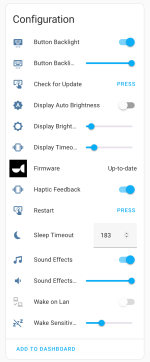
Many of the settings that are adjustable in the Remote's web configurator can be viewed and adjusted within HA as well.

Screenshot 2025-07-25 at 12.36.18 PM.png
 
However there are other good reasons to install the UC integration in HA even if you don't want to control it. By doing so, you can track your battery charge over time.
You're right... that's a good reason. damn, now i want that data... will install. 🤓
 
At this point I only have one negative critique but that has been mentioned here already. Battery life could be better. Beyond that I am thrilled with the remote. The flexibility it affords to tailor the remote to your own use is really an unexpected find.
I'm exporting a video now that I recorded with Jack Powell, who developed the UC integration for Home Assistant, and mid-recording we came up with an interesting idea for those who are running their battery down faster than others.
 
MANY apologies on the audio for this video. I had @jack.powell join me this morning for a deep dive into his HA integration and due to my stupidity, his audio was recorded directly AND in with my mic including an echo. I made some audio adjustments which helped, but I also added subtitles throughout in case you want to watch this one on mute. Sorry all, especially sorry Jack. Lots of great info in here though:
 
By doing so, you can track your battery charge over time. So if you've had issues with it not charging properly in the dock, you can look at the battery charge status over time and look for when it stops charging, or when it discharges, and then compare that with the Remote's logs to identify what is the cause.
I've noticed a few comments about the battery life of this remote and thought I'd offer some potential perspective from another device. I have Control4 Halo remotes and when they first shipped they also suffered from poor battery life. The GUI was nice and every screen had a gradient background, colorful icons, etc. During one of their major software updates the entire GUI was changed. Black screens with minimal white text. And, suddenly, you've gone from less than a day to multiple days of battery life.

Just a thought, as I noticed in @thrillcat's videos that there's some really pretty screens to be had and wonder if this could be a factor.
 
I've noticed a few comments about the battery life of this remote and thought I'd offer some potential perspective from another device. I have Control4 Halo remotes and when they first shipped they also suffered from poor battery life. The GUI was nice and every screen had a gradient background, colorful icons, etc. During one of their major software updates the entire GUI was changed. Black screens with minimal white text. And, suddenly, you've gone from less than a day to multiple days of battery life.

Just a thought, as I noticed in @thrillcat's videos that there's some really pretty screens to be had and wonder if this could be a factor.
I think that might be part of the underlying issue, but I think the battery life issues folks are having are actually tied more to the wifi connectivity issues they're also having. The R3 battery is not performing as well as the R2 battery, and the R2 had a larger OLED display vs the smaller LED display on the new remote. There's something sucking power that will likely be fixed by a firmware update, but it won't magically make the remote last multiple days.
 
Back
Top