

I realize there is a general thread about the Astrion but I thought I would start one where I show how I have configured the remote with Home Assistant.
In my case I have replaced a Harmony Hub + Elite with the Astrion + HA. So I will be using harmony terms like Activity and Devices.
Everything is IP based........not single IR signal is ever used. This was a little work for the Martantz since the Denon integration has very limited remote.send_commands but it does allow for the use of get_command...using documents from JVC i was able to have Claude UI generate me scripts for all the remote commands..and then some.
Within HA I have scripts for what would be a "Harmony Activity"....currently I have three: Watch Kaleidescape, Watch Apple TV and Watch Zidoo. Thse scripts contain the commands and logic to power on the required devices, set the appropriate inputs as well as call additional scripts which setup things like air conditioning and lighting. These scripts are exposed to Alexa where I have routines that call them via voice commands. These scripts also issue action commands to the Astrion to force it to the respective "TV Card". There is also script which handles powering theater down.
I have primarily used Astrion TV Cards to mimic traditional "activites" and "devices".
At the moment for each TV Card I have only programmed the essential buttons....still deciding how to best use the non-used buttons...like the colored custom ones.
As for how I setup my Astrion views/screens in HA. I have one view which contains 3 TV cards for each "activity": Kaleidescape, Apple TV and Zidoo...and Scene Card which triggers the Powerdown Script. I then have another view for "devices"...which has TV Cards for the Marantz and JVC. A 3rd view for my lights.
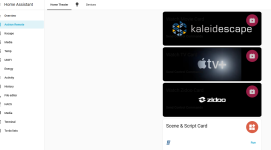
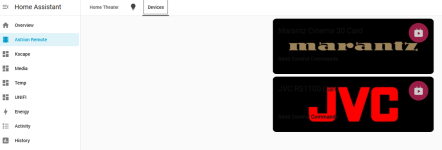
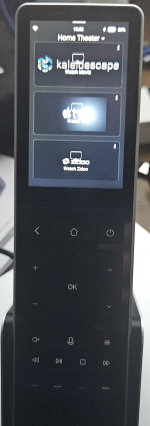
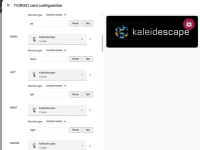
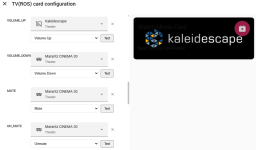
Here is example of how my Kaleidescape "Watch Movie" TV Card is currently configured:
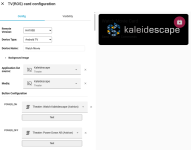
Here is example of the script for Kaleidescape/Watch Movie:
The Power Down script:
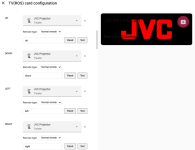
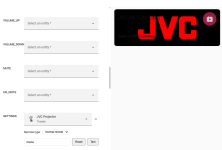
Example of a "device" card for the JVC Projector:
I would gladly appreciate any suggestions for improvement or better way of doing things.
In my case I have replaced a Harmony Hub + Elite with the Astrion + HA. So I will be using harmony terms like Activity and Devices.
Everything is IP based........not single IR signal is ever used. This was a little work for the Martantz since the Denon integration has very limited remote.send_commands but it does allow for the use of get_command...using documents from JVC i was able to have Claude UI generate me scripts for all the remote commands..and then some.
Within HA I have scripts for what would be a "Harmony Activity"....currently I have three: Watch Kaleidescape, Watch Apple TV and Watch Zidoo. Thse scripts contain the commands and logic to power on the required devices, set the appropriate inputs as well as call additional scripts which setup things like air conditioning and lighting. These scripts are exposed to Alexa where I have routines that call them via voice commands. These scripts also issue action commands to the Astrion to force it to the respective "TV Card". There is also script which handles powering theater down.
I have primarily used Astrion TV Cards to mimic traditional "activites" and "devices".
At the moment for each TV Card I have only programmed the essential buttons....still deciding how to best use the non-used buttons...like the colored custom ones.
As for how I setup my Astrion views/screens in HA. I have one view which contains 3 TV cards for each "activity": Kaleidescape, Apple TV and Zidoo...and Scene Card which triggers the Powerdown Script. I then have another view for "devices"...which has TV Cards for the Marantz and JVC. A 3rd view for my lights.
Here is example of how my Kaleidescape "Watch Movie" TV Card is currently configured:
Here is example of the script for Kaleidescape/Watch Movie:
Code:
sequence:
  - variables:
      is_cold_start: "{{ is_state('media_player.marantz_cinema_30', 'off') }}"
  - if:
      - condition: template
        value_template: "{{ is_cold_start }}"
    then:
      - action: media_player.turn_on
        target:
          entity_id: media_player.marantz_cinema_30
  - if:
      - condition: template
        value_template: "{{ is_cold_start }}"
    then:
      - action: remote.turn_on
        target:
          entity_id: remote.jvc_projector
        data: {}
      - action: script.turn_on
        target:
          entity_id: script.set_ac_to_theater_mode
      - action: script.turn_on
        target:
          entity_id: script.theater_lights_on
  - action: media_player.turn_on
    target:
      entity_id: media_player.kaleidescape_theater
  - action: remote.turn_on
    target:
      entity_id: remote.theaterhub
    data:
      activity: Kaleidescape
    enabled: false
  - wait_template: "{{ is_state('sensor.jvc_projector_power_status', 'on') }}"
    timeout: "00:00:45"
  - action: media_player.select_source
    target:
      entity_id: media_player.marantz_cinema_30
    data:
      source: KALEIDESCAPE
  - delay: "00:00:02"
  - action: remote.send_command
    target:
      entity_id: remote.kaleidescape_theater
    data:
      command: cancel
  - action: select.select_option
    metadata: {}
    target:
      entity_id: select.home_theater_astrion_remote_navigate_action
    data:
      option: Device:Watch Movie
alias: "Theater: Watch Kaleidescape (Astrion)"
mode: restart
description: ""
The Power Down script:
Code:
sequence:
  - action: script.turn_on
    metadata: {}
    target:
      entity_id: script.tell_projector_status
    data: {}
  - action: notify.alexa_media_rafael_s_echo_dot_max
    data:
      message: Turning off Theater.  See you next time!
      data:
        type: tts
  - action: remote.turn_off
    target:
      entity_id: remote.theaterhub
    enabled: false
  - action: media_player.turn_off
    target:
      entity_id: media_player.marantz_cinema_30
  - action: script.turn_on
    metadata: {}
    target:
      entity_id: script.theater_lights_off
    data: {}
  - action: climate.set_hvac_mode
    metadata: {}
    target:
      area_id: home_theater
    data:
      hvac_mode: "off"
  - action: remote.turn_off
    target:
      entity_id: remote.jvc_projector
    data: {}
  - action: remote.turn_off
    target:
      entity_id:
        - remote.z30_pro
        - remote.kaleidescape_theater
    data: {}
alias: "Theater: Power Down All (Astrion)"
description: ""
Example of a "device" card for the JVC Projector:
I would gladly appreciate any suggestions for improvement or better way of doing things.
Last edited: