I will be moving to a new home soon and plan on building a new theater from the ground up. I am interested in having automation to control the lighting, HVAC, and masking, there will be no windows so no shade control needed. I am considering Crestron and Control 4 and wondering if there is a system that integrates more seamlessly than another with the Kaleidescape? I figure since I have an opportunity to start from scratch I may as well make it as easy as possible for everything to work together.


-
Thanks for visiting the Kaleidescape Owners' Forum
This forum is for the community of Kaleidescape owners, and others interested in learning about the system, equipment, services, and the company itself.It is run by a group of enthusiastic Kaleidescape owners and dealers purely as a service to this community.
This board is not affiliated in any way with Kaleidescape, Inc.
For official technical support, product information, or customer service, please visit www.kaleidescape.com
You can dismiss this box forever by clicking the "X" in the upper right corner of this message. -
You are currently in "Guest" mode and not logged in with a registered account.
The forum is free to use and most of the forum can be used by guests who are not registered....
... but we strongly encourage you to register for a full account. There is no cost to register for a full account.
Benefits of registering for a full account:
- Participate in the discussions! You must have a registered account to make posts on the forums. You will be able to start your own thread on a topic or question, or you can reply to other threads/discussions.
- Use the "Conversation" feature (known as "private messaging" on other forums) to communicate directly with any of the other users here.
- Access the Files area. The "resources" area of the forum contains many "Favorite Scene" and Script files that can dramatically increase the enjoyment of your Kaleidescape system. Go directly to great scenes in your favorite movies, created by other owners, and add automation to playback of your system with Scripts.
- You won't see this annoying notice at the top of every screen!😊
This box goes away for registered users.
You are using an out of date browser. It may not display this or other websites correctly.
You should upgrade or use an alternative browser.
You should upgrade or use an alternative browser.
Is there a "preferred" automation system?
- Thread starter Cshull
- Start date

If you are at all capable of basic "if this, then that" type logic in a graphic interface, I have been loving using Home Assistant. It's an inexpensive solution that can handle all backend automation using triggers from your Kaleidescape or any other smart device/sensor you want to connect.
It's also nice because you can use whatever remote you want to control the devices and the automation runs based on sensors, not based on building macros.
I'm not sure how Crestron or Control4 automation logic is created, because I've never wanted to spend that kind of money on a system. They certainly have their advantages, but I've loved the power and flexibility of the Home Assistant solution. I'm currently using an Unfolded Circle Remote Two and have backed the Remote 3 project. Prior to that I was using a Harmony Elite + Hub. But since automation isn't based on the remote, it also works just fine if I pick up my Kaleidescape remote or my AppleTV remote to browse and control playback.

I suggest Control4 for a 1 remote solution to control your projector, masking screen, all AV equipment including the Kaleidescape and any future equipment you may add such as lighting. A 1 room system starts at $2000 with programming and equipment. I use the Control4 keypads for direct access to start a Kaleidescape movie and get the room ready.

We use Crestron custom programming as a standard for our installations.
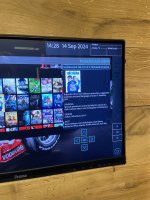
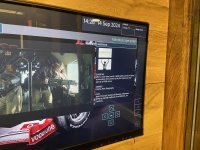
With Crestron custom, you can design the user interface to whatever you want, whereas you are fixed with that with Control4 and you can integrate more complex systems. The Crestron-integration from Kaleidescape is pretty extensive. You get a lot of information from the system incl. e.g. movie details/description which can be display on external panels or even recreate the Kaleidescape onscreen menu on a panel.
If all that is not required, Control4 is a good choice.
I like to do a combination of a wall panel with preview screen and control capabilties outside the cinema room in combination with a touchscreen handheld remote for use inside the room.
Control system with touchscreen remote plus basic integration and UI design starts at €5.000,-
Potentially, there will be some additional gateways required depending on the platforms you want to integrate for HVAC or lighting. But this is the same with Control4.
There´s also a lighter version of Crestron called Crestron Home available which is pretty similar to Control4 in terms of functionality and pricing. But we don´t use that much for our installs.

For the price of admission, I'd have to agree with @thrillcat. I've been pretty amazed at what Home Assiatant can do. You can program it yourself and it's not too difficult. The other systems are more expensive and, to my understanding, your dealer has to program these. You can get a home assistant green for about $100 and do a lot of the same Integrations with your kscape system and basically anything else connected to your home network.

I'm breaking out the Home Assistant discussion that was located here into its own thread, as I suspect that will be more helpful to people wanting to learn about it.
HA Discussion continues here.
HA Discussion continues here.
Last edited:
+1 for Control4. I’ve found that I like it so much that I’ve added automations (lights, shades, HVAC, landscape lights, garage door, security system) because of how well it works together.
I’m quite capable of implementing others, such as Home Assistant, but I have no interest in doing it.
One has to decide what role they want to play in managing all this, I’ve opted for the big red easy button. I respect those who want to self manage, it’s just not for me since I retired.
Just my 2 cents.
With Crestron custom programming, you can do more than Control4 with Kaleidescape.Can control 4 do everything with the Kscape that the Crestron can? If not, what features would I be missing out on?
However, that is mainly based on the ability to create a completely customized user interface, whereas that is fixed in Control4.
As mentioned before, i like to put a preview panel in the foyer of a cinema room, where you can already select movies and adjust everything (subtitles, language, etc.) to your liking before even entering the cinema room.
See an example below i did for one of our clients. There, you have a live image from the source (KScape in this case) and then you can put additional buttons and info-boxes on top.
You can even add functionality, that K doesn´t provide on its own, e.g. the "at what time does the movie end?" somebody mentioned in the feature request tread: you´ve got the remaining playing time of the content and you´ve got the current time, so it´s easy to calculate at what exact time the movie will end.

However, this all requires a certain amount of programming effort, hence it´s not cheap. So if you don´t need an integration at that level, Control4 may be the better solution for you.
That red button is now history lol. At least on the halo anyway+1 for Control4. I’ve found that I like it so much that I’ve added automations (lights, shades, HVAC, landscape lights, garage door, security system) because of how well it works together.
I’m quite capable of implementing others, such as Home Assistant, but I have no interest in doing it.
One has to decide what role they want to play in managing all this, I’ve opted for the big red easy button. I respect those who want to self manage, it’s just not for me since I retired.
Just my 2 cents.
yeah Die z that is super cool man. I started with amx here with kaleidescape back in the day and it was similar but damn that programming was intense.
And btw control4 has a third party driver that I use from chowmain that gives the covers on the panel as well.
Yeah, i´ve seen that. I think for most use cases, that´s totally sufficient. It´s just if you want to have a bit extra and are willing to pay the money, then there are plenty of opportunities with Crestron custom.And btw control4 has a third party driver that I use from chowmain that gives the covers on the panel as well.
