• Thanks for visiting the Kaleidescape Owners' Forum

    This forum is for the community of Kaleidescape owners, and others interested in learning about the system, equipment, services, and the company itself.

    It is run by a group of enthusiastic Kaleidescape owners and dealers purely as a service to this community.

    This board is not affiliated in any way with Kaleidescape, Inc.
    For official technical support, product information, or customer service, please visit www.kaleidescape.com

    You can dismiss this box forever by clicking the "X" in the upper right corner of this message.
  • You are currently in "Guest" mode and not logged in with a registered account.

    The forum is free to use and most of the forum can be used by guests who are not registered....

    ... but we strongly encourage you to register for a full account. There is no cost to register for a full account.

    Benefits of registering for a full account:

    • Participate in the discussions! You must have a registered account to make posts on the forums. You will be able to start your own thread on a topic or question, or you can reply to other threads/discussions.
    • Use the "Conversation" feature (known as "private messaging" on other forums) to communicate directly with any of the other users here.
    • Access the Files area. The "resources" area of the forum contains many "Favorite Scene" and Script files that can dramatically increase the enjoyment of your Kaleidescape system. Go directly to great scenes in your favorite movies, created by other owners, and add automation to playback of your system with Scripts.
    • You won't see this annoying notice at the top of every screen!😊

    It's easy and free to register for the forum. Just click the "Register" button in the upper right corner of this page, and follow the instructions there.

    This box goes away for registered users.

[Buyer’s Guide] Kaleidescape Quality Compared to Blu-ray & other Digital Sources

Disc is clean. This is 100% introduced by the player or KS encoding. Plus as I said, I can spot these artifacts in every 4K title on KS.

Prometheus is the movie that made them notice the issue, so I’m quite surprised it still looks as bad as before the update, especially since Mike said most of the block artifacts were gone in their engineering build. see:

1775871185818.png
 
Yes, Interstellar was updated recently, according to the Movies Update thread.

Can you check the HDR version of Prometheus on your player? It’s very obvious.

This title was also updated not long ago. It used to have a fake grain overlay that helped mask the block artifacts. Now that the artificial grain has been removed, the block artifacting is the worst I’ve seen.
Are we still thinking that these block artifact issues are not present on Strato C players?
 
Please check Prometheus from 5:40 to 5:55 (sky) and let us know if the block artifacts are visible.
I just tried both 4K HDR and HD and I didn't notice any artifacts in the sky.....though admittedly I'm not really sure what I'm looking for.

I don't have Jurassic World but I played Predator: Badlands which is now listed at 2.39 (was 2.35) and my video processor is reporting it playing 2.39.

For reference, my settings in the Strato C player are to use external scaler so it outputs native.
 
Thanks, this pretty much confirms it's a player issue and the new firmware did not fix it.


I think you would have noticed it if there was the same issue on the C player.
I've got a Strato V that I could hookup in the rack as well. I still have the old software, but I guess then I'd know if I notice the issue on that one. Maybe I'll try to do that later.
 
Thanks, this pretty much confirms it's a player issue and the new firmware did not fix it.


I think you would have noticed it if there was the same issue on the C player.
Please take my findings with a grain of salt. I'm not 100% sure what I'm looking for in the Prometheus and Interstellar scenes and I don't notice any differences in the Sky in my Strato C vs Strato V players in my theater with both setup to use an external scaler. Now, I do have a MadVR Envy in the chain here so that could possibly be removing the block artifacts as well.
 
Hi folks,

Just jumping in quickly here to say that we'll take a look at those two titles next week. Unfortunately everyone was already gone for the weekend when Rmarci reported that he's seeing artifacts in them. I'm not personally sure when those titles were encoded, so I can't comment yet on that front.

Regarding aspect ratios, I think that folks who are looking at these are seeing the same thing I am seeing at home, so let me explain a little bit. With the aspect ratio updates in the guide, we did a bit of a 2-step.

Step 1: Movies that have a 2.39 aspect ratio were previously bookmarked as 2.40 with a small amount of outward trim. The Strato V/E players were not factoring that trim into the masking it applied during playback, so that's what was causing the loss of a couple of scan lines from the image area. We updated those movies to 2.35 with inward trim, which is really where they should have been in the first place.

Step 2: As described above, the guide data has been modified to include an additional aspect ratio field for the exact aspect ratio, and kOS 26 sees that exact ratio and uses it both for what it displays in the movie details on screen, and also for doing things like CinemaScape adaptation and repositioning of on-screen elements during playback (pause indications, etc). That new exact-ratio information was just added to the guide alongside the beginning of the kOS 26 roll-out.

Systems don't update their guide data daily -- it's more like a weekly cadence unless something specific forces an earlier update (like buying a movie that's not in the version of the guide on the system). So it may take a little time before you see the precise aspect ratio values in the onscreen display, even after the system updates to kOS 26.0.
 
Ok, it’s not all bad news… The smeared grain in brighter areas is definitely fixed. I’m not sure if it’s due to the new encode or the player update, but Jurassic World Rebirth looks dramatically better than before. I couldn't find a frame that is worse than the BD.

More tests to come...


Jurassic World Rebirth (UPDATE)


- The UHD Blu-ray looks filtered; the new KS encode is much better. There’s also a reduction in block artifacts, though this is a grainy movie, which tends to hide them anyway.
- And of course, no more overcropping
 
Interstellar (UPDATE):


- If it wasn't for the block artifacts, this new version beats the UHD-BD
- Green push is gone.
- Fake grain overlay is gone, see in this comparison, the window.
- DNR is gone, see this comparison
- This comparison shows that the block artifacts are definitely still there. (clean on the BD)

look here:
View attachment 9780
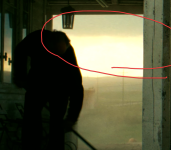
More ignorance here. What is the circled area pointing out? The unevenness of the transition from the brightly lit area to the clouds?
 
Block artifacts are definitely still present with this firmware, and they appear somewhat random, very likely introduced by the player itself. In some screenshots, they even look worse compared to before, and in other screenshots, they look better but still quite visible compared to the UHD-BD, which doesnt have any artifacts.

Ballerina 2025 (UPDATE)


-UHD-BD looks filtered, but those KS shots with block artifacts ruin it :(
 
More ignorance here. What is the circled area pointing out? The unevenness of the transition from the brightly lit area to the clouds?
The circled area is just there to show where to look. The comparisons are in HDR PQ, so if you view them on an HDR monitor using a browser that supports HDR (edge, chrome), you should be able to easily spot the block artifacts.
 
The circled area is just there to show where to look. The comparisons are in HDR PQ, so if you view them on an HDR monitor using a browser that supports HDR (edge, chrome), you should be able to easily spot the block artifacts.

Very interesting - I see these on the movie 'Revenant' on K - at the beginning of the movie the sky has block artifacts.
On my UHD 4K Ripped to MKV using a AMB6+ Corellec I dont see these artifacts.
 
Yes, everything on KS has these artifacts, and I’m pretty sure the player is introducing them, and grainy content hides them.
So either the software is still doing unintended processing, or it’s a hardware defect (which is what it looks like).
 
For those using/testing Strato V/E...I'm curious what settings you are using. I would assume you'd need to have both of these 2 settings below set like this to avoid having the player do any scaling or unintended processing?

1775929585116.png
 
For those using/testing Strato V/E...I'm curious what settings you are using. I would assume you'd need to have both of these 2 settings below set like this to avoid having the player do any scaling or unintended processing?

View attachment 9786
On my V, I have the "Mode Selection Behavior" set to "...external scaler" and "AI Video Enhancement" set to "Auto" which I'm guessing is the default. I will change it to Off to see if I notice anything different.
 
On my V, I have the "Mode Selection Behavior" set to "...external scaler" and "AI Video Enhancement" set to "Auto" which I'm guessing is the default. I will change it to Off to see if I notice anything different.
When I was trouble shooting this player back in July 2024 for audio drops, I had tried everything including the LLDv mode. The drops reduced significantly and the artifacts were mitigated to quite a degree. However the picture looked very dull compared to player led DV. I fear the problem is baked into the hardware, unfortunately.
 
Latest Avatar, OLD vs NEW Firmware.


################################################


About the new firmware so far....

The good:

- Over-cropping fixed
- Unintended DNR in brighter pixels fixed. This makes the image sharper and the grain uniformity much better. Example
- TrueHD 71 decoded to lpcm 7.1 fixed

The bad:

- I don't see any improvement regarding the block artifacts.

1775931171870.gif
 
Back
Top