

I have been having an issue downloading content from the movie store onto my Alto 6T. I posted about this in another thread related to UniFi network equipment, but figured it would have more visibility here.
Alto 6T connected by ethernet to Unifi networking equipment consisting of Unifi Dream Machine, Unifi POE switch, Wifi6 APs, WAN connected to XFinity 1.5G cable internet, and various other household devices via eithernet and WiFi.
Speedtest at the UniFi console shows nearly the full 1.5G down connection with 350M upstream. Wifi clients can achieve 900M downstream on WiFi network.
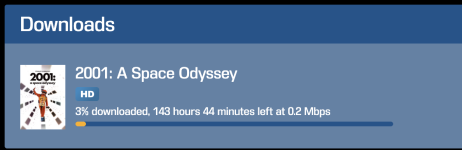
Currently attempting to download a single HD movie from the store that has been in my queue for 6+ hours, and after all that time its showing 3% complete. The status changes between totally stalled, and momentarily shows something extremely small for download rate (0.2M) with estimates of hundreds of hours for the download.
Ive attempted several troubleshooting steps including QOS prioritizing the Alto, using a known fast OpenVPN tunnel on the UDM console to bypass any throttling done by XFinity, tried using WiFi instead of ethernet, restarted all gear, removed the movie from the queue and restarted download, even attempted to use port forwarding to the Alto on all ports that KScape discloses are in use. Ive also tried connecting the Alto directly to the cable modem, which has a 4 port switch, and it easily gets and IP via DHCP and connects, but when the dowload continues its at the same excruciatingly slow rate.
None of the above changed the behavior at all, so Ive gone back to a basic network config and abandoned all other measures.
Ive reached out to KScape support and at this point they blame it on "varied performance depending on the usage of the Alto" as well as blaming Unifi network gear. The console has not been in use and is in standby all day today, and from reading other threads on this forum it seems like there are quite a few others who use UniFi with no issue.
Is there anything else I could be missing? Thank you for any advice.
Attached pic is after 6 hours in the queue.
Alto 6T connected by ethernet to Unifi networking equipment consisting of Unifi Dream Machine, Unifi POE switch, Wifi6 APs, WAN connected to XFinity 1.5G cable internet, and various other household devices via eithernet and WiFi.
Speedtest at the UniFi console shows nearly the full 1.5G down connection with 350M upstream. Wifi clients can achieve 900M downstream on WiFi network.
Currently attempting to download a single HD movie from the store that has been in my queue for 6+ hours, and after all that time its showing 3% complete. The status changes between totally stalled, and momentarily shows something extremely small for download rate (0.2M) with estimates of hundreds of hours for the download.
Ive attempted several troubleshooting steps including QOS prioritizing the Alto, using a known fast OpenVPN tunnel on the UDM console to bypass any throttling done by XFinity, tried using WiFi instead of ethernet, restarted all gear, removed the movie from the queue and restarted download, even attempted to use port forwarding to the Alto on all ports that KScape discloses are in use. Ive also tried connecting the Alto directly to the cable modem, which has a 4 port switch, and it easily gets and IP via DHCP and connects, but when the dowload continues its at the same excruciatingly slow rate.
None of the above changed the behavior at all, so Ive gone back to a basic network config and abandoned all other measures.
Ive reached out to KScape support and at this point they blame it on "varied performance depending on the usage of the Alto" as well as blaming Unifi network gear. The console has not been in use and is in standby all day today, and from reading other threads on this forum it seems like there are quite a few others who use UniFi with no issue.
Is there anything else I could be missing? Thank you for any advice.
Attached pic is after 6 hours in the queue.


