• Thanks for visiting the Kaleidescape Owners' Forum

    This forum is for the community of Kaleidescape owners, and others interested in learning about the system, equipment, services, and the company itself.

    It is run by a group of enthusiastic Kaleidescape owners and dealers purely as a service to this community.

    This board is not affiliated in any way with Kaleidescape, Inc.
    For official technical support, product information, or customer service, please visit www.kaleidescape.com

    You can dismiss this box forever by clicking the "X" in the upper right corner of this message.
  • You are currently in "Guest" mode and not logged in with a registered account.

    The forum is free to use and most of the forum can be used by guests who are not registered....

    ... but we strongly encourage you to register for a full account. There is no cost to register for a full account.

    Benefits of registering for a full account:

    • Participate in the discussions! You must have a registered account to make posts on the forums. You will be able to start your own thread on a topic or question, or you can reply to other threads/discussions.
    • Use the "Conversation" feature (known as "private messaging" on other forums) to communicate directly with any of the other users here.
    • Access the Files area. The "resources" area of the forum contains many "Favorite Scene" and Script files that can dramatically increase the enjoyment of your Kaleidescape system. Go directly to great scenes in your favorite movies, created by other owners, and add automation to playback of your system with Scripts.
    • You won't see this annoying notice at the top of every screen!😊

    It's easy and free to register for the forum. Just click the "Register" button in the upper right corner of this page, and follow the instructions there.

    This box goes away for registered users.

NEWS: Strato K Movie Player with 8K capability and new "4K Cinematic" full-chroma & higher bitrate support

I guess silly question, with the titles we already own should we delete them first then redownload the new format? Or, download the new file and delete the other? TY
 
I currently have a strato V but need a second player for a different part of the house. Considering upgrading to the K to place in theater room and moving the V to big screen tv in family room. Current setup in theater room includes a JVC NZ 900 and Madvr core 2, 150 inch CinemaScope screen, alpha lens. Anyway of knowing if there will be a noticeable difference in picture quality? Seems like a lot of factors and boxes to check. I’m sure I will find a YouTube video with a similar setup eventually just want to make sure it isn’t biased as most of the folks on YouTube are selling the devices.

Second question: If I do upgrade can I switch my second player (V in family room) from pulling movies from server to using its own HD quickly and easily? Having to have two versions of movies on the server is obviously not ideal but if I can have this second player switch back and forth where it is sourcing the movies from, I can avoid downloading both versions and just use the hard drive on the V for movies that I would have upgraded in the theater room to the new 4k format.
 
For those that don't know Goodwin's High End, they've been in this industry for almost 50 year, IIRC. ...
Goodwins is a fantastic place, better when they were in Harvard Sq.😁

I bought some B&W bookshelves from them just before they demo'd some Maggies to me. I instantly regretted purchasing the B&Ws and saved up to get the Maggies. That was in '85 or '86.
 
I currently have a strato V but need a second player for a different part of the house. Considering upgrading to the K to place in theater room and moving the V to big screen tv in family room. Current setup in theater room includes a JVC NZ 900 and Madvr core 2, 150 inch CinemaScope screen, alpha lens. Anyway of knowing if there will be a noticeable difference in picture quality? Seems like a lot of factors and boxes to check. I’m sure I will find a YouTube video with a similar setup eventually just want to make sure it isn’t biased as most of the folks on YouTube are selling the devices.

Second question: If I do upgrade can I switch my second player (V in family room) from pulling movies from server to using its own HD quickly and easily? Having to have two versions of movies on the server is obviously not ideal but if I can have this second player switch back and forth where it is sourcing the movies from, I can avoid downloading both versions and just use the hard drive on the V for movies that I would have upgraded in the theater room to the new 4k format.

What "Server" are you referring to, do you have a Terra server? If you don't have a Terra, those two players will remain separated, i.e. they will be in standalone mode and will only have access to whatever content you have downloaded to their individual SSD's. They cannot be "grouped" to share content, you would need a Terra server to group them, but doing that eliminates their internal storage.

Jim
 
What "Server" are you referring to, do you have a Terra server? If you don't have a Terra, those two players will remain separated, i.e. they will be in standalone mode and will only have access to whatever content you have downloaded to their individual SSD's. They cannot be "grouped" to share content, you would need a Terra server to group them, but doing that eliminates their internal storage.

Jim
I do have a Terra server. So my question is once you have a multi player with a terra server setup in place. Is it possible and easy to switch one of the players from relying on the server for movies back to using its own hard drive?
 
I do have a Terra server. So my question is once you have a multi player with a terra server setup in place. Is it possible and easy to switch one of the players from relying on the server for movies back to using its own hard drive?

You would have to store both Cinematic and Non Cinematic movies on the Terra - because the V cannot play the Cinematic.
IMHO having V and K players on the same pool will require huge Tarra Capacity and waste of space on the Terra.
 
I do have a Terra server. So my question is once you have a multi player with a terra server setup in place. Is it possible and easy to switch one of the players from relying on the server for movies back to using its own hard drive?

The player must be in "Standalone" mode to access the content on its SSD, so you would need to ungroup it (remove it from the system).

Jim
 
You would have to store both Cinematic and Non Cinematic movies on the Terra - because the V cannot play the Cinematic.
IMHO having V and K players on the same pool will require huge Tarra Capacity and waste of space on the Terra.
I agree, I think when I get the K, I will keep it in stand-alone mode.
 
Is it easy to change a player to and from standalone mode?

Yes, use the browser to get to the home page, select Settings, then select Components, then select the player, then select Remove from system.

Jim
 
Is it easy to change a player to and from standalone mode?
Yes, use the browser to get to the home page, select Settings, then select Components, then select the player, then select Remove from system.
It is easy, yes, but Jim's procedure above won't do it. If you just remove the Strato V from a system via the browser interface, it'll still be in player-only mode (i.e. looking for a server to connect to).

To restore a Strato K, V, E, or M to standalone mode:
  1. With the player powered on, press and hold the reset settings button on the player's back panel for approximately 5 seconds. You'll know that the reset to standalone mode is taking place as the player's front panel (or internal LEDs in the case of the Strato E/M) will start blinking prior to the player rebooting.
  2. Once the player reboots, it will be in standalone mode. You will need to activate it on your store account.
 
@J.Green I’m going to re-post this I said to Mike on the buyer’s guide thread to you as well here since this the new player thread:

“Hi Mike, I think there should be an upgrade program for V/E/M owners, specially early adopters as we have had worked through a number of bugs along the way: applying edge enhancement to 4k files, the DV red hue shift issue on some titles, the audio drop outs and interop issues, the block artifacts, DV to HDR10 conversion issues, etc. I had certainly dramatically cut back my store purchases waiting for fixes and had shifted back to 4k discs almost exclusively, and my unit has barely been used dust waiting for the various fixes to roll in. Now as the final major fixes are about to roll out, a new and better player comes out before the smaller siblings have been fully fixed. It feels we were the ones beta testing and bug hunting to make the new Strato K all it can be. So given the long teething issues the new platform has had, an upgrade program would be a good fig leaf to throw owners to make up for some of this.”
 
@J.Green Sorry if this was already answered but are the 4K Cinematic files 10bit or 12bit? Thanks.
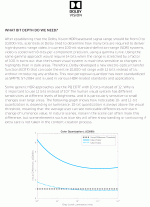
I'm not @J.Green but in reading posts from him and @MikeKobb DV titles start with a HDR12 source with accompanying DV metadata (which then gets crunched down into a DV proprietary 10-bit container that performs like a ~11.5 bit container). That post doesn't mention starting with HDR10 for a DV encode. To say it another way, while you could create a DV encode from HDR10 I don't think it's very common as a (near) 12-bit PQ EOTF is a key part of the not-so "secret sauce" in Dolby's DV system and the only way to map properly all the way out to 10000 nits.
DVBitDepth.gif
When the source file is in 4:4:4 or 4:2:2 chroma they can offer both a "4K Cinematic" DV encode (typically at 4:2:2) and a legacy/vanilla DV encode (4:2:0). When the source is 4:2:0 chroma they will only offer a legacy/vanilla DV encode (4:2:0).

If the source file is HDR12 (without accompanying DV metadata) or HDR10 it's encoded at HDR10. When it's also in 4:4:4 or 4:2:2 chroma they can offer both a "4K Cinematic" HDR10 encode and a legacy/vanilla HDR10 encode. When the source is 4:2:0 they will only offer a legacy/vanilla HDR10 encode.

If the source file is 4K SDR it's encoded at 4K SDR ( shocker! :p ). When it's also in 4:4:4 or 4:2:2 chroma they can offer both a "4K Cinematic" SDR encode and a legacy/vanilla 4K SDR encode. When the source is 4:2:0 they will only offer a legacy/vanilla 4K SDR encode.

Wow...alright. Almost need a flow chart for this one! I had to re-read quite a few posts to get it straight in my head and be able to summarize.

Let me know if I screwed anything up there K-Crew.
 
Last edited:
I agree, I think when I get the K, I will keep it in stand-alone mode.
I would sell it - no point having one in stand alone mode then you will have to micro manage what is where... if you have 2nd home that is another thing.
 
Got my Strato K today. By adding that to my system, it seemed to have triggered kOS update for my Terra server and caused it to go offline for a few minutes. Just a quick note to make sure other people don't freak out about that. Be patient and wait a bit for the update to complete.
 
I guess silly question, with the titles we already own should we delete them first then redownload the new format? Or, download the new file and delete the other? TY
Won’t matter either way.

Personally I do both at the same time - trigger the new format download and then while in the store page I delete the old one I had downloaded a s few seconds after starting the other download
 
Back
Top