

-
Thanks for visiting the Kaleidescape Owners' Forum
This forum is for the community of Kaleidescape owners, and others interested in learning about the system, equipment, services, and the company itself.It is run by a group of enthusiastic Kaleidescape owners and dealers purely as a service to this community.
This board is not affiliated in any way with Kaleidescape, Inc.
For official technical support, product information, or customer service, please visit www.kaleidescape.com
You can dismiss this box forever by clicking the "X" in the upper right corner of this message. -
You are currently in "Guest" mode and not logged in with a registered account.
The forum is free to use and most of the forum can be used by guests who are not registered....
... but we strongly encourage you to register for a full account. There is no cost to register for a full account.
Benefits of registering for a full account:
- Participate in the discussions! You must have a registered account to make posts on the forums. You will be able to start your own thread on a topic or question, or you can reply to other threads/discussions.
- Use the "Conversation" feature (known as "private messaging" on other forums) to communicate directly with any of the other users here.
- Access the Files area. The "resources" area of the forum contains many "Favorite Scene" and Script files that can dramatically increase the enjoyment of your Kaleidescape system. Go directly to great scenes in your favorite movies, created by other owners, and add automation to playback of your system with Scripts.
- You won't see this annoying notice at the top of every screen!😊
This box goes away for registered users.
You are using an out of date browser. It may not display this or other websites correctly.
You should upgrade or use an alternative browser.
You should upgrade or use an alternative browser.
Popcorn Ready app for iOS
- Thread starter OUTATIME
- Start date

- Joined
- Dec 4, 2024
- Messages
- 476
Great idea on the review link!You may want to add a link (called Rate the App or something similar) in settings so that users can rate and review the app. When I built an app a long time ago, I found that this generated more ratings and reviews since most users don't want to go the App Store and search for the app, just to rate it.
Separately, 2 questions:
1. I have a very large library (3,3000 movies), and it takes about 30 seconds to refresh each time I open the app, even if I have not purchased any new movies since the last time I used the app. Is this normal?
2. I noticed that quite a bit of data is linked to the user. How are you using that information?
On #1: Is this only the first time you open the app on that day? I have a much smaller library at around 700 titles but this is less than a second for me on my devices. I typically get between 1-1.5 Gbps on my Wifi where I use the app though. Even clicking to the catalog is less than a second for me though and that's 15K+ titles. Any other info you can provide so I can try to track this down for you?
Edit: I think I already figured this out for huge libraries like yours. Are you already on the 1.0.3 release? In that release you should see a 3x or 4x speed improvement. But I've got a plan now to make it almost instant. Stay tuned.
On #2: I'll let the AI answer that below as I'm not collecting or storing anything and this will give you the full details. Thanks for the question!
Great question — I completely understand why that label stands out.
Short version: I (KM Projects) don’t collect, store, sell, or even see any of your personal data, library, or usage analytics. There are no Popcorn Ready user accounts, no ads, no cross-app tracking, and zero third-party analytics or crash-reporting SDKs in the app.
Why those items show up under “Data Linked to You”: Apple’s App Store Privacy labels require disclosing data that leaves the device even when it goes directly to a third-party service (in this case, Kaleidescape when you optionally sign in to the Kaleidescape Movie Store). I filled out the disclosures conservatively to cover everything the app exchanges on your behalf:
- Email Address, User ID, and Purchase History: Only used if you choose to sign in to your optional Kaleidescape Movie Store account. Your login goes directly over HTTPS to kaleidescape.com(never through any server of mine), your password is discarded immediately after sign-in, and only the Kaleidescape session token is stored locally in your device’s Apple Keychain. Kaleidescape returns your owned titles, wish list, and download states so the app can display your full library and manage downloads.
- Device ID: When connected to the Movie Store, the app exchanges your Kaleidescape system ID/serial directly with Kaleidescape so it can match your theater and manage its download queue. On your local network, it also identifies the app and Apple hardware model family to your player’s syslog as required by Kaleidescape’s controller agreement. It does not collect Apple’s advertising ID (IDFA) or send device IDs to me.
- Coarse Location: The app does not use GPS/Location Services and never asks for location permission. Streaming availability lookups send a 2-letter country code (defaulting to your device’s region setting or whatever country you pick in the app), and normal web requests to Kaleidescape and the streaming lookup proxy carry your IP address (used transiently on the Cloudflare streaming proxy solely for rate limiting).
- Product Interaction: Covers the actions you send to Kaleidescape (playback control, download queue changes, wish list updates, etc.), not app analytics collected by me.
- Search History (Not Linked): Only applies to streaming-availability searches sent through a cookie-free Cloudflare proxy to TMDB; searches of your own Kaleidescape library stay on your device.
Last edited:
Re: Refresh: Yes, I updated to 1.03. But, it still took 30+ seconds. And, it happens if I use the app more than once during the same day. (I have 5GB so Wi-Fi is fast.) So, it would be great if you had a way to speed it up, particularly when the library has not changed since the last time the user used the app. I am checking Settings: Library: Refreshing to gauge how long it takes (since I have not purchased anything new in the last two days).Great idea on the review link!
On #1: Is this only the first time you open the app on that day? I have a much smaller library at around 700 titles but this is less than a second for me on my devices. I typically get between 1-1.5 Gbps on my Wifi where I use the app though. Even clicking to the catalog is less than a second for me though and that's 15K+ titles. Any other info you can provide so I can try to track this down for you?
Edit: I think I already figured this out for huge libraries like yours. Are you already on the 1.0.3 release? In that release you should see a 3x or 4x speed improvement. But I've got a plan now to make it almost instant. Stay tuned.
On #2: I'll let the AI answer that below as I'm not collecting or storing anything and this will give you the full details. Thanks for the question!
Re: Privacy data: Thanks so much for the explanation. I did not think you were collecting anything, but your (AI) explanation makes the raison d'être of the privacy settings very clear.
I forgot to mention that I left a rating/review of your app. (5 stars.)
- Joined
- Dec 4, 2024
- Messages
- 476
If you're interested in testing the new version after I get these large library improvements done please let me know and I can send you a private link to a new TestFlight group. The other previous TestFlight group had over 100 users and I think most of them would probably prefer to not get new releases through TestFlight anymore, but most users haven't left the group yet so I don't want to post it there.Re: Refresh: Yes, I updated to 1.03. But, it still took 30+ seconds. And, it happens if I use the app more than once during the same day. (I have 5GB so Wi-Fi is fast.) So, it would be great if you had a way to speed it up, particularly when the library has not changed since the last time the user used the app. I am checking Settings: Library: Refreshing to gauge how long it takes (since I have not purchased anything new in the last two days).
Re: Privacy data: Thanks so much for the explanation. I did not think you were collecting anything, but your (AI) explanation makes the raison d'être of the privacy settings very clear.
I forgot to mention that I left a rating/review of your app. (5 stars.)
Otherwise, I'll just test myself in the simulators and on my own devices and then upload to the store and it will probably be approved in about 24 hours.
Thanks for the feedback and for the review!
- Joined
- Dec 4, 2024
- Messages
- 476
I've got a 1.0.4 build in testing now and I'll have it on my devices in TestFlight in about 15 minutes. After the first time you open 1.0.4, from then on Popcorn Ready will no longer do a full refresh of your library when you open the app and will only inspect the first page to see if you have any new purchases and will just gather those new purchases.
The only time it will do a full refresh (after the initial 1.0.4 first time use) is if you go to settings and click refresh library. If you do a full refresh, it will also provide a status as the refresh completes.
This should solve the huge library problems and minimize unnecessary traffic.
The only time it will do a full refresh (after the initial 1.0.4 first time use) is if you go to settings and click refresh library. If you do a full refresh, it will also provide a status as the refresh completes.
This should solve the huge library problems and minimize unnecessary traffic.
I'll just test it in production. The changes sound like they will resolve the refresh delays (in a clever way). Thanks so much. Just post when you release it to production.I've got a 1.0.4 build in testing now and I'll have it on my devices in TestFlight in about 15 minutes. After the first time you open 1.0.4, from then on Popcorn Ready will no longer do a full refresh of your library when you open the app and will only inspect the first page to see if you have any new purchases and will just gather those new purchases.
The only time it will do a full refresh (after the initial 1.0.4 first time use) is if you go to settings and click refresh library. If you do a full refresh, it will also provide a status as the refresh completes.
This should solve the huge library problems and minimize unnecessary traffic.
- Joined
- Dec 4, 2024
- Messages
- 476
I got build 225 submitted as version 1.0.4 in the App Store. It is waiting for review. It will likely get approved tomorrow. Thanks for your feedback!I'll just test it in production. The changes sound like they will resolve the refresh delays (in a clever way). Thanks so much. Just post when you release it to production.
- Joined
- Dec 4, 2024
- Messages
- 476
Version 1.0.4 just got approved in the App Store. Once you are able to upgrade to that version please let me know if this fixes your problems with your large library. As a reminder, the very first time you open your library on this version will still do a full refresh....but then after that the only time it should do a full refresh is if you go to settings and manually do a full refresh. On normal use, it should just fetch your new movies.I'll just test it in production. The changes sound like they will resolve the refresh delays (in a clever way). Thanks so much. Just post when you release it to production.
Just tested the new version and the refresh works exactly as you indicated. Fantastic!Version 1.0.4 just got approved in the App Store. Once you are able to upgrade to that version please let me know if this fixes your problems with your large library. As a reminder, the very first time you open your library on this version will still do a full refresh....but then after that the only time it should do a full refresh is if you go to settings and manually do a full refresh. On normal use, it should just fetch your new movies.
When I first opened the app on my iPhone Air, it refreshed (with progress bar, which is nice), but was very fast. Then, when I opened it on my Duo, it did not go through refresh process.
One thing you might want to check: When the library refreshes with new purchases, the main screen does not automatically scroll to the top with the latest purchases. It stays on the row with the earlier purchases. So, even though it has refreshed, some users might not scroll to the top to see the latest purchases, and believe instead that it did not refresh. (I forgot to mention this earlier as it was true in previous version as well.) I noticed this on iPhone Air.
Thanks so much for providing this update !
P.S. Well-done on Rate/Review in Settings. (My rating and review has not appeared yet.) You may also want to invoke a pop-up asking for a rating or review: Apple used to have a standard template for this, and allowed a certain number of requests per year. I don't know whether this has changed since I developed my app a long time ago.
- Joined
- Dec 4, 2024
- Messages
- 476
Thanks for the feedback! Curious how you are liking the iPhone Duo support? I don't have one myself so I've mainly only used the simulators.Just tested the new version and the refresh works exactly as you indicated. Fantastic!
When I first opened the app on my iPhone Air, it refreshed (with progress bar, which is nice), but was very fast. Then, when I opened it on my Duo, it did not go through refresh process.
One thing you might want to check: When the library refreshes with new purchases, the main screen does not automatically scroll to the top with the latest purchases. It stays on the row with the earlier purchases. So, even though it has refreshed, some users might not scroll to the top to see the latest purchases, and believe instead that it did not refresh. (I forgot to mention this earlier as it was true in previous version as well.) I noticed this on iPhone Air.
Thanks so much for providing this update !
I think you did a great job with the Duo. I haven't noticed any issues whatsoever. The UI looks native.Thanks for the feedback! Curious how you are liking the iPhone Duo support? I don't have one myself so I've mainly only used the simulators.
But, to be honest, I don't use the Duo often because I think it is horrible in closed mode. I think the Samsung Z Fold8 is far better in form factor and software.
- Joined
- Dec 4, 2024
- Messages
- 476
Something fun coming in a future 1.1.0 version after I decide on a full new feature list for that version:
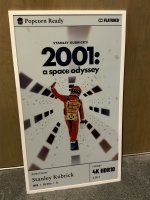
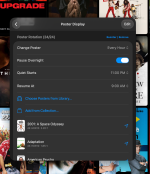
This integration is with a Samsung 32" Color ePaper Display that I purchased here: eBay Link
One note is that if you are not going to keep this plugged in via USB-C then this would work even better for a Kaleidescape Now Playing display with the Samsung EM32DX-A variant instead of the base EM32DX variant I have. The -A variant has a lower power 2.4G wifi that can stay on and allow Wake on Lan without killing your battery in 2-3 days.
But if you don't care about Now Playing and just want to send a list of posters to the display from Popcorn Ready with an interval to switch them on then that all gets sent as a schedule and the display can go to sleep and it will still execute the redraws on schedule. The fewer redraws you do the longer the batteries would last before you need to recharge.
No server or always on connection is needed for this functionality. All you need is Popcorn Ready app on your iOS or Mac device and the display. No custom software is needed on the display either.
That is super cool! Any guess how long the batteries last between charges?
- Joined
- Dec 4, 2024
- Messages
- 476
Mine will be plugged in so that it can properly handle when a movie starts playing in the theater and Popcorn Ready is aware. I just have the base variant which does not have a low power WiFi. If you have this base variant and cannot plug it in then I'd recommend not enabling Now Playing and instead just treat it as a sleeping display where you only wake it when you want to send it a new list of posters with a new schedule. Then just let that schedule run for weeks/months.That is super cool! Any guess how long the batteries last between charges?
But, here are some AI estimates. I'm not really sure how accurate these are so take with a grain of salt:
Samsung 32" Color E-Paper (EM32DX vs. EM32DX-A) — Battery & "Now Playing" Breakdown
Both the EM32DX (base model) and EM32DX-A (LH32EMDIAGBXZA) use the same 32" QHD E Ink Spectra 6 display, Tizen OS, USB-C charging, and 4,600 mAh built-in battery. Holding a static poster draws virtually zero power — battery life comes down to two things: how often the poster redraws, and whether the Wi-Fi radio stays listening for instant "Now Playing" wake-ups.
1. What's Different Between the Two Models?
- EM32DX (Base Model): Uses a single main Wi-Fi 5 module.
- Plugged in (USB-C): Instant Now Playing + unlimited poster rotation, always at 100%.
- Cordless with Network Standby OFF (deep sleep): Runs your preloaded rotation schedule offline for weeks to months, but cannot wake remotely for Now Playing (requires pressing the physical power button on the back to connect).
- Cordless with Network Standby ON (Wake-on-LAN): Wakes wirelessly in ~1.5 seconds when a movie starts, but keeping the main Wi-Fi standby path alive drains roughly ~1.5–2% per hour (~1.5–2.5 days per charge).
- EM32DX-A ("A" Variant): Adds a secondary low-power 2.4 GHz Wi-Fi standby module designed specifically to solve the ~2-day standby drain on battery.
- Keeps a lightweight standby connection over 2.4 GHz Wi-Fi (not Thread/Matter) so the main Tizen board and Wi-Fi 5 radio can stay in deep sleep until a wake signal arrives.
- Note: Local LAN Wake-on-LAN has been hardware-verified on the base EM32DX, while EM32DX-A local LAN Wake-on-LAN behavior (vs. Samsung VXT cloud wake) has not yet been physically tested by us — worth confirming if buying the -A specifically for cordless local Now Playing.
2. Estimated Battery Life by Rotation Interval (4,600 mAh Battery)
Based on Samsung's published Network-Standby-OFF baselines (~200 days at 1 redraw/day, ~500 days at 1 redraw every 3 days), each local offline poster flip uses roughly ~0.45% battery, while deep-sleep standby is only ~0.05%/day. Estimates below assume Pause Overnight (11 PM – 7 AM) is enabled and include a realistic ~15–20% margin below lab numbers:
| Rotation Schedule (11 PM – 7 AM Quiet Hours) | Redraws / Day | Either Model — No Now Playing (Deep Sleep / Standby OFF) | Base EM32DX — With Now Playing (Wi-Fi Standby ON) | EM32DX-A — With Now Playing (Est., 2.4 GHz Low-Power Standby) |
|---|---|---|---|---|
| Once a Day | 1 | ~160–200 days (~5–6 mo) | ~1.5–2.5 days | ~30–65 days (~1–2 mo) |
| Every 12 Hours | 2 | ~85–105 days (~3 mo) | ~1.5–2.5 days | ~25–50 days (~1–1.5 mo) |
| Every 6 Hours | 3 | ~55–70 days (~2 mo) | ~1.5–2.5 days | ~22–40 days (~3–6 wks) |
| Every 4 Hours (default) | 4 | ~45–55 days (~6–8 wks) | ~1.5–2.5 days | ~20–35 days (~3–5 wks) |
| Every 2 Hours | 8 | ~22–27 days (~3–4 wks) | ~1.5–2 days | ~14–20 days (~2–3 wks) |
| Every Hour | 16 | ~11–14 days (~1.5–2 wks) | ~1.5–2 days | ~9–12 days |
(EM32DX-A "With Now Playing" figures are engineering estimates assuming ~3–5 movies/week on a quiet 2.4 GHz SSID, since Samsung does not publish an official days rating for Network Standby ON; real-world runtime will vary with router DTIM settings and LAN broadcast traffic.)
3. Practical Takeaways
- If you can run a hidden USB-C power cord: Get the base EM32DX. Both models behave identically when plugged in — instant Now Playing and hourly rotation with zero battery management.
- If you want 100% cordless scheduled rotation only (no Now Playing): Either model works great; set Every 4 Hours or Once a Day with Network Standby turned off for multi-month battery life. (Even in deep sleep, hourly flipping alone burns ~7%/day, capping battery around ~2 weeks.)
- If you want 100% cordless + live Now Playing: Expect to recharge the base EM32DX every ~2 days. The EM32DX-A is built to stretch cordless standby from days to weeks/months (just verify local Wake-on-LAN compatibility on 2.4 GHz before buying strictly for that use case).

How cool! Does the display look good? I've never heard of the technology before.

I want it!
- Joined
- Dec 4, 2024
- Messages
- 476
If you have a specific movie request that you want to see what it looks like on the ePaper display just let me know and I'll get a photo of it!I want it!
Thanks. I ordered the same one you have so I'll see it soon in personIf you have a specific movie request that you want to see what it looks like on the ePaper display just let me know and I'll get a photo of it!

- Joined
- Dec 4, 2024
- Messages
- 476
Right now I'm working around all of the little quirks in the Samsung schedule and player software so that the options I provide in Popcorn Ready for number of posters you can upload and the intervals and how long the schedule loops all make sense. I already added some good image optimization to the posters to make them work well on the ePaper display and I think they look great!Thanks. I ordered the same one you have so I'll see it soon in person
I've already got Now Playing working so that it automatically switches to that poster when a movie is playing and it shows an estimated end time. But with this version of the display, I would only recommend using the Now Playing feature if you are able to keep the display plugged in.
Hopefully I can get this version of Popcorn Ready pushed out by the time you receive your display!